

MGC-UK
Known Participant
October 11, 2021
Answered

Site Setup - Server Side

  • October 11, 2021
  • 4 replies
  • 780 views

Hi need some help.  We have a Dreamweaver 2021 website build and recently moved from http to https security.  The website is hosted on British Telecom Apache server. We are having issues with updating the design from our local folder structure.

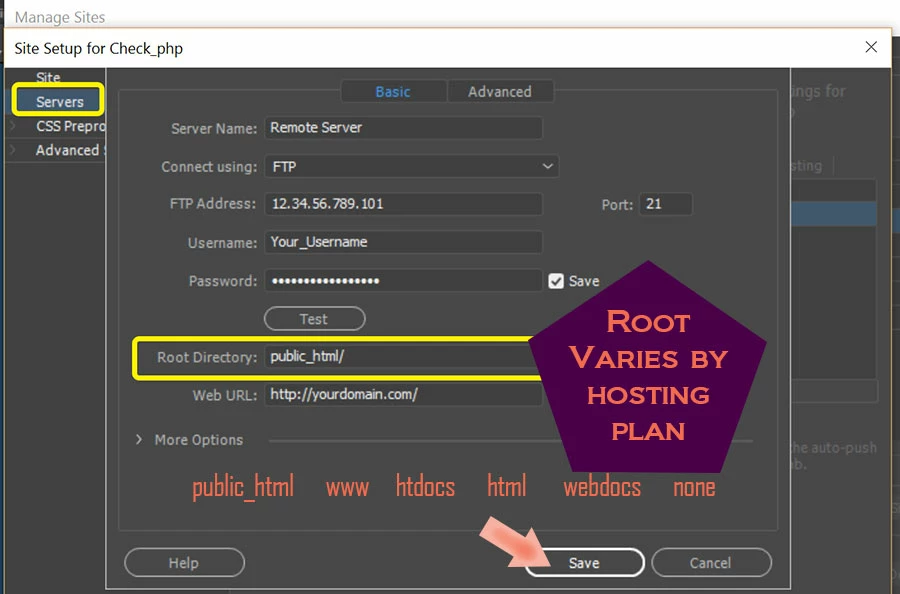
In the Site Setup form there is a field :  Root Directory

What folder should be included here.  The server side folder design has the folder "Public" which contains the website content.

Should we just enter "Public" in the Root Directory field ????

Thanks when someone has a moment.

Murray
This topic has been closed for replies.
Correct answer Nancy OShea

See screenshot from Manage Sites > Servers...


4 replies

Nancy OShea
Community Expert
Nancy OSheaCommunity ExpertCorrect answer
Community Expert
October 11, 2021

See screenshot from Manage Sites > Servers...


Nancy O'Shea— Product User & Community Expert
MGC-UK
MGC-UKAuthor
Known Participant
October 12, 2021

Nancy.  Many thanks.  I also communicated with British Telecom (BT) who host our website.  If you leave the Root Directory "Blank" the root defaults to "/" -- ie the top of the structure.  Alternatively you can use one of the following -- /public, public/, /public/ to point to the Public folder.

As things have resolved the updated pushed out through our normal synch have corrected some of the issues.  I needed to complete a SSL State -- clear to get rid of previously cached website content.

Guess the issue can be closed.  Many thanks to everyone who responded.

Murray

 
Legend
October 11, 2021

As an aside note IF you have any links in your files which are prefaced with http:// you should change them to https:// plus you should also update your .htaccess file (if you have one) to redirect any Google listing that are http to https:


https://www.freecodecamp.org/news/how-to-redirect-http-to-https-using-htaccess/ 

MGC-UK
MGC-UKAuthor
Known Participant
October 11, 2021

Thanks for the extra input.  Yes that is actually why I was wanting to push out (synch) our local folder content to the correct folder (Public).  We have a small number of HTTP links (on a different  server) and these need to be changed to a HTTPS server.

BT have activated .htaccess file to force traffic from HTTP to HTTPS.

Cheers

Murray

Legend
October 11, 2021
quote

Thanks for the extra input.  Yes that is actually why I was wanting to push out (synch) our local folder content to the correct folder (Public).  We have a small number of HTTP links (on a different  server) and these need to be changed to a HTTPS server.

BT have activated .htaccess file to force traffic from HTTP to HTTPS.

Cheers

Murray


By @MGC-UK


OK, that's great..........nice of BT to change the htaccess file for you.

Jon Fritz
Community Expert
Community Expert
October 11, 2021

Yes.

The root directory of the server is what you place in that field.

DO NOT include the root directory in your local site structure (within the folders and files of your site). Essentially, the local root folder, whatever you named it, will have its contents transferred into the server root folder that's named in that field, when you upload.

MGC-UK
MGC-UKAuthor
Known Participant
October 11, 2021

Jon.  OK -- looks like I need to change the "Root Directory" field from the current "blank" to "Public".

FYI -- BT mirror the Public folder content to a "Secure" folder which manages the HTTPS connection.

Thanks for the clear feedback.

Murray

Community Expert
October 11, 2021

Yes - the root directory should be your public folder.  Are you getting a particular error when you try to update?  Moving from HTTPS --> HTTPS doesn't affect your transfer or files because that is done via FTP.  Have you confirmed with your host the type of FTP setup you should be using (FTPS/SFTP, port number, etc.)?

MGC-UK
MGC-UKAuthor
Known Participant
October 11, 2021

Hi Ben.  Sorry think you missed the point slightly.  We migrated the website from HTTP to HTTPS.  FYI the way BT managed activating HTTPS -- they mirror the PUBLIC folder to a SECURE folder which manages the HTTPS connection.  That part is working OK but what I have been struggling with has been pushing out design updates (some HTTPS URL links) these haven't been updating.

The host type is FTP port 21 so no issue there but I was trying to make sure that the Local Folder design was synching with the correct folder.  I had previously left the Root Directory field on the server side tab -- blank.  Sounds like this needs to be changed to  "Public". 

Thanks for your input.

Murray


Legend
October 11, 2021

Yes, you would just push any new or updated files to where your old http files were originally kept. The host will usually replicate that folder into a secure folder, so you don't actually change anything, other than any links to http files, which might exist in your old files and possibly update your htaccess file if you have access to one, this redirects any links which may be listed in external directories to the correct secure files.