Known Participant
January 19, 2022
Answered

Site works great on Mac. But is different on iPad and iPhone

  • January 19, 2022
  • 3 replies
  • 714 views

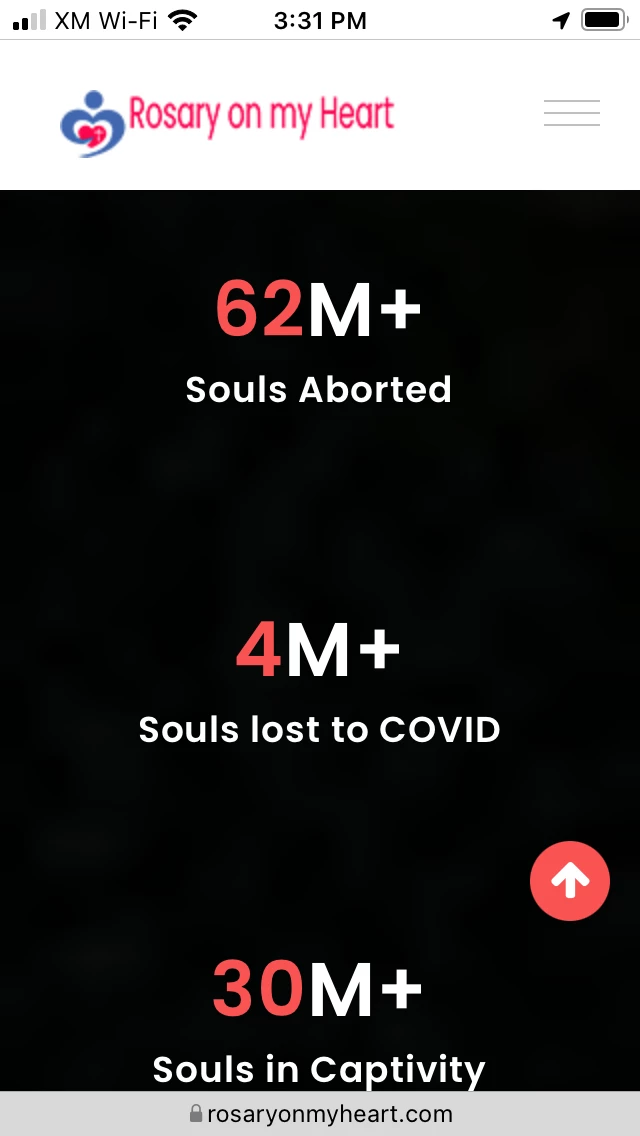
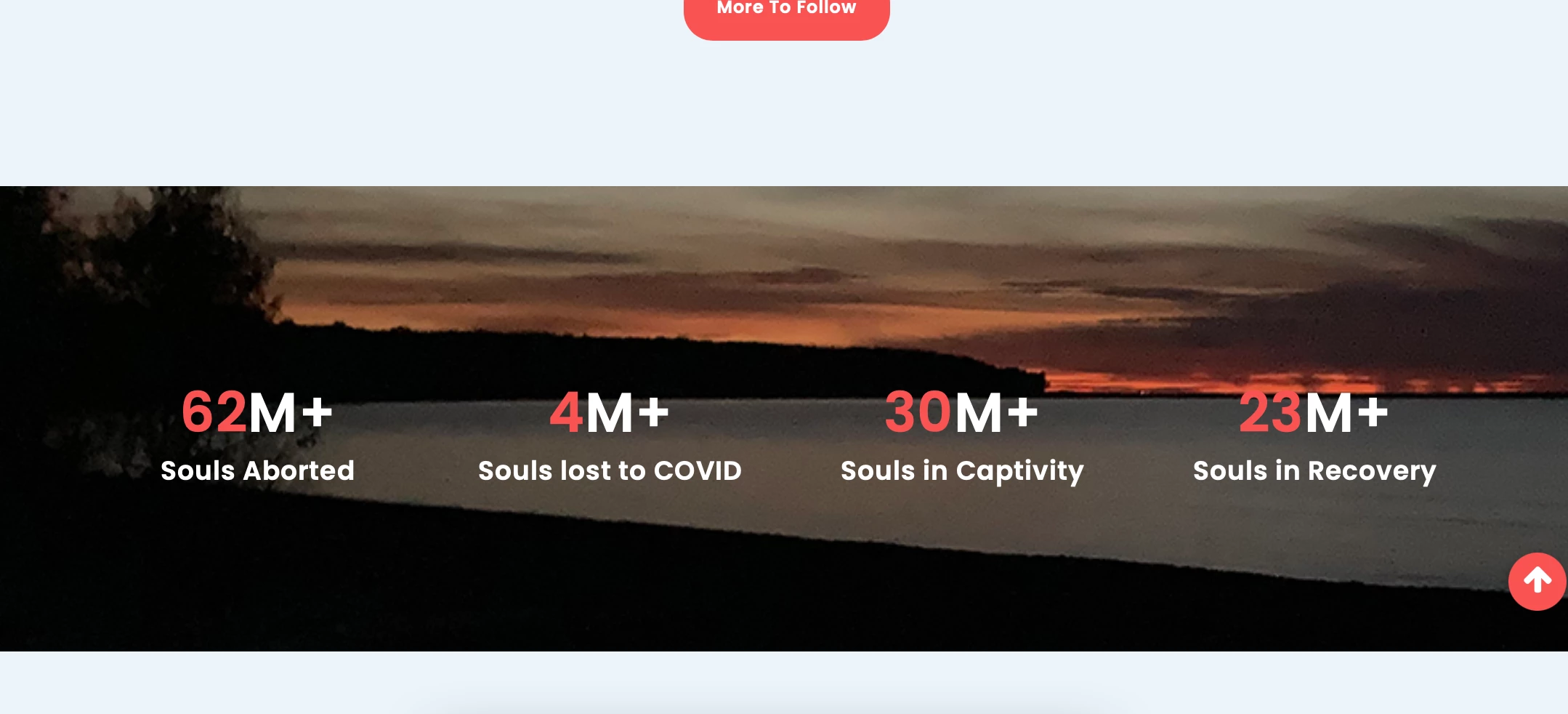
Does anyone have a clue why some of the features on this site do not work on iOS? At issue is the background image in the quote section and the counter section. On the Apple mobile devices the background image is blurred and/or darkened. I am using a purchased template (support is not responding) and editing the code in DreamWeaver. I am no expert. But I suspect a number of the .js files have errors in the code because when opened in DreamWeaver, the text color in these files turns white midway through the end. Errors exist in a couple .css files too. I can't figure out the glitch in the code and cannot find a source for a clean (or updated?) version of these files. I'm attaching images of the screens in question (from iOS) and how they should look (from my Mac). 

And here is the list of filenames (.js and .css, some plugins) that I am suspect have errors(?). Again, not my expertise. 

font-awesome.min.css

animated-headline.js

bootstrap.min.js

form-contact.js

isotope.pkgd.min.js

jquery.inview.min.js

jquery.min.js

jquery.ripples-min.js

jquery.stellar.min.js

lightbox.min.js

main.js

modernizer-2.8.3.min.js

owl.carousel.min.js

scrolltopcontrol.js

slick-nav.js

wow.min.js

animated-headlines.css

bootstrap.min.css

Site: https://rosaryonmyheart.com 

Thanks in advance! 

    This topic has been closed for replies.
    Correct answer Ben M

    I'm no pro. Entered survival mode after layoff in another industry during a recession. I'm just more comfortable at this stage of my life with Dreamweaver used in schools, and don't like the backdoors in Wordpress that require diligence to updating. I've never met a Wordpress site I liked and back when I used Dreamweaver for food money, the hardcoded sites lasted a good long time. Support here is recommending a move to Wordpress (above). Interesting. I have to ask, then. Is there a platform (like Shopify for ecommerce) that provides the backend updating needs automatically so I wouldn't have to do those updates if I created a site using said platform? I'm not building sites that much anymore. My sites are few and tiny these days. No charge. Just trying to help folks in need like myself. Not a pro. I'm getting quite a shellacking here. I'm sorry I have never graduated from beginner. Open to trying something else, but switching to Wordpress from Dreamweaver is a route I have always been reluctant to do. I evaluate every three years and always stick with Dreamweaver. The techs at hosting company say the same. My sites are so small and few. Perhaps I am sticking with a dying application? Am I correct that this is the suggestion here? To move away from Dreamweaver to Wordpress? 


    If you don't want to do updating or managing all the plugins of a hosted CMS, there are solutions like Wix/Squarespace that do it all for you. The cost of those could end up being more than a basic shared hosting plan though if that is all you are using.  With that said, while DW is not in its prime and is arguably in need of an overhaul, I don't think this is about moving away from a dying application because we could offer you more modern web development tools, but most are no longer focused on visual development and have more of a code/development focus which is not the direction you are looking to go down. Most editors have gone in this direction as the Wix/Squarespace's of the world have come into the visualization/no-code space better than Adobe's attempt with Muse.


    Personally speaking if you are trying to keep things simple, I would recommend to go back to the client and tell them that the mobile image is not supported that they are looking for and development to get that added would be more than what it's worth. Then you can keep using DW as you are.

    3 replies

    BenPleysier
    Community Expert
    Community Expert
    January 26, 2022

    As @osgood_  has said, background images do not work well on mobile devices. Personally I would not worry about that, users are mostly out to get information, not to admire the quality of background images.

    Wappler is the DMXzone-made Dreamweaver replacement and includes the best of their powerful extensions, as well as much more!
    Nancy OShea
    Community Expert
    Community Expert
    January 20, 2022

    Holy script-fest, Batman!  Did you do this or did it come this way?  Getting that smorgasbord of outdated scripts / widgets to work right in modern devices will be like rearranging deck chairs on the Titanic. Some of those scripts have been discontinued for 7 or more years.  It's not surprising the code is broken.


    My advice would be to rebuild this project in WordPress with a premium Bootstrap Template.  Even WordPress with all its baggage would be more streamlined than what you have now.


    Nancy O'Shea— Product User & Community Expert
    Legend
    January 20, 2022
    quote

    Holy script-fest, Batman! 


    By @Nancy OShea


    It's not excessive by todays standards, its fairly normal, even I'm now breaking my scripts and css up into smaller chunks/files as its easier to manage............if you cant beat em, join em.....although a lot of 3rd party scripts will be carrying a lot of redundant code, of course!

    Community Expert
    January 20, 2022

    Agreed that it's not excessive. In fact it's better than a lot scoring 89 on desktop and 59 on mobile from lighthouse for performance.


    Also agreed that the background-attachment does not work on iOS still.  However, I am debating about the impact of the graphic not being seen on iOS.  From an accessibility standpoint the counter numbers over the sunset background can be difficult to read and would probably fail an accessibility test. So the fact that the background darkens on mobile over those numbers may actually make the page more accessible and easier to read. Even your own logo at the top can be hard to decipher with the dark red over the dark gray background at its current size.  I would definitely consider some of this styling as you work to have a background image on the mobile layout.

    Legend
    January 19, 2022

    I dont have an iphone or ipad (I'm poor) BUT I think they still do not support the css background attachment fixed property or only partially support it in Safari browser.


    https://kriesi.at/support/topic/ios-do-not-support-fixed-backgrounds/


    Try setting the background attachment to 'scroll' for mobile devices.


    Add the <style> </style> block of code (see below) to your page AFTER the link to your main css stylesheet, like:


    <link href="css/style.css" rel="stylesheet"/>


    <style>

    @media screen and (max-width: 768px) {

    .cta_section{

     background-attachment: scroll;

    }

    }


    @media screen and (max-width: 768px) {

    #counter_area{

    background-attachment: scroll;

    }

    }

    </style>


    You won't get the nice effect that you do on desktop, where the background images remains static, but it might work better on iOS mobile devices.

    Known Participant
    January 20, 2022

    Thank you Osgood. This is helpful.