
Participant
November 22, 2021
Question

Slow and energy hog

  • November 22, 2021
  • 2 replies
  • 161 views

Hi,

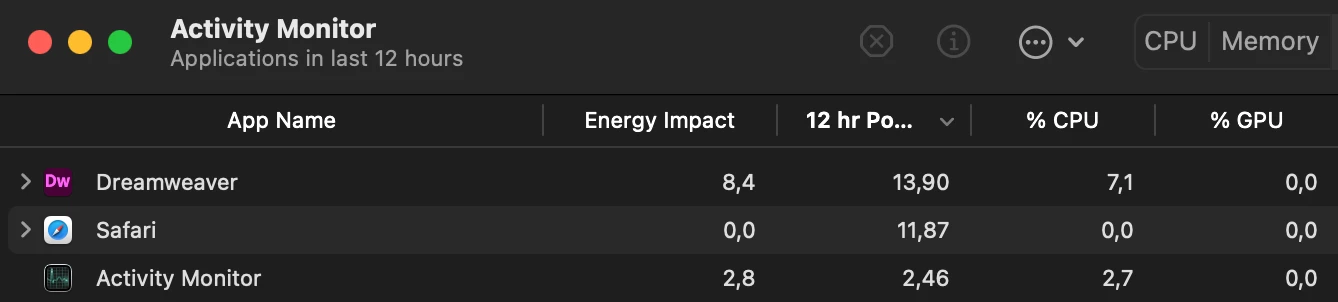
Dreamweaver is sooo slooow on MacBook by default and if try working on some larger files like few thousand lines, it requires a lot of patience. I have an i5 Air, so not much, but for my needs Photoshop or Illustrator work flawlessly and responsive, while DW is totally sluggish and also hogging energy, even just sitting in background (not used for past 12h in comparison to heaviely used Safari - screen).

I mainly work via ftp however even disconnecting is not much help. This is also the only app that crashes regularly (maybe a bit less recently).

I'm always up to date with CC plan + Apple.
This topic has been closed for replies.

2 replies

Community Expert
November 23, 2021

DW from my experience has always used a bit more memory than other CS apps on the Mac. But can you describe what you mean about you mainly work via FTP?  Are you downloading the files and working with them locally or are you saying your files are not on your computer? DW can become slower if you are working on files not on your computer.

HadrysAuthor
Participant
November 24, 2021

I work on local copies of files and upload them on save via s/ftp - so a very common way. Opening files this way with 1000+ lines is slow, even working on them (scrolling, typing) can be painful, also opening large files from HD like a DB dump is sooo slow that I tendt to use something like Brackets or just TextEdit for quick find&replace.


I'm considering switching to some other IDE regardless of the learning curve as DW is way to slow. I just do basic coding,  up to 15 open files, no preview or any fancy features - for comparison, on Windows Edit++ was everything I needed.


I'm generally very fond of CC and try to use as many apps I can/need but DW is just ridiculous...


Resetting preferences didn't change a thing regarding energy (ab)use while just having DW open, without any files open or being connected to s/ftp... What it's doing in the background have an energy footprint comparable to half of heaviely used apps? Having DW in the background considerably reduces my battery time, so I developed a habit of keeping it closed unless needed, in opposition to all other apps.


Today I'm switching to M1 chip so after all this wasted time and energy I'll give it a go, to see if things get any better.

Nancy OShea
Community Expert
Community Expert
November 22, 2021

Ensure your computer meets the minimum CPU & GPU requirements. Most Creative Cloud apps work on:
Windows 10 versions 21H1, 20H2, 2004, and 1909 (LTSB branches are not supported)
macOS 12 (Monterey), macOS 11 (Big Sur), macOS 10.16 or 10.15 (Catalina)
- https://helpx.adobe.com/creative-cloud/system-requirements.html
- https://helpx.adobe.com/download-install/kb/apple-silicon-m1-chip.html
- https://helpx.adobe.com/dreamweaver/system-requirements.html

If you continue to have trouble, try Restoring Preferences

https://helpx.adobe.com/dreamweaver/kb/restore-preferences-dreamweaver.html


CONTACT ADOBE SUPPORT:
================
Online Chat: https://helpx.adobe.com/contact.html?rghtup=autoOpen
Phone M-F, during normal business hours: https://helpx.adobe.com/contact/phone.html


Nancy O'Shea— Product User & Community Expert