Participant
July 11, 2019
Answered

Small logo for each page [is pixelated]

  • July 11, 2019
  • 2 replies
  • 1344 views

New to Dreamweaver. I build my logo in Indesign. I made it 1.5 inch / 2.5 inch but it shows up a bit pixilated.

This topic has been closed for replies.
Correct answer Nancy OShea

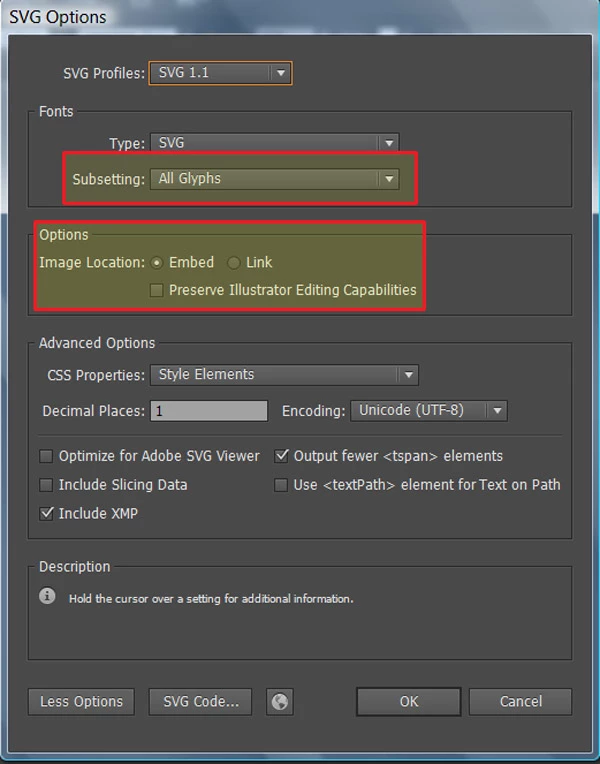
Use Illustrator to create your logo as a vector graphic and export it to SVG.  See Illustrator screenshot.

Once exported, you can re-scale your SVG logo without any loss in quality.  You cannot do that with raster images -- JPG or PNG. 

2 replies

Legend
July 12, 2019

This might of interest: https://svg.scand.com/

Never used it myself so can't say whether it works with the latest version of Indesign but might be worth a try ....

Paul-M - Community Expert
Nancy OShea
Community Expert
Nancy OSheaCommunity ExpertCorrect answer
Community Expert
July 11, 2019

Use Illustrator to create your logo as a vector graphic and export it to SVG.  See Illustrator screenshot.

Once exported, you can re-scale your SVG logo without any loss in quality.  You cannot do that with raster images -- JPG or PNG. 

Nancy O'Shea— Product User & Community Expert
Participant
July 26, 2019

Thanks that really helped. And I got to learn a bit of Illustrator.

I made my logo in Illustrator.

Now another question.

I put the SVG file in my site folder in Dreamweaver.

But when I want to place the image I cannot select it.

Any advice?

Nancy OShea
Community Expert
Community Expert
July 26, 2019

I usually copy & paste the SVG code into my document in Code View.  To see it, you have to switch to Live View.

I can also bring in SVGs from the Insert menu > Image....

Nancy O'Shea— Product User & Community Expert