


Known Participant
July 12, 2017
Answered

Sorting the DW 2017.5 Files panel

  • July 12, 2017
  • 1 reply
  • 1164 views

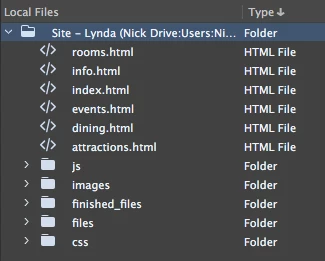
I've figured out how to sort by item type (grouping folders, files) and to get the files list at top instead of the folders, but this sort forces the lists into descending order. (See screen grab.) Has anyone figured out how to sort alphabetically after first sorting by type?

Thanks,

Nick
    This topic has been closed for replies.
    Correct answer lnayal

    You can file this as a feature request

    Adobe Dreamweaver CC: Feature Ideas

    1 reply

    BenPleysier
    Community Expert
    Community Expert
    July 12, 2017

    Click on Type again so that the arrow points up

    Wappler is the DMXzone-made Dreamweaver replacement and includes the best of their powerful extensions, as well as much more!
    Known Participant
    July 12, 2017

    Thanks. But that's not the sort structure I want. I want the files, not the folders, at top. Clicking the Type arrow to the up position alphabetizes, but returns the folders to the top position. I want the files at top as in my screen grab, but in alphabetical (ascending) order. I don't think it can be done in the current wiring of the panel.

    lnayalCorrect answer
    Participating Frequently
    July 13, 2017

    You can file this as a feature request

    Adobe Dreamweaver CC: Feature Ideas