Participant
October 2, 2020
Answered

Source Code Toolbar Missing

  • October 2, 2020
  • 1 reply
  • 502 views

Hi,i am new in Dreamweawer. I make Yesterday a new project and Today is the CSS Toolbar gone. I cant find a solution how can i bring it back on screen.Now i must open CSS file in another tab only. Can someone help me please?

    This topic has been closed for replies.
    Correct answer MacroEdge

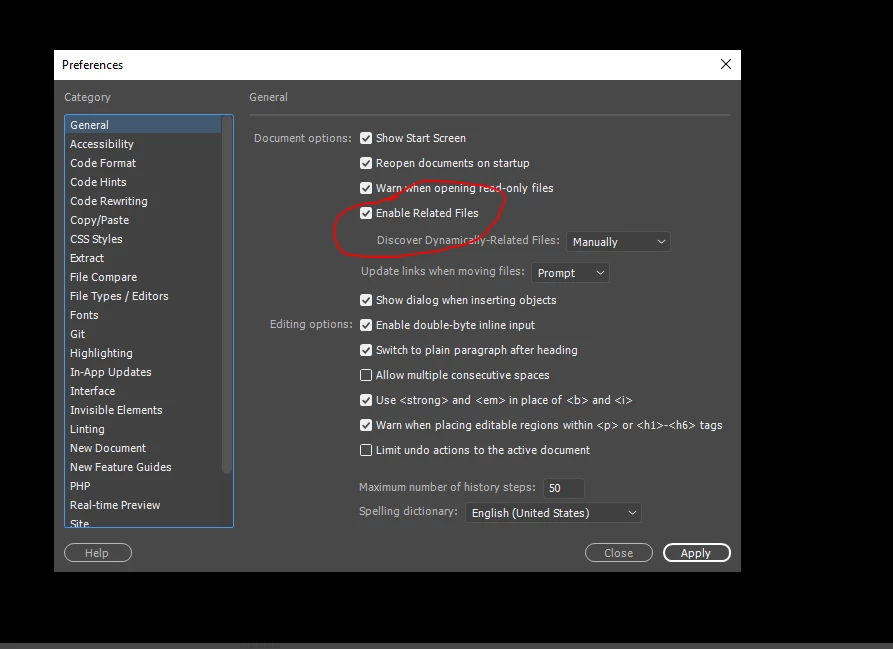
    I found it ...Edit->Preferences->Enable Related Files.
    1 reply

    Nancy OShea
    Community Expert
    Community Expert
    October 2, 2020

    Go to Window menu > CSS Designer or Shift + F11.

    To open CSS files in code view, open Files Panel (F8) and double -click on the asset.  See screenshot.


    Nancy O'Shea— Product User & Community Expert
    MacroEdgeAuthor
    Participant
    October 3, 2020

    Hi,thanks for your Answer. But i missing this menu.

    in Pic 2 ,you can see how it looks now if i open tne SCC File,it is not connected to the HTML Site,

    but opened in new Window.

    MacroEdgeAuthorCorrect answer
    Participant
    October 3, 2020

    I found it ...Edit->Preferences->Enable Related Files.
