
Participant
April 12, 2018
Answered

Space between navigation section and content

  • April 12, 2018
  • 3 replies
  • 274 views

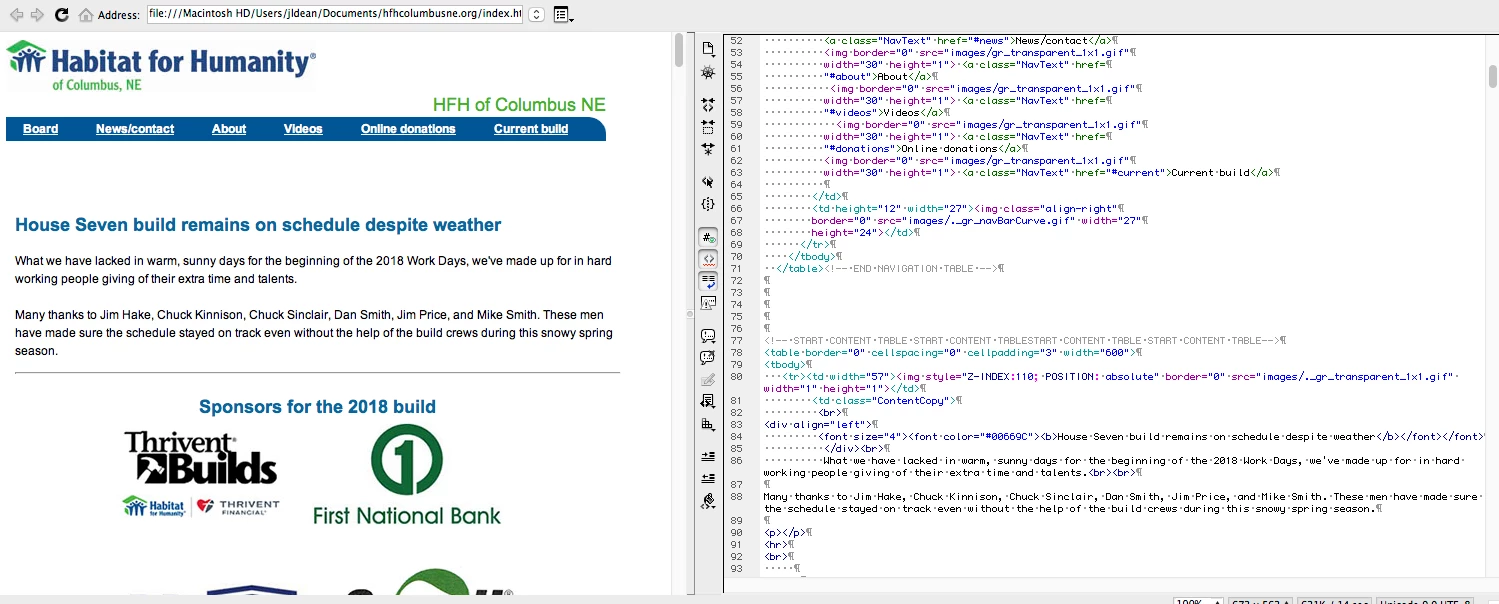
I have a space between the start of my content and the navigation section that I can't get rid of without making matter even worse. Screen shot shows its appearance and the coding. Any help greatly appreciated. This is nin Dreamweaver 5.5. URL of page is hfhcolumbusne.org.

    This topic has been closed for replies.
    Correct answer Nancy OShea

    Remove the 3 <br> tags between navigation and content tables. 

    PS:  I realize Habitat for Humanity is supported by volunteers but it's a real shame they don't have a modern responsive website yet.   I'm rather surprised your chapter doesn't use WordPress.

    Habitat for Humanity of Ventura County

    3 replies

    Nancy OShea
    Community Expert
    Nancy OSheaCommunity ExpertCorrect answer
    Community Expert
    April 12, 2018

    Remove the 3 <br> tags between navigation and content tables. 

    PS:  I realize Habitat for Humanity is supported by volunteers but it's a real shame they don't have a modern responsive website yet.   I'm rather surprised your chapter doesn't use WordPress.

    Habitat for Humanity of Ventura County

    Nancy O'Shea— Product User & Community Expert
    Jon Fritz
    Community Expert
    Community Expert
    April 12, 2018

    You have some structural errors in your html that need to be addressed.

    Visit http://validator.w3.org and get a listing. Once all of the errors are taken care of, it's likely the display will correct itself.

    WolfShade
    Legend
    April 12, 2018

    If you are relying on DW preview, don't.  It's not up to par with browser standards.  Preview in an actual browser.

    That said, if an actual browser is being used, your code is using deprecated table attributes.  You should be using CSS.

    If there is any CSS involved, check the code to make sure that there are no padding or margin attributes that could be contributing to this issue.

    V/r,

    ^ _ ^

    UPDATE:  I can confirm that this is happening in FireFox 52.  I don't see anything that could be contributing to this in the code.  What CSS there is is for bold text, or image position, etc.  While there are spaces in between the tables, this should not be impacting the layout.  Have you tried taking out the blank lines between the tables?