

Participant
Feb 20, 2020 8:49 PM UTC
Question

Special character must be escaped but I can't find the error
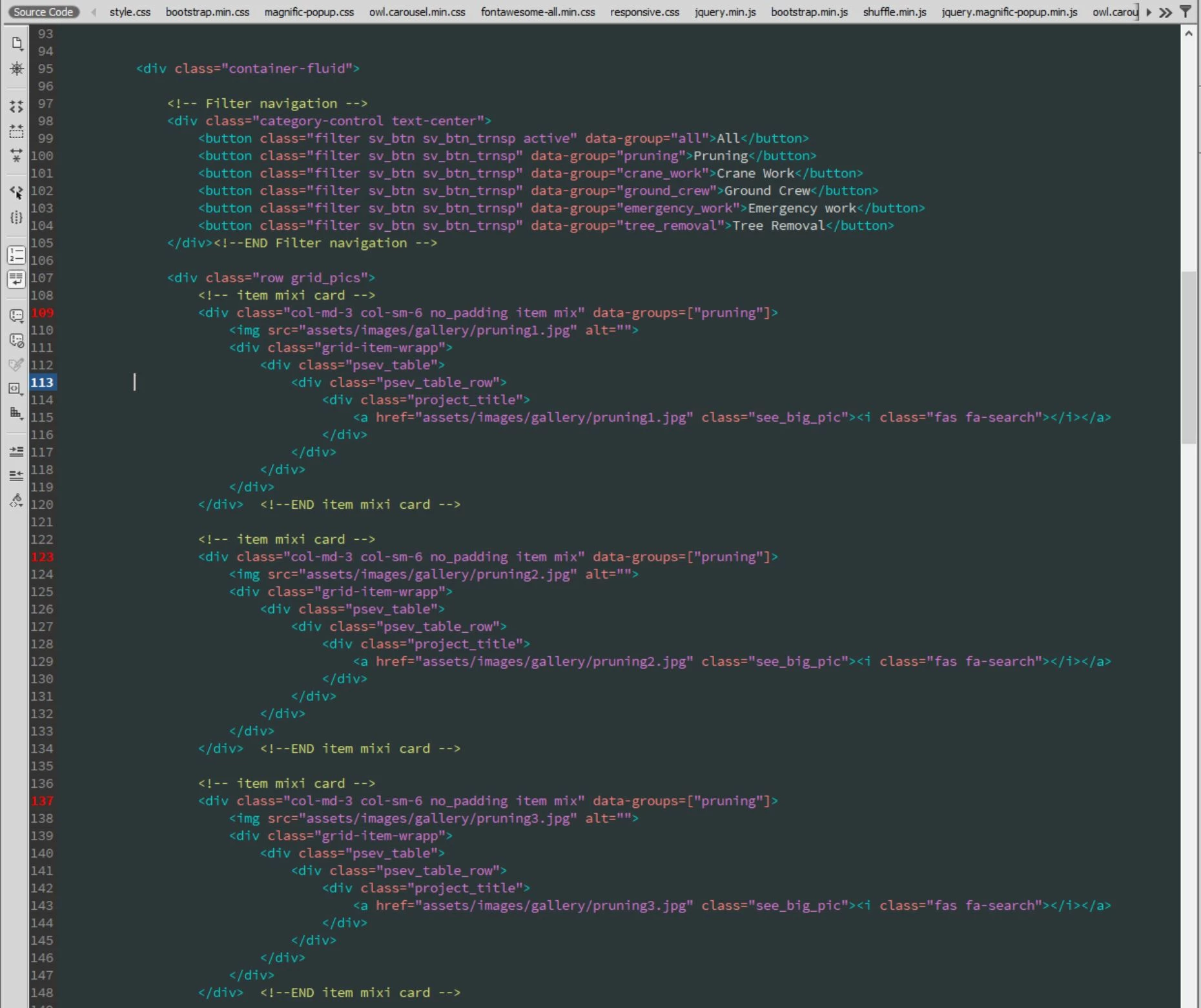
I'm not really sure why I'm getting this error on dreamweaver. Everything seems to be running fine but I keep gettting this error. Anyone know why?

This topic is closed to new replies. Start a new post to keep the conversation going.

6 replies

Jon Fritz
Community Expert
Community Expert
Feb 20, 2020 9:21 PM UTC

DW's validator wants you to write the following...

data-groups=["pruning"]

...as something along the lines of...

data-groups="['pruning']"

...with alternating double and single quote pairs.

Translate
BenPleysier
Community Expert
Community Expert
Feb 20, 2020 9:03 PM UTC

These are illegal characters for the data- attribute (outside of the quotation marks)


Translate
Wappler is the DMXzone-made Dreamweaver replacement and includes the best of their powerful extensions, as well as much more!
Legend
Feb 20, 2020 10:41 PM UTC

I don't know what 'data-group [ ]' is myself but the [ ] are not illegal after investigation, Jon is most likely onto something with the double/single quote aspect.


EDITED:

Maybe the brackets ARE illegal (persoanlly I've never come across them before myself) I was getting some feedback from an old post on Google where it looks like someone else is using them for some reason, or trying to use them:

https://stackoverflow.com/questions/34154181/jquery-expression-for-data-group


But I cant find any reference anywhere else much.

Translate
BenPleysier
Community Expert
Community Expert
Feb 20, 2020 11:28 PM UTC

The syntax for the data- attribute is

data-name="data value"


Where name cannot be in capitals and datavalue can be any string. The use of brackets within the datavalue can be associated with a framework.

Translate
Wappler is the DMXzone-made Dreamweaver replacement and includes the best of their powerful extensions, as well as much more!
Legend
Feb 20, 2020 9:01 PM UTC

It's most likely to be that the Dreamweaver validator doesn't understand - data-group="["pruning"]

If its only that which evokes a validation error then forget it and move on.

Test by removing them


Translate