barbrab
Known Participant
July 13, 2017
Answered

Special Characters Linting Issue

  • July 13, 2017
  • 1 reply
  • 701 views

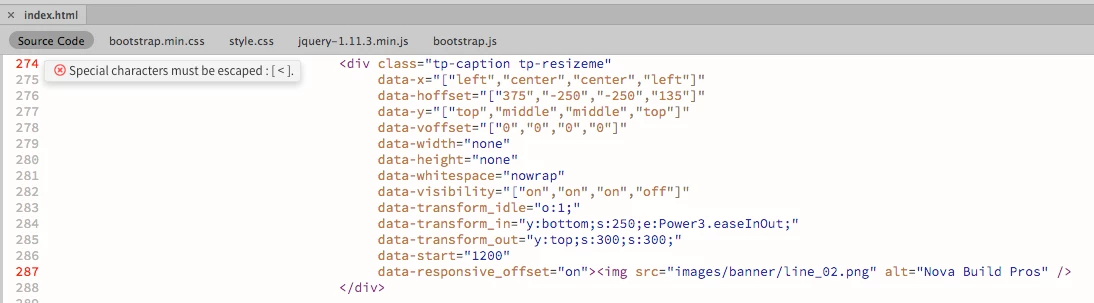
I keep getting the same error repeatedly and I can't figure out what the problem is. For each of these entries I get the same error, saying that special characters must be escaped, and showing a tag open symbol, but I have no extra open tags that I can see. I need a fresh pair of eyes. The error on line 287 is the same, but it shows the closing tag as being the issue.

Can anyone spot the trouble?

    This topic has been closed for replies.
    Correct answer osgood_

    Now an EX-MVP  (Hope I'm not breaking any rules)

    You're missing the closing > at the end of your opening <div (see in red below):

    <div class="tp-caption tp-resizeme">

    EDITED

    Actually thats not the case I see the > 'burried' now a little later on in the code sequence.

    I don't know if this is legitimate but try surrounding your multiple data, which is inside the "[     ]" with just the single pair '     ' of quotes NOT the double pair (see below):

    <div class="tp-caption tp-resizeme"

    data-x="['left','center','center','left']"

    data-hoffset="['375','-250','-250','135']"

    data-y="['top','middle','middle','top']"

    dat-voffset="['0','0','0','0']"

    data-width="none"

    data-height="none"

    data-whitespace="nowrap"

    data-visibility="['on','on','on','off']"

    data-transform_idle="o:1;"

    data-transform_in="y:bottom;s:250;e:Power3.easeInOut;"

    data-transform_out="y:top;s:300;s:300;"

    data-start="1200"

    data-responsive_offset="on">

    <img src="images/banner/line_o2.png" alt="Nov Build Pros" />

    </div>

    1 reply

    osgood_Correct answer
    Legend
    July 13, 2017

    Now an EX-MVP  (Hope I'm not breaking any rules)

    You're missing the closing > at the end of your opening <div (see in red below):

    <div class="tp-caption tp-resizeme">

    EDITED

    Actually thats not the case I see the > 'burried' now a little later on in the code sequence.

    I don't know if this is legitimate but try surrounding your multiple data, which is inside the "[     ]" with just the single pair '     ' of quotes NOT the double pair (see below):

    <div class="tp-caption tp-resizeme"

    data-x="['left','center','center','left']"

    data-hoffset="['375','-250','-250','135']"

    data-y="['top','middle','middle','top']"

    dat-voffset="['0','0','0','0']"

    data-width="none"

    data-height="none"

    data-whitespace="nowrap"

    data-visibility="['on','on','on','off']"

    data-transform_idle="o:1;"

    data-transform_in="y:bottom;s:250;e:Power3.easeInOut;"

    data-transform_out="y:top;s:300;s:300;"

    data-start="1200"

    data-responsive_offset="on">

    <img src="images/banner/line_o2.png" alt="Nov Build Pros" />

    </div>

    Nancy OShea
    Community Expert
    Community Expert
    July 13, 2017

    Linting prefers double quotes.  But you can change it in Preferences.  See screenshot.

    "attr-value-double-quotes": false,

    Nancy

    Nancy O'Shea— Product User & Community Expert
    Legend
    July 13, 2017

    https://forums.adobe.com/people/Nancy+OShea  wrote

    Linting prefers double quotes.  But you can change it in Preferences.  See screenshot.

    Now an EX-MVP (Hope I'm not breaking any rules)

    It obviously doesnt when its double trouble """" that throws the escape error, if you use "''" that throws no errors, however I don't know if that is correct syntax as I don't know much about data-blah=""

    This is ok: data-blah="somecode" but this would throw the escape error - data-blah="["on","on","on","off"]" whilst the single quote version data-blah="['on','on','on','off']" would not.

    I mean I'm only guessing basing on php throwing errors in certain situations where you have to use single quotes ' if you open with a double " quote.