Inspiring
September 15, 2019
Answered

Specify CSS ordering in Targeted Rule dropdown list

  • September 15, 2019
  • 2 replies
  • 428 views

In Code View, I have my font styles that I use the most at the top hoping that they would appear in that order in the dropdown list in Targeted Rule, but their order is totally different. How can I make them appear in the same order?

Thanks

Alan

    This topic has been closed for replies.
    Correct answer Nancy OShea

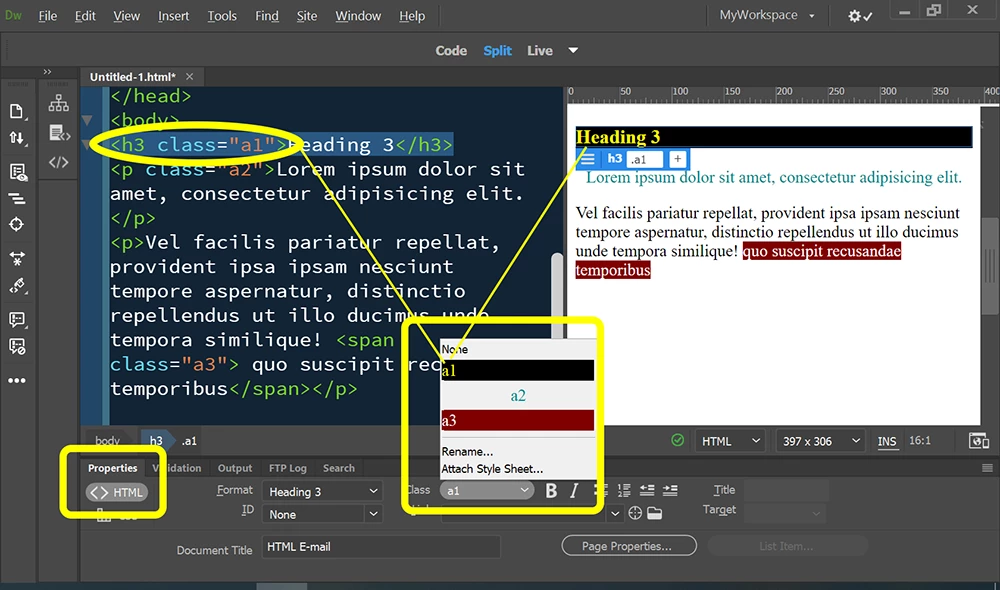
    CSS Class names are sorted alphabetically in the HTML Properties Panel's Class list   See screenshot.  Put your most frequently used CSS classes at the top by naming them .a1, .a2, .a3 and so on. 


    2 replies

    Nancy OShea
    Community Expert
    Nancy OSheaCommunity ExpertCorrect answer
    Community Expert
    September 15, 2019

    CSS Class names are sorted alphabetically in the HTML Properties Panel's Class list   See screenshot.  Put your most frequently used CSS classes at the top by naming them .a1, .a2, .a3 and so on. 


    Nancy O'Shea— Product User & Community Expert
    BenPleysier
    Community Expert
    Community Expert
    September 15, 2019

    Dreamweaver does not have the facility to order the style rules, in fact I know of no editor that will do that. The only way is to create the style rules in the order that wish them to be.


    Having said that, I would not worry about re-arranging the CSS, especially thinking about the Dreamweaver beta version that has a vastly improved Live view.

    Wappler is the DMXzone-made Dreamweaver replacement and includes the best of their powerful extensions, as well as much more!