
wcspaulding1
Participating Frequently
September 28, 2017
Answered

Specify port number for Dreamweaver's server.

  • September 28, 2017
  • 3 replies
  • 4586 views

Whenever I select Preview in Browser, by pressing F12, using Dreamweaver’s server, it works sometimes and other times it does not. It seems to depend on the port number that is selected. I have tried to use a consistent port number by altering the json file in the configuration folder, per the instructions provided by Adobe, but this does not work. Does anyone know how to make Dreamweaver server work consistently, so that I do not get the following error: “You tried to access an external HTML page, which can not be opened on the device for preview. Open the page in Dreamweaver to preview the page on the device.You tried to access an external HTML page, which can not be opened on the device for preview. Open the page in Dreamweaver to preview the page on the device.

This topic has been closed for replies.
Correct answer Nancy OShea

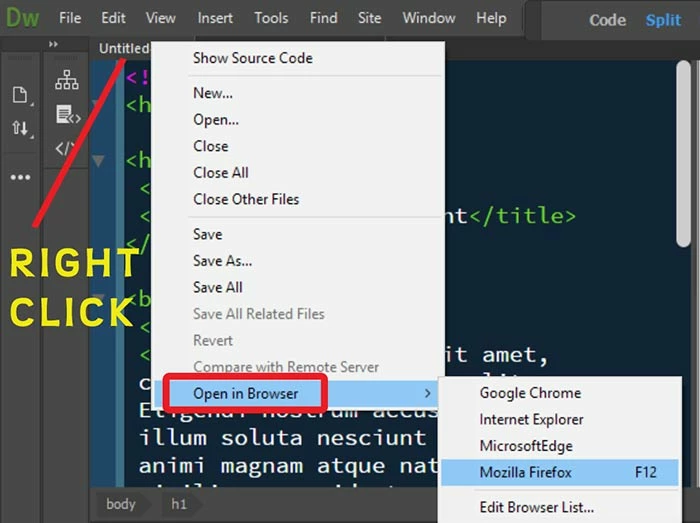
My solution.  Don't use Real-Time Preview.  Use right click on an open tab or file in your Files Panel and select Open in Browser.  Don't use F12.

Also see, Jon's workaround in Reply #3 of this related thread.

Re: How do I fix dead link when using Preview In Browser?

Nancy

3 replies

Community Manager
August 21, 2018

Hi,

We have addressed this issue in our latest Prerelease build. The fix is available to try out in prerelease build.

Please go to the link Adobe Prerelease and install the latest build 11167.

https://forums.adobeprerelease.com/dwalpha/discussion/367/dw-latest-build-11167-is-availab le

Thanks

Kratika

Dreamweaver Team

Participant
July 22, 2019

Sorry... but the ISSUE WAS NOT ADDRESSED.... not was it fixed in the "NEXT" release... Nor did the JSON file creation... What does it take to simply get an override to the dispatch of the "real time preview" ... ADDING A NON 80 port>?

Nancy OShea
Community Expert
Community Expert
July 22, 2019

Go to Preferences and turn off Real-Time Preview.  See screenshot from DW CC 2019.

Nancy O'Shea— Product User & Community Expert
Niharika Jha
Adobe Employee
Adobe Employee
October 12, 2017

Hi,

Is this issue intermittent or you are seeing this consistently on your machine? We have been trying to reproduce and fix it in-house but since it is intermittent we have been been struggling to corner the cause. Please help us with the following details-

1. On which platform and Dw version are you seeing the issue?

2. Is there any specific file on which the issue occurs?

3. Were you in CodeView/Split/Live/Design when you saw this?

4. In which workspace were you working?

5. Which browser are you using?

6. Are there any specific workflow steps in which you see the issue?

Regards,

Niharika Gupta

Adobe Dreamweaver

wcspaulding1
Participating Frequently
October 12, 2017

Windows 10, Google Chrome Canary, Dreamweaver 2017.5

When it works, it works with any file. I believe it has to do with the port number.  Because the port numbers are random,  some of them work and some of them do not..  However, there does not seem to be a way to specify the port number. It would be very helpful if the port number could be specified under Preferences. Setting up a Json file seems unnecessarily complicated. Not that it is hard, but it seems unnecessary when it would be easy enough to specify under Preferences. In any case, the Json file does not work.

Nancy OShea
Community Expert
Nancy OSheaCommunity ExpertCorrect answer
Community Expert
September 28, 2017

My solution.  Don't use Real-Time Preview.  Use right click on an open tab or file in your Files Panel and select Open in Browser.  Don't use F12.

Also see, Jon's workaround in Reply #3 of this related thread.

Re: How do I fix dead link when using Preview In Browser?

Nancy

Nancy O'Shea— Product User & Community Expert
wcspaulding1
Participating Frequently
September 29, 2017

I already know about Open in Browser, but I like the auto-update feature with Real-Time Preview. What I want to know is why doesn't the following info from Adobe work (How to troubleshoot issues with Device Preview in Dreamweaver ). I know that some ports work and other don't, but DW keeps using random port numbers instead of the one that I assigned, per the instructions below:

Advanced troubleshooting

Couldn't launch the Device Preview service

Dreamweaver runs a local HTTP, node server for the Device Preview service on a random port assigned by the node. Device Preview will not work if one or both of the following is blocked by your system administrator:

  • The random port assigned by the node server
  • The IP address of the localhost, 127.0.0.1

Perform the following steps to address this issue:

  • Relaunch Dreamweaver. In case Dreamweaver was unable to create the node server instance, restarting Dreamweaver will address the issue.If this doesn't help, proceed to step 2 and 3.
  • Assign a specific port for the Device Preview services from the node server. You need to add this port number in a NodePort.json file along with the key for device preview. The process for doing so is described here.

Creating a NodePort.json file

  • Create a file, NodePort.json, and specify the port number in the file in the following format:
    123
    {“previewport” : <portnumber>}
    123
    {“previewport” : 8010}
  1. Save the NodePort.json file in the following path:
    • Win: %appdata%\Adobe\Dreamweaver CC 2015\en_US\Configuration
    • Mac: ~/Library/Application Support/Adobe/Dreamweaver CC 2015/en_US/Configuration
  2. Relaunch Dreamweaver.