
Handycam
Known Participant
January 16, 2012
Question

Spry: click to show details? JQuery?

  • January 16, 2012
  • 1 reply
  • 1152 views

I have an app which displays a spry dataset, like so:
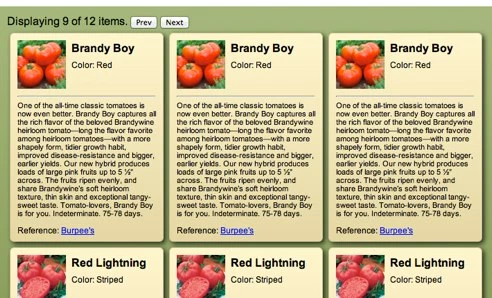
Those cards are a spry region:

<div spry:region="pv1" spry:repeatchildren="pv1" class="badges">

                    <div class="badge">

                              <img src="images/{image}" alt=""/>

                              <div class="details">

                              <p class="name">{name}</p>

                              <p>Color: {color}</p>

                              <hr class="clrflt"/>

                              <p class="desc">{description}</p>

                              <p> Reference: <a href="{refLink}">{refName}</a></p>

                    </div>

          </div>

My question is, I'd like to create another DIV that appears when one of the cards is clicked (or a view details button).  I know how to do the hide and show with JQuery, but how could I get which card was clicked on, so my details DIV shows the correct record's data? Is this doable is Spry alone?  I have had problems getting Spry items to cooperate with JQuery...

This topic has been closed for replies.

1 reply

Participating Frequently
January 19, 2012

I don't know of the spry property to use (if there is one). In jQuery (Version >= 1.6):

  • assign each div a name
  • $(this).tagName
  • or event.target.tagName

another option would be to bind (http://api.jquery.com/bind/) the data to the div. Now the interesting question here is whether jQuery inside a spry loop get looped with the html content or not.

Handycam
HandycamAuthor
Known Participant
January 19, 2012

Yes, but in this case all the child divs are created dynamically by Spry, so I can't assign a name.

I have gotten a bit closer with this:

<div spry:region="pv1" spry:repeatchildren="pv1" class="badges">

                    <div class="badge">

                              <img src="images/{image}" alt=""/>

                              <div class="details">

                                        <p class="name" spry:select="selected" spry:setrow="pv1" >{name}</p>

                                        <p>Color: {color}</p>

                                        <hr class="clrflt"/>

                                        <p class="desc">{description}</p>

                                        <p> Reference: <a href="{refLink}">{refName}</a></p>

                              </div>

                    </div>

          </div>

which updates a detail div:

<div id="detail" spry:detailregion="ds1">

          <p class="name">{name}</p>

</div>