


spry menu drop down list interfering with text in body of page, How do I fix?
Hello,
First let me say that I am a retired network person _not_ a web developer, so this may be a simple question, but any help would be appreciated.
A non-profit asked me if I would develop a web page for them. I am doing it Pro Bono (Free) using Dreamweaver CS 6.
I put a Horizontal SPRY menu bar in a "Draw AP Div" and right below it I have another "Div" that holds the text for the page. In both Live view and Preview in Browser I ram having two problems with the menu bar.
- when the sub menu drops down it conflicts with the page's body text.
- when I pull the mouse down I can only access the top most sub menu item. Going further down to the second item and the sub menu disappears.
Here is a capture in Design + Live view (ignore the red box at the bottom it is automatically added by the screen capture utility):
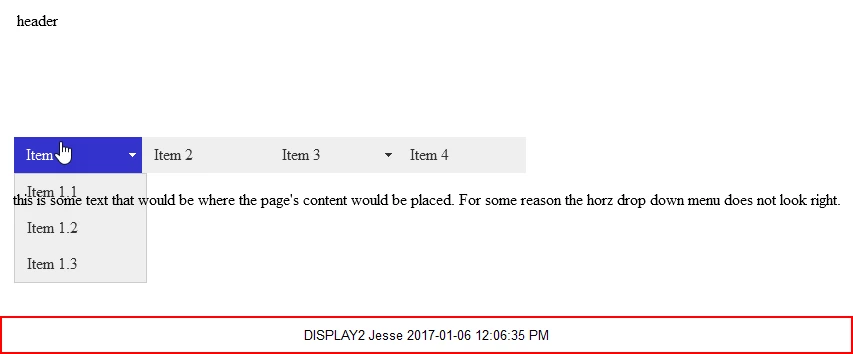
If I pull the mouse straight down Item 1.1 will highlight, if I go down to Item 1.2 the sub menu disappears.
Also the menu item text does not look good overlaying the body text.
I can solve problem 2 by pulling the Div that contains the body text down but that then leaves a unsightly gap between the menu bar and the text on the page.
For my test / sample I have not altered any CSS properties, except the draw an AP Div. I have not altered any of the menu bar code or properties.
Here is the HTML code:
<!doctype html>
<html>
<head>
<meta charset="utf-8">
<title>Untitled Document</title>
<style type="text/css">
#apDiv1 {
position: absolute;
left: 18px;
top: 17px;
width: 1578px;
height: 102px;
z-index: 1;
}
#apDiv2 {
position: absolute;
left: 15px;
top: 143px;
width: 1577px;
height: 39px;
z-index: 2;
}
</style>
<link href="SpryAssets/SpryMenuBarHorizontal.css" rel="stylesheet" type="text/css">
<style type="text/css">
#apDiv3 {
position: absolute;
left: 14px;
top: 196px;
width: 1579px;
height: 94px;
z-index: 3;
}
</style>
<script src="SpryAssets/SpryMenuBar.js" type="text/javascript"></script>
</head>
<body>
<div id="apDiv1">header</div>
<div id="apDiv2">
<ul id="MenuBar1" class="MenuBarHorizontal">
<li><a class="MenuBarItemSubmenu" href="#">Item 1</a>
<ul>
<li><a href="#">Item 1.1</a></li>
<li><a href="#">Item 1.2</a></li>
<li><a href="#">Item 1.3</a></li>
</ul>
</li>
<li><a href="#">Item 2</a></li>
<li><a class="MenuBarItemSubmenu" href="#">Item 3</a>
<ul>
<li><a class="MenuBarItemSubmenu" href="#">Item 3.1</a>
<ul>
<li><a href="#">Item 3.1.1</a></li>
<li><a href="#">Item 3.1.2</a></li>
</ul>
</li>
<li><a href="#">Item 3.2</a></li>
<li><a href="#">Item 3.3</a></li>
</ul>
</li>
<li><a href="#">Item 4</a></li>
</ul>
</div>
<div id="apDiv3">this is some text that would be where the page's content would be placed. For some reason the horz drop down menu does not look right.</div>
<script type="text/javascript">
var MenuBar1 = new Spry.Widget.MenuBar("MenuBar1", {imgDown:"SpryAssets/SpryMenuBarDownHover.gif", imgRight:"SpryAssets/SpryMenuBarRightHover.gif"});
</script>
</body>
</html>
Please help.
Thanks in Advance,
Jesse

 AdChoices