


Participant
November 21, 2016
Answered

Standard Toolbar will not view.

  • November 21, 2016
  • 3 replies
  • 818 views

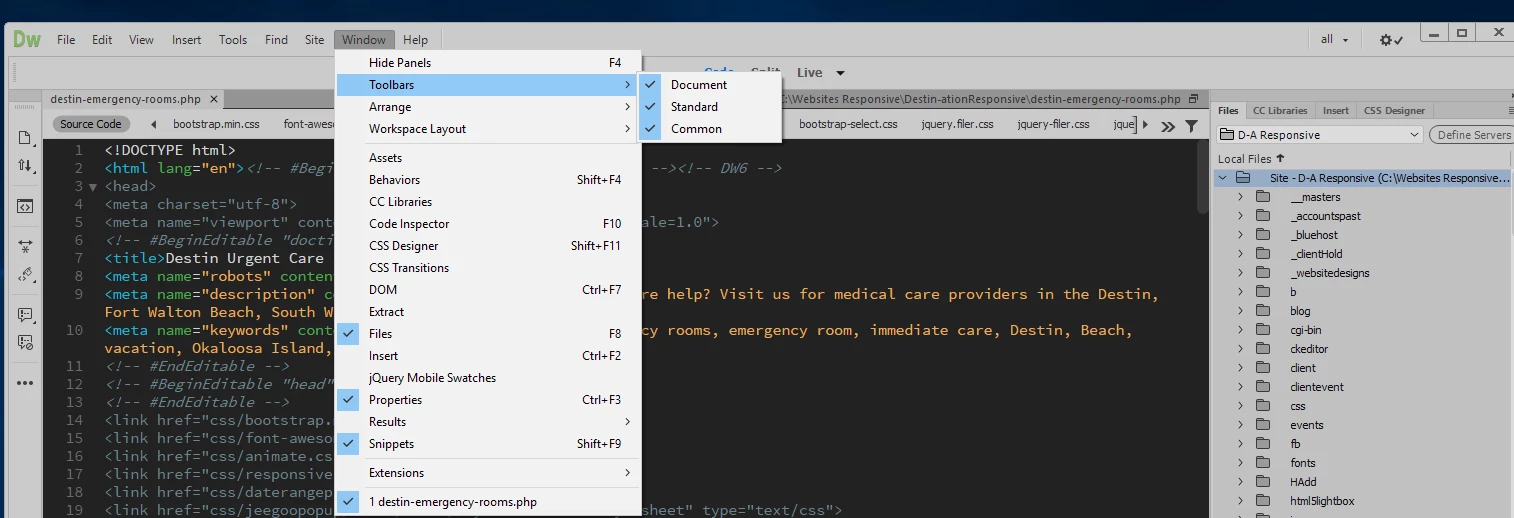
My standard toolbar will not view (after new Dreamweaver CC update).  Windows > Toolbars > Standard is checked.  Will not view in code/split/Live views or in Standard or Developer layout. Looking for suggestions on how to add. 
    This topic has been closed for replies.
    Correct answer WebmasterDestin

    THANK YOU!!!  Yes, it was on my second monitor.  I had several windows open and I could not see it.

    3 replies

    susantom72
    Participant
    October 17, 2017

    Aaaaaaargh yes, my standard toolbar was "stuck" to the top/left of my screen and I was unable to move it at all.  I thought this was a Dreamweaver bug and it was driving me nuts because it covered my main menu.  I didn't even think to look at my 2nd monitor but did after reading this.  There it was, the end of the standard toolbar had crept over to monitor #2.  I was then able to grab and drag the toolbar and anchor it in DW.

    THANK YOU!!!

    Nancy OShea
    Community Expert
    Community Expert
    November 21, 2016

    Do you use multiple displays?

    Nancy O'Shea— Product User & Community Expert
    Jon Fritz
    Community Expert
    Community Expert
    November 21, 2016

    It's probably floating around and hiding behind something.

    Mine in the Developer Workspace actually appeared partially off screen on the right and was a pain to move.

    Go to Window > Workspace Layout > Reset 'workspace name' then try turning it on again.

    WebmasterDestinAuthorCorrect answer
    Participant
    November 21, 2016

    THANK YOU!!!  Yes, it was on my second monitor.  I had several windows open and I could not see it.