


anealsjc
Participant
August 29, 2017
Question

Stop Dreamweaver rewriting my code!

  • August 29, 2017
  • 2 replies
  • 1007 views

I noticed awhile back that Dreamweaver has started altering the tracking codes in my URLs.

Original version

?utm_medium=email&utm_source=source&utm_campaign=NAME

What Dreamweaver does

?utm_medium=email&utm_source=source&utm_campaign=NAME

This only happens after pasting it back into Dreamweaver from our marketing automation program. I tested it and the links are correct in the Marketing Automation program but wrong immediately after pasting into Dreamweaver.

I've unchecked Enable Linting.
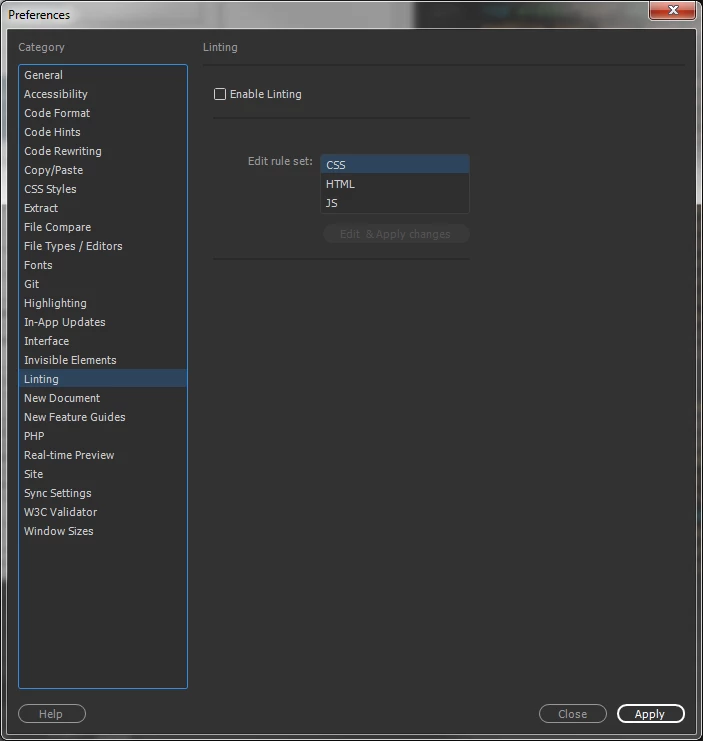
I've turned off code rewriting & have Do not encode special characters in URL encoding checked.
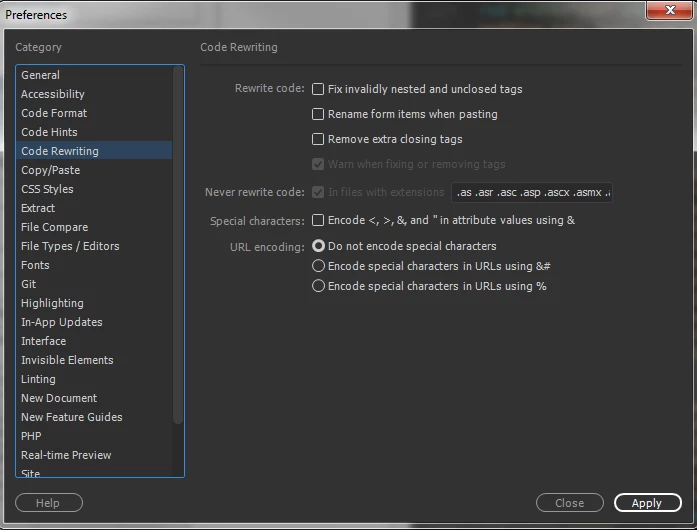
Am I missing something else?

Can anyone help on this?

    This topic has been closed for replies.

    2 replies

    italosan
    Community Expert
    Community Expert
    August 31, 2017

    Hi anealsjc,
    Can you please to double check the "Do not encode special characters" in the URL encoding area of the preferences? As strange it can sounds you need to click it 2 times to activate it (because of the special character check box). At the end it should be marked in the blue color you will see in the screenshoot.

    Nancy OShea
    Community Expert
    Community Expert
    August 29, 2017

    I can't reproduce it in my version of DW (CC 2017.0.1).  I pasted your code from forum into a PHP file and an HTML file.  No changes to code in either one.  Incidentally, I have code Linting turned on.

    <!doctype html>

    <html>

    <head>

    <meta charset="utf-8">

    <title>Untitled Document</title>

    </head>

    <body>

    <a href="mailto:?utm_medium=email&utm_source=source&utm_campaign=NAME">mailto link</a>

    </body>

    </html>

    When DW tries to reconcile code errors, it's often because something else is throwing errors.  Have you validated your code?

    Nancy O'Shea— Product User & Community Expert
    anealsjc
    anealsjcAuthor
    Participant
    August 30, 2017

    I have. And I never have issues initially when I paste it in. The issues don't happen until I've edited in our marketing automation platform and then pasted back into Dreamwaver. When I paste all of the code back in it's changing the & in the URL tracking codes and adding the code for &

    BenPleysier
    Community Expert
    Community Expert
    August 30, 2017

    Could you try pasting the code in Notepad or similar program (no styling) and then copying and pasting the code into Dreamweaver?

    I have a suspicion that there may be hidden characters involved.

    Wappler is the DMXzone-made Dreamweaver replacement and includes the best of their powerful extensions, as well as much more!