

Inspiring
January 9, 2017
Question

Strange Popup Message

  • January 9, 2017
  • 2 replies
  • 560 views

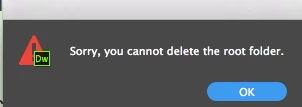
On occasions I get a strange popup message and it's always when I select a few words and hit the delete key. Anyone know why?
Thanks
Alan

    This topic has been closed for replies.

    2 replies

    Nancy OShea
    Community Expert
    Community Expert
    January 9, 2017

    You should be working in a defined local site folder in Local View.

    Your files panel should resemble this:

    To collapse your File Panel Group, click on the 2 small chevrons << / >> above the Files tab.

    That should help keep focus on your document. 

    Also don't forget to Save often (Ctrl/Cmd+S)

    Glitches can occur when you do a lot of heavy editing and forget to regularly save your changes.

    Nancy

    Nancy O'Shea— Product User & Community Expert
    Inspiring
    January 10, 2017

    First I don't have my own site, I write stories and upload them to a host website. Second my cursor is in an HTML document (my story) and I've highlighted three words that I want to delete - I am not pointing at any folders at all.

    Thanks

    Alan

    Nancy OShea
    Community Expert
    Community Expert
    January 10, 2017

    It does not matter that you don't have your own web site.  But to work in DW, you must have a defined local site folder.    Example C:\myStories.

    If you have not set one up, go to Site > New Site and create one.

    Nancy

    Nancy O'Shea— Product User & Community Expert
    Community Expert
    January 9, 2017

    Sounds like the focus of your pointer is on the root folder and DW thinks you are focused on the root folder in the files panel.  Is this regularly recurring when you repeat the same task over and over (ie: code view, live view, certain files, etc.)?