Hosun
Inspiring
July 18, 2019
Answered

SVG :hover [was: hover]

  • July 18, 2019
  • 4 replies
  • 9216 views

Hi,

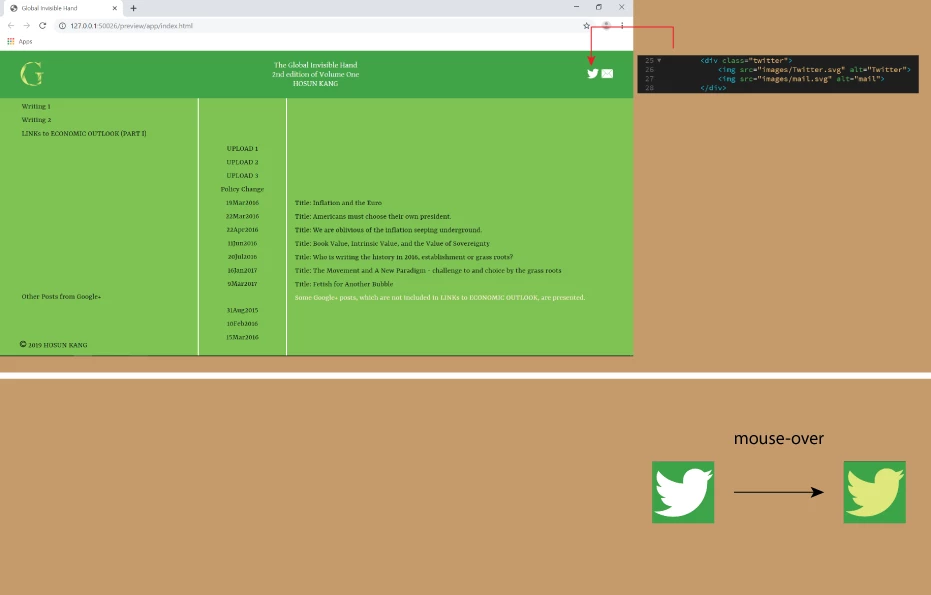
Upon mouse-over, I want to change the color of Twitter logo.

How would I do?

Global Invisible Hand

Hosun Kang

This topic has been closed for replies.
Correct answer osgood_

Simplest way would be to use fontawesome icons. Link the css stylesheet to your page:

<link rel="stylesheet" href="https://maxcdn.bootstrapcdn.com/font-awesome/4.7.0/css/font-awesome.min.css">

Add the below tag where you want the twitter logo to appear:

<i class="fa fa-twitter"></i>

Style the icon with css:

.fa-twitter {

font-size: 30px;

}

.fa-twitter:hover {

color: yellow;

}

4 replies

B i r n o u
Legend
July 28, 2019

well time for sleep, 23:23... wake up at 5:00...

Legend
July 28, 2019

https://forums.adobe.com/people/B+i+r+n+o+u  wrote

well time for sleep, 23:23... wake up at 5:00...

Strange not, I knew that was coming soon. You're so predictable.

osgood_Correct answer
Legend
July 18, 2019

Simplest way would be to use fontawesome icons. Link the css stylesheet to your page:

<link rel="stylesheet" href="https://maxcdn.bootstrapcdn.com/font-awesome/4.7.0/css/font-awesome.min.css">

Add the below tag where you want the twitter logo to appear:

<i class="fa fa-twitter"></i>

Style the icon with css:

.fa-twitter {

font-size: 30px;

}

.fa-twitter:hover {

color: yellow;

}

Nancy OShea
Community Expert
Community Expert
July 18, 2019

I 2nd the Font Awesome approach.  That's how I do it 90% of the time.  Plus you can stack multiple FA icons for some interesting effects.

https://fontawesome.com/how-to-use/on-the-web/styling/stacking-icons

Nancy O'Shea— Product User & Community Expert
pziecina
Legend
July 18, 2019

A simple way is to apply a css filter on hover -

https://developer.mozilla.org/en-US/docs/Web/CSS/filter

BenPleysier
Community Expert
Community Expert
July 18, 2019

Because of the way that you are displaying the vector image, you cannot restyle the image using pseudo classes like :hover.

To be able to use a pseudo class, you will need to embed the image in your document as in Adding vector graphics to the Web - Learn web development | MDN . What is not shown in the article is the <use> element which takes nodes from within the SVG document and duplicates them. See https://css-tricks.com/svg-use-with-external-reference-take-2/

To illustrate, copy the below code and paste it into a new document and view in browser.

<!doctype html>

<html><head>

  <meta charset="UTF-8">

  <title>Using an SVG</title>

  <meta name="viewport" content="width=device-width, initial-scale=1, shrink-to-fit=no">

  <style>

    /* Can be in an external style sheet */

    svg.btn-youtube {

      fill: red;

      width: 80px;

      height: auto;

    }

    svg.btn-youtube:hover {

      fill: gray;

    }

    svg .image {

      fill: white;

    }

  </style>

  </head>

  <body is="dmx-app" id="test">

    <!-- Vector Image, not displayed - can be an external file-->

    <svg style="display: none;">

      <defs>

        <symbol id="icon-video" viewBox="0 0 1024 721">

          <title>YouTube Play Button</title>

          <path class="button" d="M1023.6,361.5c0,24.5,0.9,49-0.2,73.5c-1.7,36.6-4.7,73.1-7.3,109.6c-2,28.9-8.5,56.9-19.3,83.8 c-18.2,45.4-52.8,70.6-100,78.3c-23.1,3.8-46.7,4.9-70.1,6.1c-41.1,2.1-82.2,3.5-123.3,5c-22.1,0.8-44.3,1.1-66.4,1.5 c-42.3,0.6-84.6,1.5-126.9,1.3c-46.1-0.1-92.3-1-138.4-1.9c-36.6-0.7-73.2-1.6-109.9-3c-30.8-1.2-61.6-2.4-92.2-5 c-19-1.6-38.1-4.6-56.6-9.3c-43-11.1-71.6-38.4-86-80.7c-8.9-26-14.7-52.5-16.6-79.9c-2.5-35.4-5.8-70.7-6.7-106.1 C2.5,389.7,2.8,344.9,3.3,300c0.5-48,4-95.8,10.1-143.4c3.3-25.8,10.5-50.9,22.3-74.2c18.4-36.2,48.9-57,87.9-65 c17.2-3.5,34.9-4.9,52.5-5.9c38.2-2.2,76.5-3.9,114.7-5.2c32.9-1.2,65.9-1.7,98.9-2.3c25.6-0.5,51.3-0.8,76.9-1 c24.3-0.2,48.6-0.5,73-0.5c30.3,0.1,60.6,0.5,90.9,1c28.6,0.5,57.3,1,85.9,2c44.6,1.7,89.2,3.5,133.7,5.9 c21.2,1.1,42.7,2.1,63.2,8.2c44.1,13.2,73,41.9,87.5,85.7c8.8,26.7,14.1,54,15.9,82c2.2,34.2,5,68.4,6.5,102.7 C1024.5,313.8,1023.7,337.6,1023.6,361.5C1023.6,361.5,1023.6,361.5,1023.6,361.5z M408.2,494c92.1-47.8,183.5-95.1,275.9-143 c-92.5-48.3-183.9-96-275.9-144C408.2,303,408.2,397.9,408.2,494z"></path>

          <path class="image" d="M408.2,494c0-96.1,0-191,0-287c92,48,183.4,95.7,275.9,144C591.6,398.9,500.3,446.3,408.2,494z"></path>

        </symbol>

      </defs>

    </svg>

    <!-- Vector Image displayed -->

    <svg class="btn-youtube">

      <use xlink:href="#icon-video"></use>

    </svg>

  </body></html>

Wappler is the DMXzone-made Dreamweaver replacement and includes the best of their powerful extensions, as well as much more!