
Participant
March 13, 2019
Answered

Swap remote and local files panels

  • March 13, 2019
  • 1 reply
  • 473 views

I like my local files to be in the left panel and my remote files to be in the right panel. I just need to know how to swap the screen view between local files and remote server. This question was posed previously, but was never answered properly.

Thanks/pjs
This topic has been closed for replies.
Correct answer Paul-M

Hi,

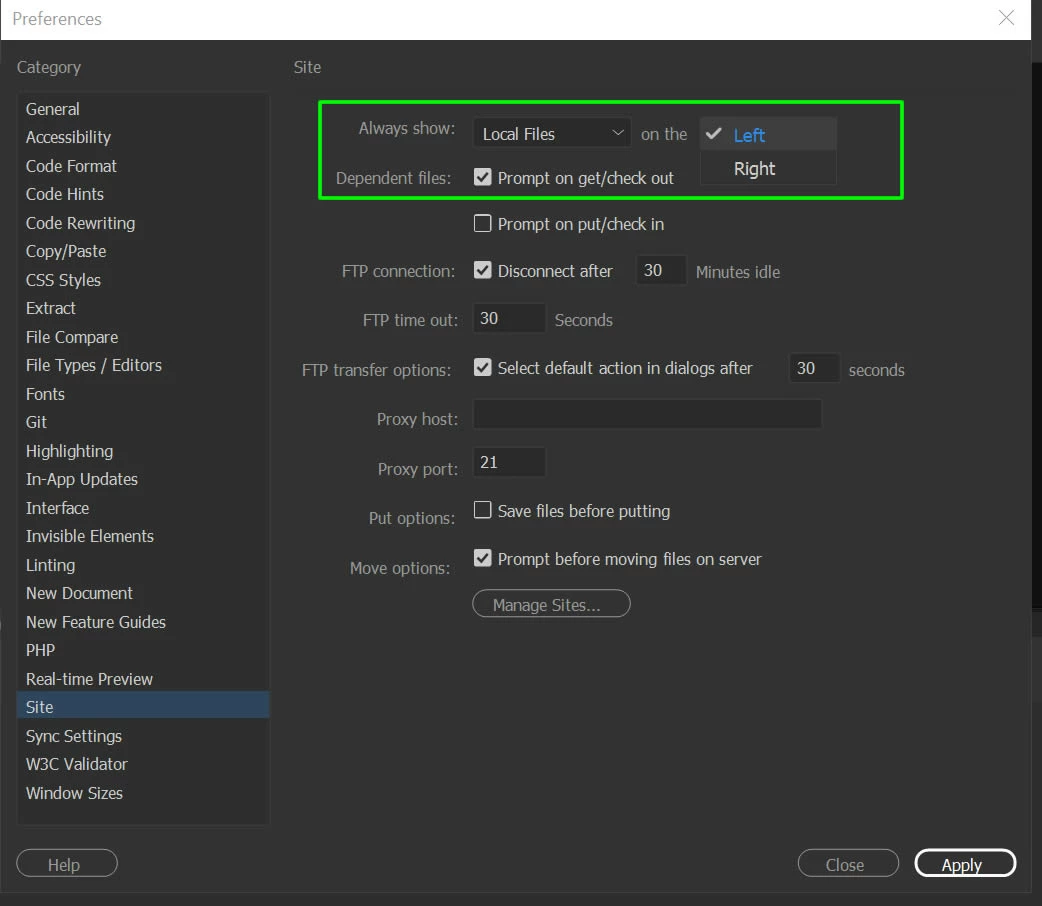
In dreamweaver go to edit > preferiences > site

Screenshot:

1 reply

Paul-MCorrect answer
Legend
March 13, 2019

Hi,

In dreamweaver go to edit > preferiences > site

Screenshot:

Paul-M - Community Expert
pjshaneAuthor
Participant
March 13, 2019

The answer is correct, thanks.

I could not find a place to click on Correct below the answer.

pjs

Legend
March 13, 2019

You're welcome,

I combined the screenshot with my first reply and marked it as correct

Paul-M - Community Expert