Participant
July 1, 2019
Answered

Switched from CS6 to CC 19.2 - PDF Drag & Drop

  • July 1, 2019
  • 2 replies
  • 290 views

Recently switched from Dreamweaver cs6 where I could drag and drop any local file to any page. Is this feature no longer available in DW CC 19.2? I was able to drag and drop things defined as assets (image, media, etc.) in CC 19.2, but it doesn't appear that pdf's are considered an asset. My typing sucks - so drag and drop is a great feature for me, would rather not type the URL to each PDF document if possible.

Thanks for your help.

This topic has been closed for replies.
Correct answer Nancy OShea

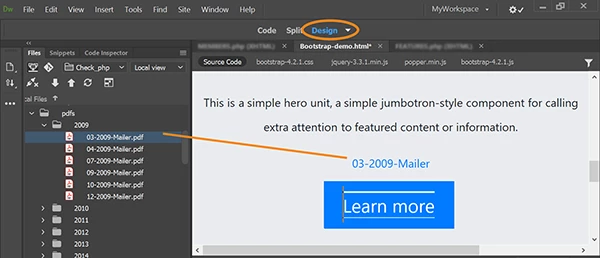
I forgot to mention that drag & drop from Files Panel does work in Design View.

2 replies

Nancy OShea
Community Expert
Nancy OSheaCommunity ExpertCorrect answer
Community Expert
July 3, 2019

I forgot to mention that drag & drop from Files Panel does work in Design View.

Nancy O'Shea— Product User & Community Expert
Nancy OShea
Community Expert
Community Expert
July 1, 2019

Drag & drop of assets does not work as it did in previous Creative Suite versions.

  • Did you define your local site folder in DW CC?
  • Are the PDF files saved to  your local site folder?

If yes, then  no typing is necessary. Use your Properties inspector to browse to the PDF file.  See screenshot.

Nancy O'Shea— Product User & Community Expert