



jeffreyp64846165
Inspiring
May 25, 2017
Answered

Sync Settings Errors

  • May 25, 2017
  • 2 replies
  • 674 views

Trying to sync settings between CC2015 and CC2017.

In 2015, Preferences, Sync Settings, clicking "Sync Settings Now" returns the error, "Sync completed, but with errors."
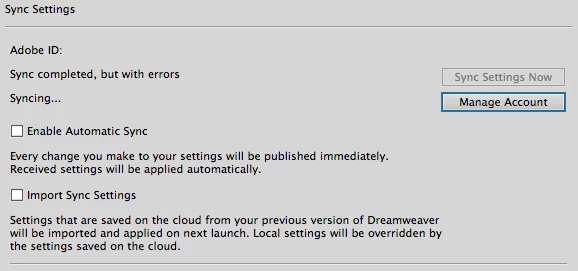
I've tried logging out/in with no change.

If I can't solve this, is there a workaround to move my snippets manually from 2015 to 2017?

This topic has been closed for replies.
Correct answer jeffreyp64846165

Yeah, it's that lack of wrapping snippets that has me doing this little exercise. Grrr. DW CC2017 has been a world of hurt.

And since I don't have a C: drive, I found the snippets in ~/Library/Application Support/Adobe/Dreamweaver CC 2015/en_US/Configuration/Snippets

2 replies

Nayan_Kankariya
Adobe Employee
Adobe Employee
June 20, 2017

There is another approach to get the snippets or any other synced settings from CC 2015. You can check "Import Sync Settings" in Sync Settings tab of the preferences dialog in CC 2017 and restart Dw.

This will get all the settings synced in CC 2015.

"Sync completed, but with errors." error is due to High End ASCII characters present in Snippet name. We are currently looking into fixing it but as a quick work-around, you can rename the snippet so that it does not contain any High End ASCII characters.

Please let me know if this helps.

Thanks,

Nayan

Jon Fritz
Community Expert
Community Expert
May 25, 2017

The Snippets folder is one of the easier ones to duplicate.

1. Turn on your operating system's hidden files
2 . Go to...

C: > Users > your user name > AppData > Roaming > Adobe > Dreamweaver (old version) > your language > Configuration

3. Copy the Snippets folder within that Configuration folder.
4. Go to the same location, substituting the new version of DW in the path above, and paste the Snippets folder into the Configuration folder of the newer version. Since you've already tried to bring your Snippets across, you'll likely need to overwrite an existing folder instead of a simple Paste.

That will bring everything across.

It's possible the reason you may be seeing errors in the automated sync is because CC2017 removed the ability to use Wrapping Snippets. If you have any, they'll still work, but they can no longer be created in CC2017 and they won't work with the new "Snippet Keywords" function (basically a modified keyboard shortcut system for Snippets that is incompatible with selecting code that you would normally want wrapped).

jeffreyp64846165
jeffreyp64846165AuthorCorrect answer
Inspiring
May 25, 2017

Yeah, it's that lack of wrapping snippets that has me doing this little exercise. Grrr. DW CC2017 has been a world of hurt.

And since I don't have a C: drive, I found the snippets in ~/Library/Application Support/Adobe/Dreamweaver CC 2015/en_US/Configuration/Snippets