Participant
June 17, 2019
Answered

Synchronisation code/visuel

  • June 17, 2019
  • 1 reply
  • 580 views

Bonjour,

Comment faire pour que le code entré dans la fenêtre de code soit répercuté dans la fenêtre de visualisation ? (Dreamweaver 19.1 sous Mac OSX 10.14.5)

Merci de votre aide

This topic has been closed for replies.
Correct answer Nancy OShea

Nomades  wrote

Hi,

... my problem is that changing code doesn't update the viewer.

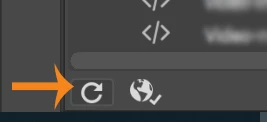
Use Ctrl / Cmd +S to Save.  And use the keyboard shortcut F5 or click the Refresh icon (see screenshot).

1 reply

HARSHIKA_VERMA
Community Manager
Community Manager
June 17, 2019

Hi Nomades,

Thank you for reaching out. It isn't immediately clear from reading your post, so I would suggest sharing a few more details of the issue with screenshots that will be helpful. Also, I am assuming you are trying to enter the code in the Code window. Please click on Code View to enter the code, from here as shown in the screenshot, after writing the code you can view it in Split view or Live view.

Please check this article for more info Set up your coding environment in Adobe Dreamweaver and let us know if that helps.

Thanks,

Harshika

NomadesAuthor
Participant
June 17, 2019

Hi,

I know split window, but my problem is that changing code doesn't update the viewer.

My text (underline) is 2019 / 2020 and viewer shows 2018 / 2019. So, code and view are different. No way to work like that...

Is there a button I don't see to reload the view ?

Thanks for help !

HARSHIKA_VERMA
Community Manager
Community Manager
June 17, 2019

Thank you for the additional information Nomades. It seems that you have some code errors. I would suggest validating your code errors by Clicking on Window>Results>Validation. Try to fix the errors and let us know if that helps.

Thanks,

Harshika