There is alot of code to include everything here. It seems like the tab code is blocking the link.
I still don't know what the problem is. Incidentally, Spry is deprecated in modern DW. Adobe abandoned Spry in 2012 because it's outdated & the code base had not been updated since 2006. You might want to replace Spry Tabs with with jQuery UI. The code is very flexible and you can customize it as required.
Below is an example of jQuery UI Tabs. I used the black-tie Theme here but you can use any of the others below.
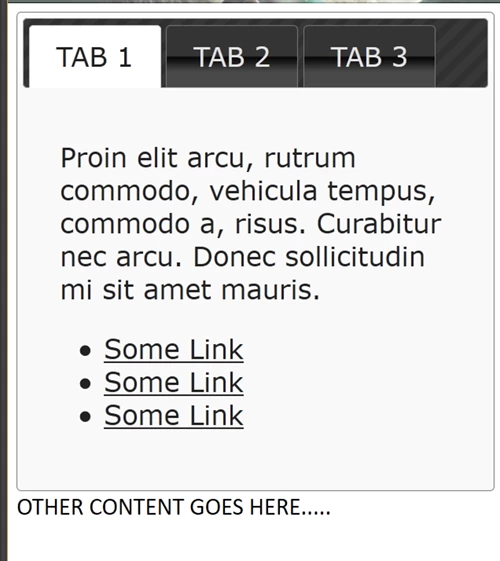
<!doctype html>
<html lang="en">
<head>
<meta charset="utf-8">
<meta name="viewport" content="width=device-width, initial-scale=1">
<title>jQuery UI Tabs - Default functionality</title>
<!--change jQuery UI Theme as desired. This one is black-tie-->
<link rel="stylesheet" href="http://code.jquery.com/ui/1.12.1/themes/black-tie/jquery-ui.css">
</head>
<body>
<div id="tabs">
<ul>
<li><a href="#tabs-1">TAB 1</a></li>
<li><a href="#tabs-2">TAB 2</a></li>
<li><a href="#tabs-3">TAB 3</a></li>
</ul>
<div id="tabs-1">
<p>Proin elit arcu, rutrum commodo, vehicula tempus, commodo a, risus. Curabitur nec arcu. Donec sollicitudin mi sit amet mauris. </p>
<ul>
<li><a href="#">Some Link</a></li>
<li><a href="#">Some Link</a></li>
<li><a href="#">Some Link</a></li>
</ul>
</div>
<div id="tabs-2">
<p>Morbi tincidunt, dui sit amet facilisis feugiat, odio metus gravida ante, ut pharetra massa metus id nunc. Duis scelerisque molestie turpis.</p>
<ul>
<li><a href="#">Some Link</a></li>
<li><a href="#">Some Link</a></li>
<li><a href="#">Some Link</a></li>
</ul>
</div>
<div id="tabs-3">
<p>Mauris eleifend est et turpis. Duis id erat. Suspendisse potenti. </p>
<ul>
<li><a href="#">Some Link</a></li>
<li><a href="#">Some Link</a></li>
<li><a href="#">Some Link</a></li>
</ul>
<!--end tab--></div>
<!--end tabbed panels--></div>
OTHER CONTENT GOES HERE.....
<!--jQuery Core minified-->
<script src="https://code.jquery.com/jquery-1.12.2.min.js" integrity="sha256-lZFHibXzMHo3GGeehn1hudTAP3Sc0uKXBXAzHX1sjtk=" crossorigin="anonymous">
</script>
<!--jQuery UI minified-->
<script src="https://code.jquery.com/ui/1.12.1/jquery-ui.min.js" integrity="sha256-VazP97ZCwtekAsvgPBSUwPFKdrwD3unUfSGVYrahUqU=" crossorigin="anonymous"></script>
<script>
//Invoke Tabs on page load
$( function() {
$( "#tabs" ).tabs();
} );
</script>
</body>
</html>
====================
JQUERY UI THEMES:
black-tie
blitzer
cupertino
dark-hive
dot-luv
eggplant
excite-bike
flick
hot-sneaks
humanity
le-frog
mint-choc
overcast
pepper-grinder
redmond
smoothness (default)
south-street
start
sunny
swanky-purse
trontastic
ui-darkness
ui-lightness
vader
Nancy




 AdChoices