


Participant
July 29, 2023
Answered

Tables not working correctly

  • July 29, 2023
  • 5 replies
  • 704 views

I am a simplistic Dreamweaver user.  For years I've been doing simple tables in html.  For example, create a table 1600 pixels wide with five rows and no columns.  Fill them in with photos and text.  I never had any issues.  


Starting today I created a table as described above.  There is only one row displayed.  When I try to insert an email I get something like this:
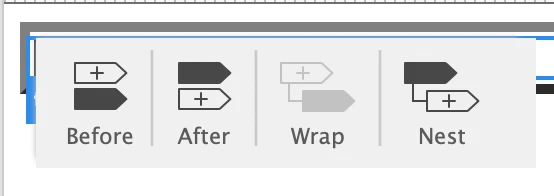
 

 If I choose "before" then it creates another table.  

So I decide to create my file using html commands and not menu commands.  This works initially, but eventually images and text appear in the wrong place.

I know this all sounds vague.  I am hoping the Creative Cloud did an update and there is a bug somewhere.  I sunk hours trying different things, but eventually it gets screwed up.  Help!

    This topic has been closed for replies.
    Correct answer Jon Fritz

    Working with tables in the Live View Editor interface is clunky at best.

    Switch to Design View (Ctrl + Shift + F11) and you should have the more familiar tools you're used to.

    5 replies

    Jon Fritz
    Community Expert
    Jon FritzCommunity ExpertCorrect answer
    Community Expert
    July 31, 2023

    Working with tables in the Live View Editor interface is clunky at best.

    Switch to Design View (Ctrl + Shift + F11) and you should have the more familiar tools you're used to.

    Participant
    July 31, 2023

    Thanks Jon!  That fixes everything.  My guess is an update caused things to change.  Using your suggestion gets me back into familar territory.

    Nancy OShea
    Community Expert
    Community Expert
    July 31, 2023

    Be sure to test your layout in REAL browsers with minimized browser viewport the way mobile device users will see it.


    Nancy O'Shea— Product User & Community Expert
    Nancy OShea
    Community Expert
    Community Expert
    July 29, 2023

    This is 2023, not 1995.  The majority of Internet users have mobile, tablet & hybrid devices.  You're alienating a large segment of people for whom 1600 pixel width tables won't fit.  In short, your approach to 'web design' is not user-friendly on modern web devices.   Why do this to people when you don't need to?


    Just insert images in sequential order. No fixed-widths or tables necessary.


    SCREENSHOT:


    HTML & CSS CODE:

    <!doctype html>
    <html lang="en">
    <head>
    <meta charset="utf-8">
    <title>CSS Grid Test</title>
    <meta name="viewport" content="width=device-width, initial-scale=1">
    <style>
    body {width:98%}
    
    .grid-container { 
    display: grid;
    grid-column-start: col 0;
    grid-gap: 5px;
    grid-template-columns: repeat(auto-fit, minmax(300px, 1fr));
    grid-template-rows: repeat(auto-fit, 1fr);
    }
    .grid-container img {
    vertical-align: baseline;
    max-width: 100%;
    height: auto;
    }
    </style>
    </head>
    <body>
    <h2>CSS Grid Test</h2>
    <div class="grid-container">
    <img src="https://dummyimage.com/650x490>" alt="placeholder">
    <img src="https://dummyimage.com/650x490>" alt="placeholder">
    <img src="https://dummyimage.com/650x490>" alt="placeholder">
    <img src="https://dummyimage.com/650x490>" alt="placeholder">
    <img src="https://dummyimage.com/650x490>" alt="placeholder">
    <img src="https://dummyimage.com/650x490>" alt="placeholder">
    <img src="https://dummyimage.com/650x490>" alt="placeholder">
    <img src="https://dummyimage.com/650x490>" alt="placeholder">
    <img src="https://dummyimage.com/650x490>" alt="placeholder">
    </div>
    </body>
    </html>


    Hope that helps.


    Nancy O'Shea— Product User & Community Expert
    Participant
    July 31, 2023

    Great suggestion!  Thanks!

    Community Expert
    July 29, 2023
    quote

    I am hoping the Creative Cloud did an update and there is a bug somewhere.

    By @John28917698ciz6


    As far as I know, TABLE doesn't have any notable bugs, but then again I didn't quite understand your problem. In any case, Dw is now on minimal maintenance, i.e. only maintenance for compatibility with new operating systems and blocking bugs are taken into account, and announce a possible update.

    Community Expert
    July 29, 2023

    I agree with @BenPleysier , it's true that it's not very easy to follow and understand your problems in order to help you as best we can.


    However, it seems that you'd like to use the rows of the TABLE to slide in images. So, in that case, why not use either :

    but Flex could very quickly and easily meet your requirements.


    If you google the subject, here's an article that might help you along the way: How to create a responsive image gallery with CSS flexbox 

    Participant
    July 31, 2023

    This method looks very interesting.  I will give it a try.

    BenPleysier
    Community Expert
    Community Expert
    July 29, 2023

    I am sorry, but you are not making any sense. A table is not a table when it does not contain a one or more columns.


    Show us what you want to do and we may be able to come up with a more modern and compliant solution.

    Wappler is the DMXzone-made Dreamweaver replacement and includes the best of their powerful extensions, as well as much more!