
pag81
Participant
November 8, 2017
Answered

Tag bracket code colors

  • November 8, 2017
  • 2 replies
  • 1838 views

Hello everyone,
i want migrate from my dreamweaver cs5 to new CC, but there it's a problem.
how it's possible change colors at tag bracket in html code?

from others post i found this:
example in colours.xml located in "%appdata%\Adobe\Dreamweaver CC 2017\en_US\Configuration\Brackets\extensions\user\\"
but these are not used:

<tagColor id="CodeColor_CFScriptTag" text="#903"/>
<tagColor id="CodeColor_HTMLAnchor" text="#060"/>
<tagColor id="CodeColor_HTMLForm" text="#F90"/>
<tagColor id="CodeColor_HTMLImage" text="#909"/>
<tagColor id="CodeColor_HTMLObject" text="#900"/>
<tagColor id="CodeColor_HTMLScript" text="#900"/>
<tagColor id="CodeColor_HTMLStyle" text="#909"/>
<tagColor id="CodeColor_HTMLTable" text="#099"/>

with new dreamweaver CC it's possible modify only the color by theme?
https://helpx.adobe.com/dreamweaver/using/customize-code-coloring.html
it's possible only with this style for all tag? ".cm-tag {color: #BD46BD;} "

i need the old differentiated colours by tag:
img, table, a, form, script, object!

EXAMPLE of old code:
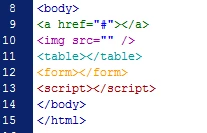
Сфт anyone help me to set old colours???

Thank you

Messaggio modificato da Alberto Pagura

This topic has been closed for replies.
Correct answer Kratika Agarwal

Hello,

We have started working on “Code Coloring Customization” improvements by adding support for customization of generic and language specific colors and the changes are available in our latest Prerelease drop.

With this improvement you will be able to customize Code Colors in Dreamweaver Preferences --> Interface window.


Please join Dreamweaver beta program from below link and try out the feature.

https://www.adobeprerelease.com/beta/9EB451B5-D2E8-46E5-AFA2-78C85442FFA2/participate/CD0C95AA-6274-...


Thanks

Dreamweaver Team

2 replies

Kratika AgarwalCommunity ManagerCorrect answer
Community Manager
May 12, 2020

Hello,

We have started working on “Code Coloring Customization” improvements by adding support for customization of generic and language specific colors and the changes are available in our latest Prerelease drop.

With this improvement you will be able to customize Code Colors in Dreamweaver Preferences --> Interface window.


Please join Dreamweaver beta program from below link and try out the feature.

https://www.adobeprerelease.com/beta/9EB451B5-D2E8-46E5-AFA2-78C85442FFA2/participate/CD0C95AA-6274-...


Thanks

Dreamweaver Team

Community Manager
November 9, 2017

Hi,

could you please try below steps and see if it works for you:

Create a new code color Theme.  See screenshot.

Replace contents of LESS file with the RubyBlue Theme from GitHub.

RubyBlue/RubyBlueTheme.less at master · Brackets-Themes/RubyBlue · GitHub

Save & close LESS file.  Go back to Preferences and Apply your newly created Theme.

Thanks

pag81
pag81Author
Participant
November 9, 2017

Hello dear Kratika,

yes i put the github code on my template, but the problem it's same, i can't find the different tag by colour:

Any idea?
Thanks

Al.

Nancy OShea
Community Expert
Community Expert
November 9, 2017

Drop back to version CC 2015 before Brackets code-mirror was introduced.

You will never get exactly the same kind of code tag coloring in the latest versions of DW.

Nancy O'Shea— Product User & Community Expert