


Participant
December 29, 2016
Answered

Tag highlighting in Dreamweaver 2017

  • December 29, 2016
  • 1 reply
  • 628 views

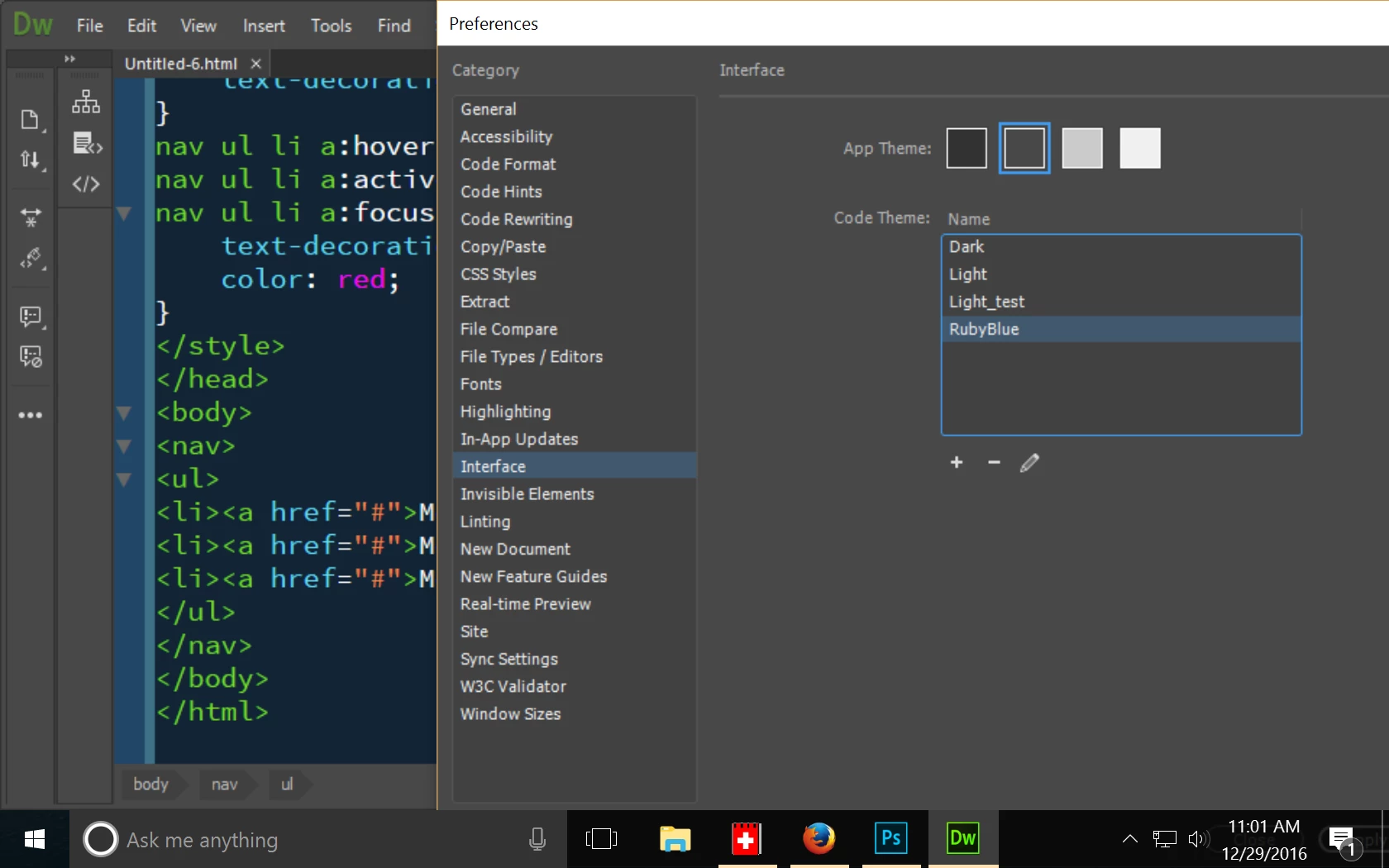
So, I just updated to the latest version of Dreamweaver. I open a html page, go to source code, click some tag and this awful highlighting happens.

I have light-grey version of interface and turned off eveything in 'preferences - highlighting'. Didn't help.

Can anyone, please, tell how to turn it off, because I'm literally struggling to see anything in this highlighting.

This topic has been closed for replies.
Correct answer Nancy OShea

Use the Dark code theme instead of the light one.  IMO, it's much easier to work with.

Or you can create a custom code color theme  by pressing the plus sign & editing the LESS file. 

Or you can get a Brackets Theme from GitHub (as I did) and paste it into your custom LESS.

Nancy

1 reply

Nancy OShea
Community Expert
Nancy OSheaCommunity ExpertCorrect answer
Community Expert
December 29, 2016

Use the Dark code theme instead of the light one.  IMO, it's much easier to work with.

Or you can create a custom code color theme  by pressing the plus sign & editing the LESS file. 

Or you can get a Brackets Theme from GitHub (as I did) and paste it into your custom LESS.

Nancy

Nancy O'Shea— Product User & Community Expert