
Participant
September 16, 2021
Answered

Technical problems with "map area"

  • September 16, 2021
  • 1 reply
  • 403 views

Hello, we are a several partners in the same office and all can't inclode "map areas" with Dreamweaver 2021. When we select the circle, rect o free to do "map areas", don't active anything, we think is a problem with the application.  We need to use this tool and it's impossible for us.

Someone can help us.

Thanks.
This topic has been closed for replies.
Correct answer Nancy OShea

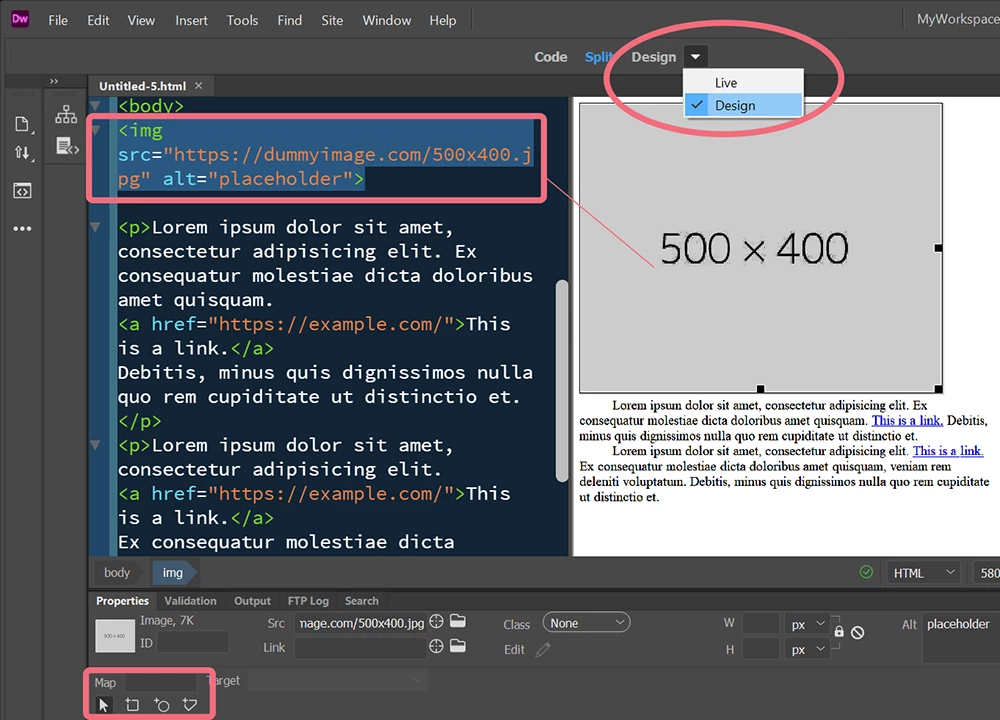
Image Maps are available only from Design View on your Document Toolbar.  See screenshot.  Also the coordinate tools will display in your Properties Panel (Ctrl+F3) only when a foreground image is selected first.


That said, Image Maps are not responsive.  You may find it more prudent to use another approach.  See below for a responsive SVG image map.

https://jsfiddle.net/NancyO/6k3v4ge1/21/


Hope that helps.


1 reply

BenPleysier
Community Expert
Community Expert
September 16, 2021

Have you read How to include interactive hotspots in your web site (adobe.com)


Please be reminded that image maps do not work in responsive design.

Wappler is the DMXzone-made Dreamweaver replacement and includes the best of their powerful extensions, as well as much more!
Participant
September 16, 2021

Thanks for your help. We have been able to resolve ours doubts.

Thanks you so much.

Nancy OShea
Community Expert
Nancy OSheaCommunity ExpertCorrect answer
Community Expert
September 16, 2021

Image Maps are available only from Design View on your Document Toolbar.  See screenshot.  Also the coordinate tools will display in your Properties Panel (Ctrl+F3) only when a foreground image is selected first.


That said, Image Maps are not responsive.  You may find it more prudent to use another approach.  See below for a responsive SVG image map.

https://jsfiddle.net/NancyO/6k3v4ge1/21/


Hope that helps.


Nancy O'Shea— Product User & Community Expert