


Inspiring
July 1, 2017
Answered

Template Editable tag attributes removes editable region

  • July 1, 2017
  • 4 replies
  • 1232 views

Hi,

I have a nested template.

In it's parent template I have several editable regions, one of them is for the document title:

<title>
<!-- InstanceBeginEditable name="title" -->
DnD-Production
<!-- InstanceEndEditable -->
</title>

I am trying to add an editable text attribute in the nested template, in a "submit" form, which is near the bottom of my doc

Before:

<input name="orderSubject" type="hidden" value="formValue" />

I use the editable tag attribute:
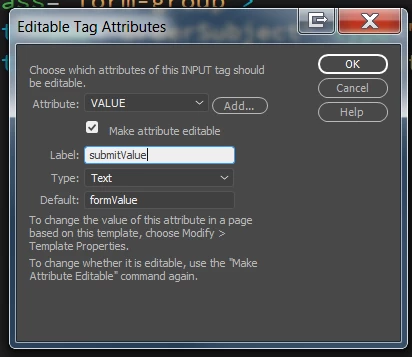
after:

<input name="orderSubject" type="hidden" value="@@(submitValue)@@" />

The problem is that it also places the TemplateParam in the middle of the "title" editable region.

<title>
<!-- InstanceBeginEditable name="title" -->
DnD-Production
<!-- TemplateParam name="submitValue" type="text" value="formValue" -->
<!-- InstanceEndEditable -->
</title>

This causes a problem because when i try to update descendant pages i get a message  that the "title" region is unresolved
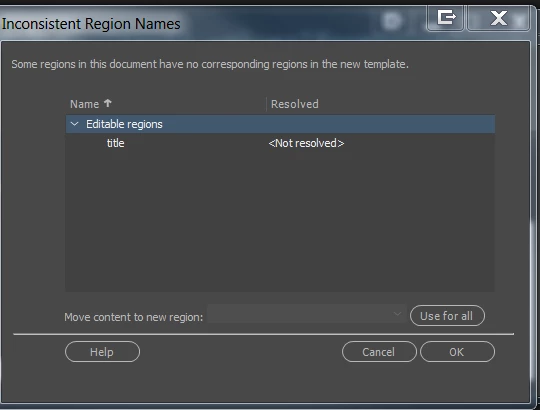
Is this normal? Am i doing something wrong here?

How can I fix this, I mean add the editable text without removing the title editable region?

This topic has been closed for replies.
Correct answer Nancy OShea

Use Server-Side-Includes (SSIs) for common headers, footers and navigation.

Alt-Web Design & Publishing: Server-Side Includes with PHP

Nancy

4 replies

karpiyonAuthor
Inspiring
July 3, 2017

I have a basic template which has the navbar and an editable regions.

From this i prepare the contact page, info page and other pages.

I also have 3 different kinds of image pages:

  1. A carousel with some structure
  2. A page which shows before/after slides of imagees
  3. An images gallery

For each of the above 3 I have several different version, each with differenty images and text.

For the above 3 I have 3 different nested templates.

If I a make one template it would be too complicated.

Nancy OShea
Community Expert
Nancy OSheaCommunity ExpertCorrect answer
Community Expert
July 3, 2017

Use Server-Side-Includes (SSIs) for common headers, footers and navigation.

Alt-Web Design & Publishing: Server-Side Includes with PHP

Nancy

Nancy O'Shea— Product User & Community Expert
karpiyonAuthor
Inspiring
July 3, 2017

Great that solve the navbar tough i will still need templates to modify the images in each page.

karpiyonAuthor
Inspiring
July 2, 2017

Or perhaps the answer I ma looking for is how to  define editable tag attributes in a nested template.

Nancy OShea
Community Expert
Community Expert
July 2, 2017

I cannot think of a single user case where nested templates are beneficial.   Not one.   I don't recommend nesting Templates. 

Create 1 Template with all the elements & layouts required for your entire site.

Add Optional Editable Regions for elements that will be used on some pages but not others.  In this way, you are fully covered by 1 template instead of several.

If you need an extra navigation element on some pages, use Server-Side Includes.  But please don't nest Templates.

Nancy

Nancy O'Shea— Product User & Community Expert
karpiyonAuthor
Inspiring
July 2, 2017

I appreciate your reply.

I am sure you have more experience yet i do find some good things in nested templates and the fact that adobe still supports it implies that they may have some use.

I wanted to use them but probably what i was trying to achieve is not possible.

thank you anywya.

karpiyonAuthor
Inspiring
July 2, 2017

Thank you,

I am following the definitions in: https://helpx.adobe.com/dreamweaver/using/creating-nested-template.html

The base template have 3 editable regions:

Begin editable

>Title…

End editable

Begin editable

>Body…

End editable

Begin editable

>Scripts…

End editable

In the nested one, I do not touch the Tilte region, hnce I should be passede on as editable to the pages.

I added 2 editable regions inside the body editable region:

Begin editable

>Body_text1

End editable

Begin editable

>Body_text2

End editable

I tried to add the editable attribute HERE

So far all is well and
This was wokring fine.

When I tried to add the editable attribute, it coruppted the Title editable region as I showed in the first message of this post.

I think I followd adobe
method for using nested templatep properly.

Nancy OShea
Community Expert
Community Expert
July 2, 2017

You cannot nest editable regions under any circumstances.

You have to close one editable before you can begin a new one.

Nancy

Nancy O'Shea— Product User & Community Expert