jenniferw73472812
Participant
November 10, 2017
Answered

Template guides

  • November 10, 2017
  • 2 replies
  • 456 views

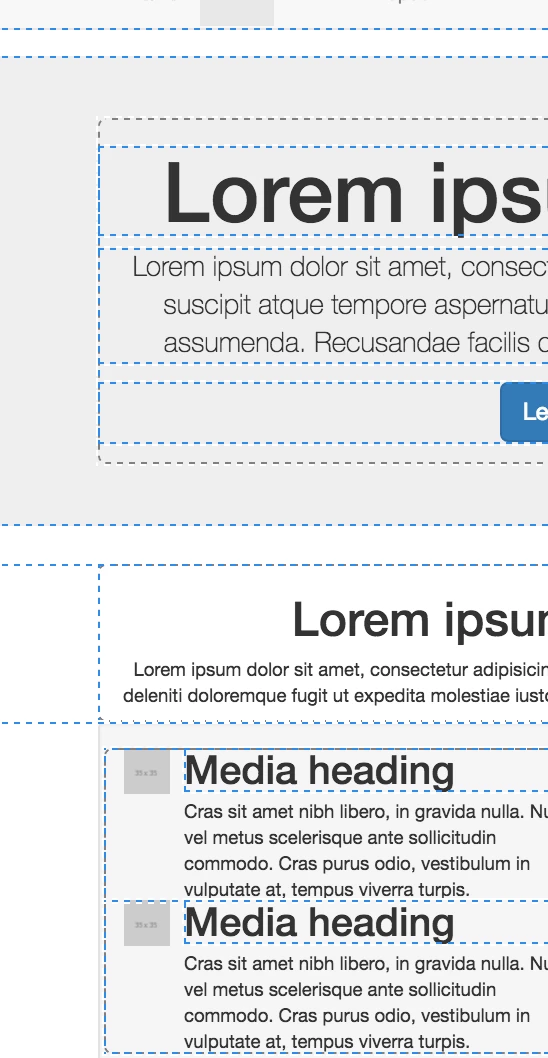
I recently opened a template file just to check it out. I noticed the dashed blue lines around the elements. Super Handy!! My question, how the heck do I turn those on? I'm still fairly new to coding and would find that little feature super handy!!
This topic has been closed for replies.
Correct answer Nancy OShea

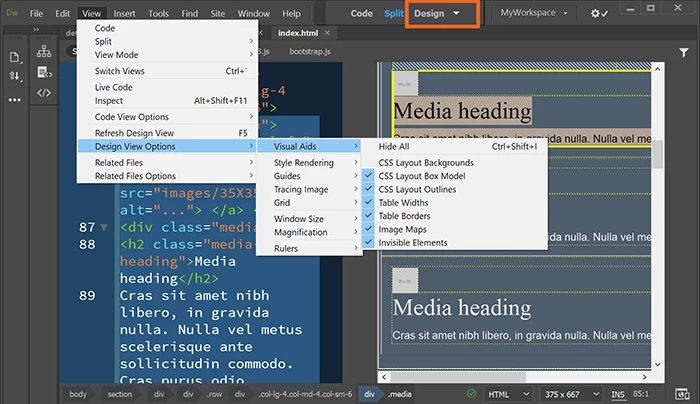
Switch to Design View.  

Then go to View > Design View Options > Visual Aids and select everything you want to see.

2 replies

Nancy OShea
Community Expert
Nancy OSheaCommunity ExpertCorrect answer
Community Expert
November 12, 2017

Switch to Design View.  

Then go to View > Design View Options > Visual Aids and select everything you want to see.

Nancy O'Shea— Product User & Community Expert
jenniferw73472812
Participant
November 12, 2017

anyone??

Legend
November 12, 2017

I know 100% of nothing about DW but the only place I've ever seen those blue dotted/dashed lines is whilst in 'Live' view, but that was back in version cc2015

Further investigation seems to reveal that the lines ONLY appear if you have a css file with 'bootstrap' in the name linked to the page. If you name it anything else the lines do not show up. Interesting. Not sure if someone who is more familar with DW can confirm that and why that should be.