So it appears I do have a working version now, but it would be good to know what to do for the above. And I do not know why one version has an issue in the first place. How would this happen?
By @Leann5E78
If your files have disappeared from the Assets panel in Dreamweaver, don’t panic — there can be many causes, but most of them are easy to fix. Just go step by step and double-check the following things in order. Even if they seem obvious or already done, it's worth verifying them calmly 😉
- Do you have a folder named exactly Templates at the root of your site?
- Does this folder contain your .dwt or .dwt.php files?
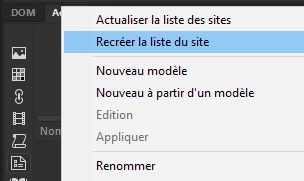
- Try to rebuild the template list: go to the Assets panel, click the little menu icon (top right), and use the option to refresh the list.
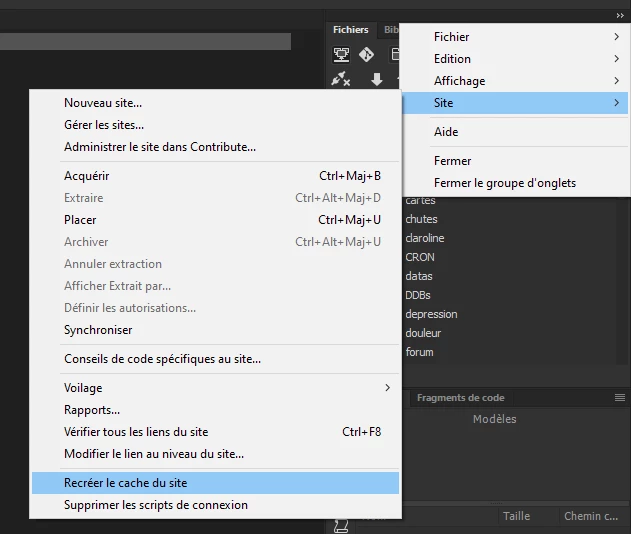
- Also try to rebuild the site cache, using the top-right menu in the Files panel.
- If nothing works, try the "heavy" method: reset Dreamweaver preferences.
- Full steps are here: https://helpx.adobe.com/dreamweaver/kb/restore-preferences-dreamweaver.html
- If DW crashes during the reset, you might need to delete the preferences manually, and on Windows, also remove the related registry key (Everything is detailed in the link above.).
- But, instead of deleting anything, you can just rename the folders or registry keys by adding the string "_backup" at the end of the name.
- After rebuilding preferences, don't forget to quit Dreamweaver, restart it, and whatever just re-create the template list like in step 3.
If your templates still don’t show up… well, maybe it's time to add a new step to this list, one that comes from years of fighting with DW templates 😉




 AdChoices