sebastians84855614
Participating Frequently
October 18, 2018
Answered

Templates don't update related pages.

  • October 18, 2018
  • 1 reply
  • 2191 views

I'm on Adobe Dreamweaver CC 19.0. Windows 10.

The template feature don't update pages created under the template. After changes I got a pop-up: "Update Template FIles"  but 0 files are updated.

  files updated: 0

  files which could not be updated: 0

The manual update also gives:

  files updated: 0

  files which could not be updated: 0

The template file is located in automatically generated folder (Templates). All files passed W3C validation. Also I have recreated the site chache.

Any idea how to fix this issue?

This topic has been closed for replies.
Correct answer ALsp

I'm not entirely sure. I would never use Adobe CC versions for real work, but we do need to familiarize ourselves with them to test our products and answer customer questions, because, sadly, a lot of people seem to buy what Adobe is selling , but...

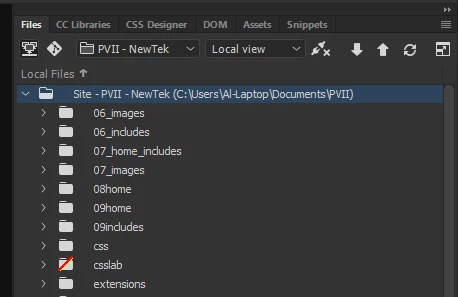
When I look at my Files panel, the root site folder for a selected local site always contains the full path to the chosen directory, and not, like yours, merely the name of the site.

1 reply

ALsp
Legend
October 19, 2018

It would appear from your screen capture that there are no files linked to your DWT. Do you have a local web site properly defined?

sebastians84855614
Participating Frequently
October 19, 2018

Hello, I think I have.

ALsp
ALspCorrect answer
Legend
October 19, 2018

I'm not entirely sure. I would never use Adobe CC versions for real work, but we do need to familiarize ourselves with them to test our products and answer customer questions, because, sadly, a lot of people seem to buy what Adobe is selling , but...

When I look at my Files panel, the root site folder for a selected local site always contains the full path to the chosen directory, and not, like yours, merely the name of the site.