Participating Frequently
June 18, 2017
Answered

the latest dreamweaver update caused major problems

  • June 18, 2017
  • 3 replies
  • 983 views

I opened Dreamweaver to edit several web pages (I own 10 websites that

always need updated content). I received notification to update the app. I

initiated the update but at 100% upload it gave a failure message. The

error message for the failure said to rename file. I was not sure what that

meant so I thought I would just open the app and continue my work.

Apparently, the update installation removed the shortcut from my taskbar.

So, I went to my computer's settings and saw that Dreamweaver was still

listed. This really confused me. I performed an uninstall because I

thought I needed to uninstall the app from my computer. Also, I used Adobe

CC Cleaner to make sure it was completely removed. I figured that I could

then perform a fresh install. Then, I started the installation. At about

25%, the installation stopped and a P50 error message popped up. So, now I

no longer have the Dreamweaver app on my computer.

What should I do?

Steve

    This topic has been closed for replies.
    Correct answer Jon Fritz

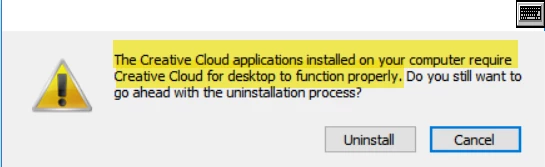
    No luck!  I have tried everything you have suggested.  See attached screenshots of error messages. 

    I tried to install CC and got the following error message.

    Can someone from Adobe manually remove Acrobat, CC and Dreamweaver?


    Here's Adobe's Cleaner Tool: Use the Creative Cloud Cleaner Tool to solve installation problems

    That should wipe everything you tell it to.

    3 replies

    Nancy OShea
    Community Expert
    Community Expert
    June 19, 2017

    Error Code 50 is a file transfer problem.  Unable to back-up assets.

    Error code 2 or error code 50: Adobe Creative Cloud desktop application failed to update

    Nancy O'Shea— Product User & Community Expert
    Participating Frequently
    June 19, 2017

    It would be of great help if you can post error messages snapshot which you are seeing. That would help us understanding problem better.

    1. Did you try re-install after restart of computer? If not, give it a try.

    2. If it still fails, please post the error message you are seeing.

    3. Do you have any other Adobe application? If yes, how do they behvae?

    4. Which OS you have on your computer?

    schtevmalAuthor
    Participating Frequently
    June 19, 2017

    lnayal  wrote

    It would be of great help if you can post error messages snapshot which you are seeing. That would help us understanding problem better.

    1. Did you try re-install after restart of computer? If not, give it a try.

    2. If it still fails, please post the error message you are seeing.

    3. Do you have any other Adobe application? If yes, how do they behvae?

    4. Which OS you have on your computer?

    1. Yes
    2. See attached screenshot of error message
    3. See attached screenshot of error message
    4. Windows 10

    Participating Frequently
    June 19, 2017

    Did you try downloading Adobe Application manager ?

    If not here are the links:

    Adobe - Adobe Application Manager : For Windows

    Adobe - Adobe Application Manager : For Macintosh

    U can refer to this thread if this helps: Adobe application manager missing or damaged Problem Student Editon of Creative Cloud

    else Please share installation logs from below location, you can mail the logs to me at lnayalatadobedotcom

    Windows 64-bit: \Program Files(x86)\Common Files\Adobe\Installers

    Mac OS: /Library/Logs/Adobe/Installers/

    Nancy OShea
    Community Expert
    Community Expert
    June 18, 2017

    Did you restart your computer after the update?

    Also, were you using an Admin level user account with full read, write permissions when you ran the update?

    Finally do you remember the error message or code that came up?

    Nancy O'Shea— Product User & Community Expert
    schtevmalAuthor
    Participating Frequently
    June 19, 2017

    https://forums.adobe.com/people/Nancy+OShea  wrote

    Did you restart your computer after the update?

    Also, were you using an Admin level user account with full read, write permissions when you ran the update?

    Finally do you remember the error message or code that came up?

    1. Yes
    2. Yes
    3. The initial error message said to rename file.