


wefollow
Inspiring
September 13, 2017
Answered

the site definition was not defined properly

  • September 13, 2017
  • 1 reply
  • 851 views

When I test from DW, Connected to your web server successfully.

From site setup:

   FTP address had  ftp.ipage.com   then change ftp.mydomainname.com....What's the different?

Web URL:  Http://ftp.ipage.com  then changed to ftp.mydomainname.com....again What's the differnt?

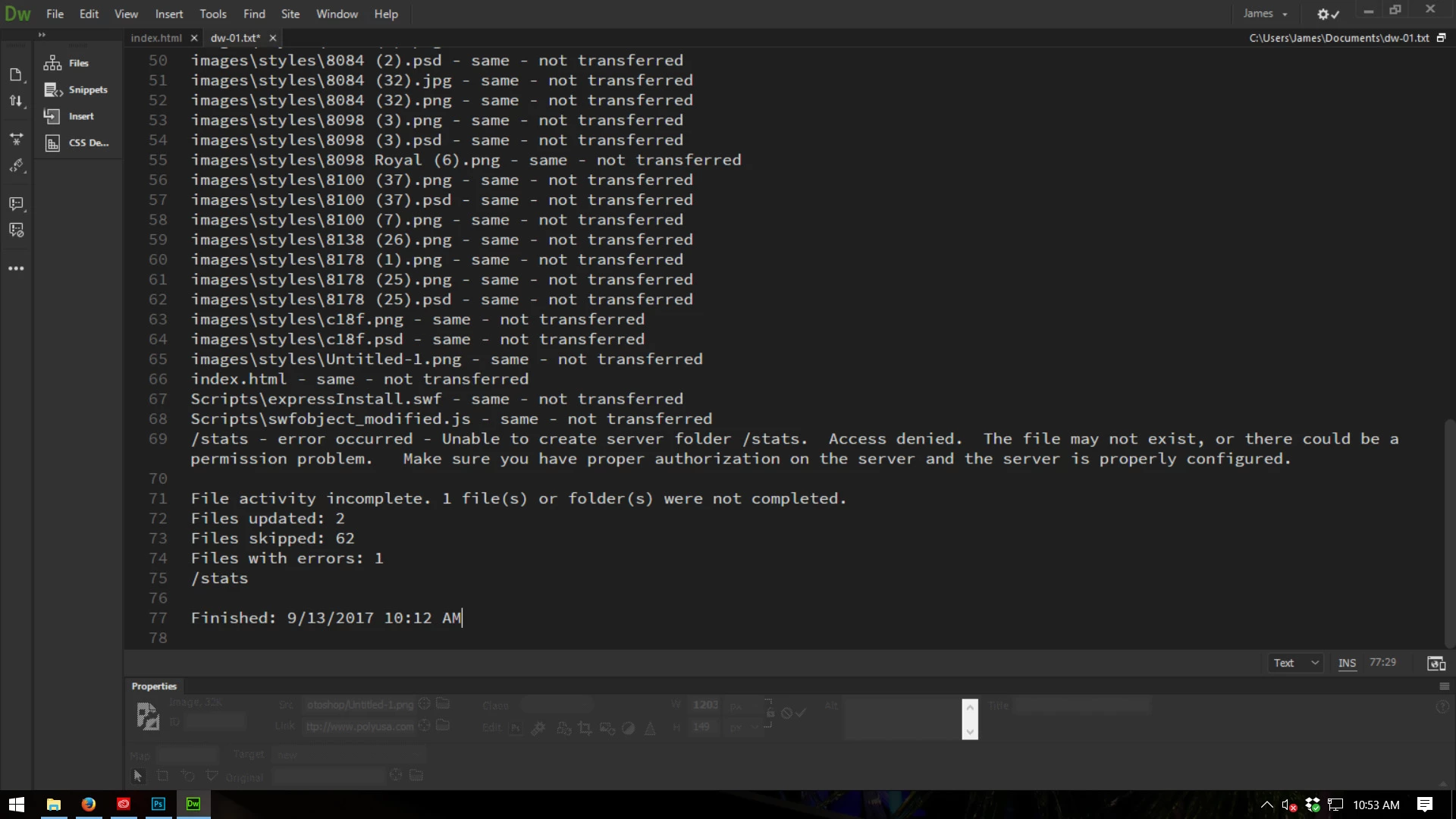
Both way worked to upload but getting message .....file activity incomplate......

Need help to recheck my Site Definition......

Thanks for reading.......

I attached error message

This topic has been closed for replies.
Correct answer Jon Fritz

"Same Not Transferred" typically pops up when your hosting company hasn't set up your file permissions correctly.

The ability to overwrite existing files on your server appears to be missing for your log-in.

Show that screen shot to your hosting company. They should be able to repair your permissions pretty easily.

1 reply

Jon Fritz
Community Expert
Jon FritzCommunity ExpertCorrect answer
Community Expert
September 13, 2017

"Same Not Transferred" typically pops up when your hosting company hasn't set up your file permissions correctly.

The ability to overwrite existing files on your server appears to be missing for your log-in.

Show that screen shot to your hosting company. They should be able to repair your permissions pretty easily.

wefollow
wefollowAuthor
Inspiring
September 13, 2017

thanks,

I will do that n let you know

Inspiring
September 13, 2017

Please see post #17 at Re: Doesn't synchronize

You do not have any issues and showing GoDaddy that screenshot is a waste of time.

Typically when a file upload attempt has a permissions issue then an error message saying something along the lines of Permissions Denied is displayed. Same - not transferred means the file on the server is the same as the file you're attempting to upload, therefore the file was not transferred (or uploaded in other words). The bottom chunk of you error message explains the issue. You actually did upload 2 new files, the 62 unchanged files were not uploaded since they already existed on the server, and do some google searching on godaddy's stats folder to get more info about what your error message is saying in regards to permissions on the stats folder.