
Tip to remove the anoying highlighting in DW2017
Hi,
as many of you, I was anoyed about the highlighting of matching tags.
After some experiments, this is what I found and what works.
In the main.less file (you open it by going to Preferences > Interface. By default, the current theme is selected, so just click on the little pencil, this will open the file)
add these lines to the 'Custom colors' section at the bottom:
.CodeMirror-matchingbracket, .CodeMirror-matchingtag{
background-color: #eeeeee !important;
color: #000000 !important;
}
.CodeMirror-matchingtag.cm-tag { color: #009B02 !important;}
.CodeMirror-matchingtag.cm-meta { color: #e34a4a !important; }
.CodeMirror-matchingtag.cm-keyword { color: #0000BA !important; }
.CodeMirror-matchingtag.cm-variable { color: #00A600 !important; }
.CodeMirror-matchingtag.cm-variable-2 { color: #21A3F6 !important; }
.CodeMirror-matchingtag.cm-def {color: #000000 !important;}
.CodeMirror-matchingtag.cm-string {color: #D20000 !important;}
.CodeMirror-matchingtag.cm-comment {color: #DE8D00 !important;}
.CodeMirror-matchingtag.cm-attribute {color: #90009D !important;}
You can change the colors to match your theme, as I am using the light-theme.
Here is an image of the result :
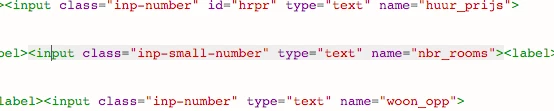
Hope it helps !
If you want the complete main.less file, you can find it here : www.rooijakkersnet.nl/css/main.less


 AdChoices