Hosun
Inspiring
June 24, 2019
Answered

tool tip

  • June 24, 2019
  • 1 reply
  • 536 views

Hi,

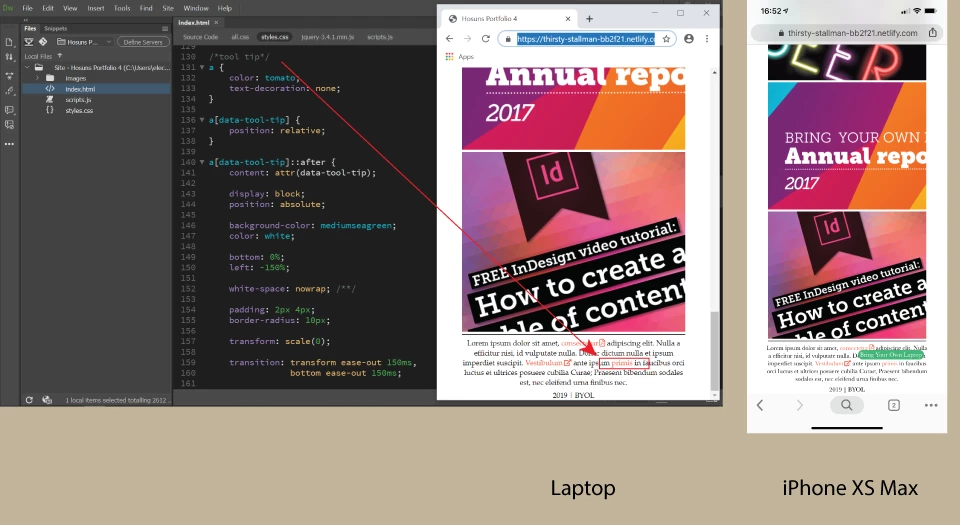
There is Chrome on laptop and mobile.

My issue is "tool tip".

On laptop, it looks fine.

On mobile, something is wrong.

Is there anyway to adjust "tool tip" to mobile?

Or, would I delete "tool tip" entirely on mobile?

Hosuns Portfolio 4

Hosun Kang

This topic has been closed for replies.
Correct answer Nancy OShea

An average human finger tip is about 50 px by 50 px.  See screenshot of a tap target.

Tap targets should also be spaced about 8 pixels apart, horizontally and vertically, so that a user's finger tap on one target does not inadvertently touch another tap target.  That's why most developers use oversized buttons for tap targets instead of tiny text.

Accessible Styles  |  Web Fundamentals  |  Google Developers

1 reply

Nancy OShea
Community Expert
Nancy OSheaCommunity ExpertCorrect answer
Community Expert
June 25, 2019

An average human finger tip is about 50 px by 50 px.  See screenshot of a tap target.

Tap targets should also be spaced about 8 pixels apart, horizontally and vertically, so that a user's finger tap on one target does not inadvertently touch another tap target.  That's why most developers use oversized buttons for tap targets instead of tiny text.

Accessible Styles  |  Web Fundamentals  |  Google Developers

Nancy O'Shea— Product User & Community Expert
Hosun
HosunAuthor
Inspiring
June 25, 2019

Hi,

I tried your advice.

With the finger tap, tool tip appears.

Is there any way to make it disappear?

Hosuns Portfolio 4

Hosun Kang