
Known Participant
November 15, 2018
Answered

tooltips in dreamweaver

  • November 15, 2018
  • 3 replies
  • 919 views

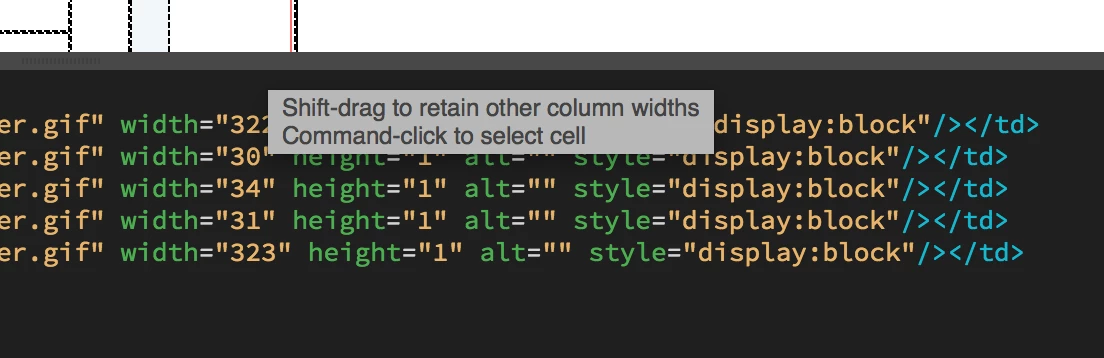
I've read a couple forum post on how to get rid of this and they aren't working. first one says go to preferences and turn off "enable descriptive tooltips" - didn't work. the other suggestion was to go to view- design view options- visual aids- css layout box model. this didn't work either. this stupid box is driving me crazy it covers my code and scrolling doesn't get rid of it. How do i get rid of this? Ive attached a screen grab so everyone sees how annoying this thing is.

    This topic has been closed for replies.
    Correct answer Jon Fritz

    As far as I know, while working with Tables in DW's Design View, there's no way to turn those tooltips off, though in CC2019, they don't appear to be as easily triggered as they were in previous versions.

    Unless using tabular data, tables should be avoided in today's web design and I believe, because of that, Adobe has no real interest in changing the behavior of the tooltip pop-ups.


    Switching to the Live View Editor to modify your tables may work better for you, since it doesn't have the tooltips at all. There are some differences in how it's done there. From Live View, first click the left edge of the table to select it. When you see the the blue TABLE tab appear, click the 3 bar menu icon. The cells of the table will highlight black and allow you to do the same kinds of actions as Design View to merge, change size, etc when you right click.

    3 replies

    Nancy OShea
    Community Expert
    Community Expert
    November 16, 2018

    I hope for your sake you're not using tables generated in Photoshop.  The use of spacer.gifs in table-based layouts is a clear sign of trouble with a capitol T.   Photoshop generates horrible  HTML code.  It should never be used in production sites. 

    Nancy O'Shea— Product User & Community Expert
    BenPleysier
    Community Expert
    Community Expert
    November 16, 2018

    There should be no need to restart the computer. Let me have a further look and I'll come back to you.

    Wappler is the DMXzone-made Dreamweaver replacement and includes the best of their powerful extensions, as well as much more!
    BenPleysier
    Community Expert
    Community Expert
    November 16, 2018

    When you turned the tooltips off under preferences, did you restart Dreamweaver?

    Wappler is the DMXzone-made Dreamweaver replacement and includes the best of their powerful extensions, as well as much more!
    Known Participant
    November 16, 2018

    thanks for your reply.

    I did quit and restart dreamweaver but I haven't restarted my computer yet.

    BenPleysier
    Community Expert
    Community Expert
    November 16, 2018

    I am using the latest version of Dreamweaver and cannot get the tooltips to appear.

    Therefore I am assuming that you are using an older version of Dreamweaver in which case you can go to

    View > Visual Aids > CSS Layout Box Model

    to turn the tooltip off.

    Wappler is the DMXzone-made Dreamweaver replacement and includes the best of their powerful extensions, as well as much more!