

Inspiring
June 27, 2023
Question

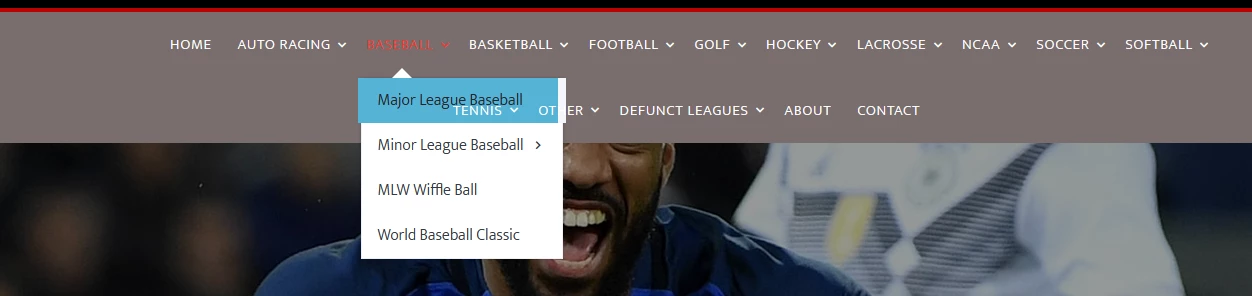
Top Sub-Menus Underlapping Bottom Menu

  • June 27, 2023
  • 3 replies
  • 414 views

How Can I fix this problem with menu? it's underlapping the bottom menu


    This topic has been closed for replies.

    3 replies

    Community Expert
    June 28, 2023

    Can you share your code for the page? The fact that we are seeing the text behind when there is a hover leads me to believe there is some level of transparency in play here that is causing the area behind to be shown.


    But with that said, this feels way too busy for a top level navigation. While it's great to have all sports, consider a site like ESPN ( https://www.espn.com/ ). They have the same problem as you and have found a better UX way to overcome this issue that you might want to consider.

    Legend
    June 27, 2023
    quote

    How Can I fix this problem with menu? it's underlapping the bottom menu



    By @jamedlock83


    We can't see your code but it's a z-index issue. You should apply a high z-index to the sub-menu css. That should have the effect of positioning the sub-menu above your bottom/main navigation.


    However your main navigation looks a bit busy....too many top-level links, that would be my initial concern

    Nancy OShea
    Community Expert
    Community Expert
    June 27, 2023

    Short Answer: simplify your top navbar.


    The prevailing theory in responsive web design is less is more.  Complex navigation doesn't work well on mobile devices which haven't enough available real estate to accommodate them. 


    Use Bootstrap Cards containing images & links in the body of your index page.  This adds visual interest, user engagement and is easier for touch screen users to access.

    <div class="card" style="width: 18rem;">
      <img class="card-img-top" src="..." alt="Card image cap">
      <div class="card-body">
        <h5 class="card-title">Card title</h5>
        <p class="card-text">Some quick example text to build on the card title and make up the bulk of the card's content.</p>
        <a href="#" class="btn btn-primary">Go somewhere</a>
      </div>
    </div>


    Nancy O'Shea— Product User & Community Expert