


Transfer 50+ DW Sites from 2019 Intel Mac Pro (Sonoma) to M3 MacBook Pro (Tahoe)?
My main computer is a 2019 Intel Mac Pro running Sonoma and the latest version of DW.
I am being forced to move ALL my 50+ DW sites to my MacBook Pro running Tahoe and the latest version of DW.
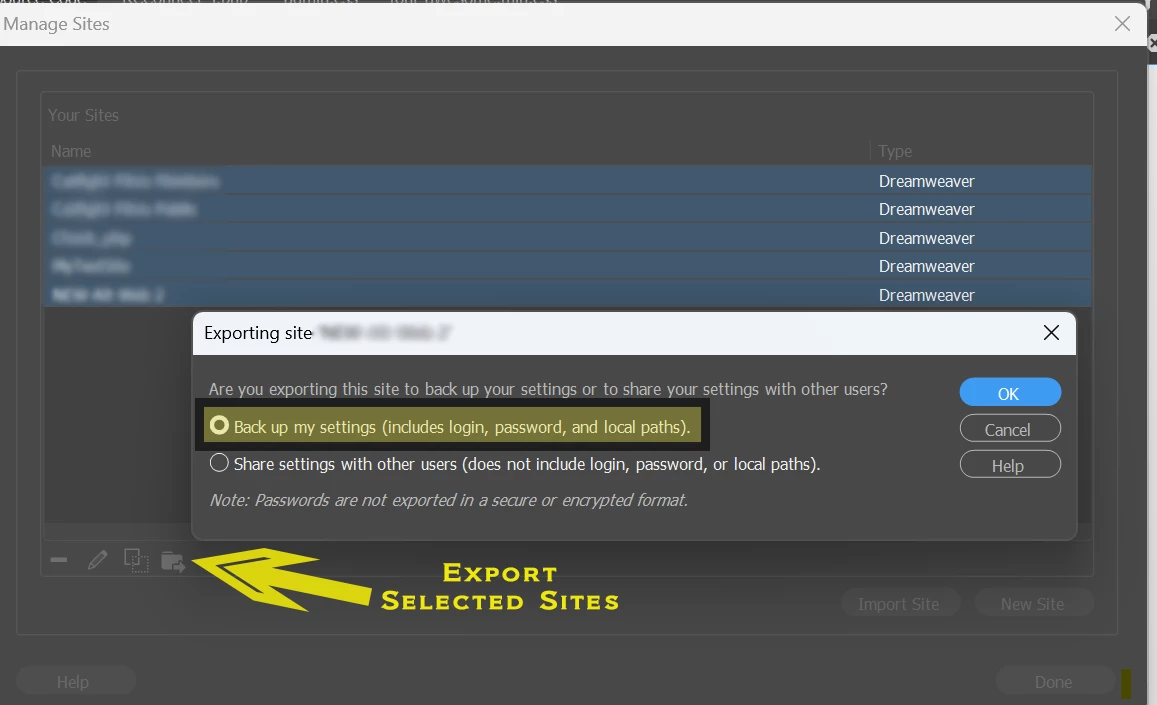
I have read some articles on how to Export/Import .ste files. I want to copy ALL my server connections (user names, passwords, i.p. address settings, etc.), so from what I gather I should choose the Backup vs the Share export option… is that right?
My main concern (if I understand the process correctly) is Export Backup option also retains pointers to all the actual site root folders for each of my customers’ actual images, assets, etc. used on their websites which now all 50+ of those folders are located on my Mac Pro. So if I export my .ste files on the Mac Pro and then import those into the MacBook Pro, those pointers will no longer be valid? I am guessing I will need to copy all those website root assets folders manually onto my MacBook Pro before I do the Import, BUT how will DW locate those relocated assets as (I am guessing) it will be looking for those in their previous Mac Pro locations?

 AdChoices