Participant
July 29, 2017
Answered

Trial dreamweaver [Where are Fluid Grid layouts?]

  • July 29, 2017
  • 2 replies
  • 479 views

Just downloaded dreamweaver trial cc new version to see how the fluid grid works as per video but in file new I do not see fluid grid layout anywhere. Any ideas why not?.

This topic has been closed for replies.
Correct answer Nancy OShea

Fluid Grid Layouts are gone.  They were a nice idea in 2012 when Adobe DW introduced them but fell way short of potential.  They have since been replaced with a much more robust responsive framework called Bootstrap.

First Define your local site folder by going to Site > New Site.  Example:  C:\myTestSite

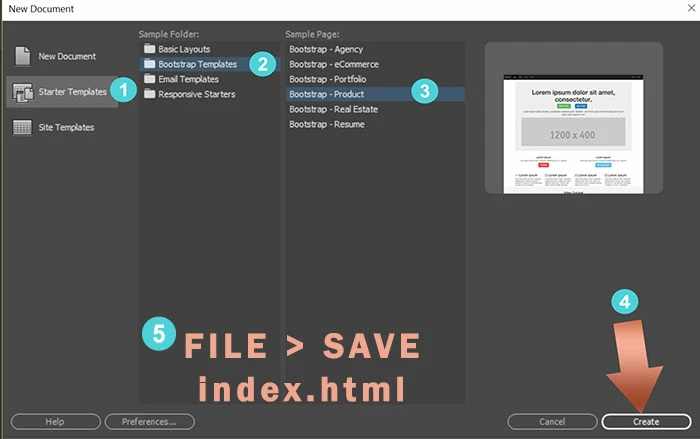
Next, go to File > New > Starter Templates.  Pick one of the Bootstrap Templates and hit Create button.   Immediately SaveAs index.html.  

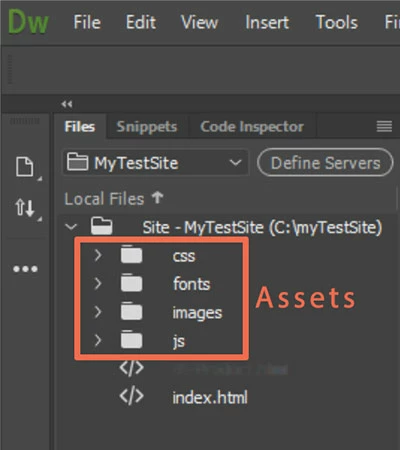
DW will create assets folders in your local site as seen in your Files Panel (F8)

You have a responsive site to work with.

For more on working with Bootstrap, see links below.

W3 Schools - Bootstrap

http://www.w3schools.com/bootstrap/

Tutorial Republic - Bootstrap for Beginners

http://www.tutorialrepublic.com/twitter-bootstrap-tutorial/

Grid Overview

http://getbootstrap.com/examples/grid/

CSS Overview

http://getbootstrap.com/css/

Bootstrap in Adobe Dreamweaver CC 2015 - Overview

https://helpx.adobe.com/dreamweaver/using/bootstrap.html

2 replies

Jon Fritz
Community Expert
Community Expert
July 31, 2017

You will definitely want to make sure your educational resources match the program version you are using. DW has undergone some major changes over the last few years and using resources that are even a small dot release different from your actual program will have significant differences.

Nancy OShea
Community Expert
Nancy OSheaCommunity ExpertCorrect answer
Community Expert
July 30, 2017

Fluid Grid Layouts are gone.  They were a nice idea in 2012 when Adobe DW introduced them but fell way short of potential.  They have since been replaced with a much more robust responsive framework called Bootstrap.

First Define your local site folder by going to Site > New Site.  Example:  C:\myTestSite

Next, go to File > New > Starter Templates.  Pick one of the Bootstrap Templates and hit Create button.   Immediately SaveAs index.html.  

DW will create assets folders in your local site as seen in your Files Panel (F8)

You have a responsive site to work with.

For more on working with Bootstrap, see links below.

W3 Schools - Bootstrap

http://www.w3schools.com/bootstrap/

Tutorial Republic - Bootstrap for Beginners

http://www.tutorialrepublic.com/twitter-bootstrap-tutorial/

Grid Overview

http://getbootstrap.com/examples/grid/

CSS Overview

http://getbootstrap.com/css/

Bootstrap in Adobe Dreamweaver CC 2015 - Overview

https://helpx.adobe.com/dreamweaver/using/bootstrap.html

Nancy O'Shea— Product User & Community Expert