
Participant
July 20, 2017
Answered

Trouble configuring Git on DW CC for Mac

  • July 20, 2017
  • 2 replies
  • 10572 views

I'm stuck trying to configure my site using the most recent updated Dreamweaver CC to connect to my Git / Github repositories. When I click to associate a Github repository to this site check box I get the following error. Dreamweaver could not locate the Git client on your computer... I've followed the instructions Learn how to download and use Git with Dreamweaver CC.  - but no dice.
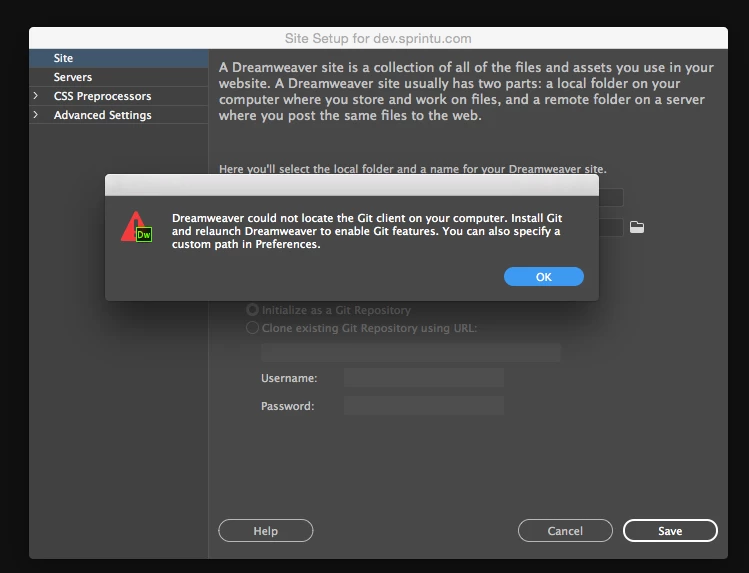
Not sure what to do here. I have both the Git-2.13.1 and GitHub Desktop.

Running Yosemite 10.10.5 on my Mac Pro.

Thanks!

Eric
This topic has been closed for replies.
Correct answer Eric Madsen

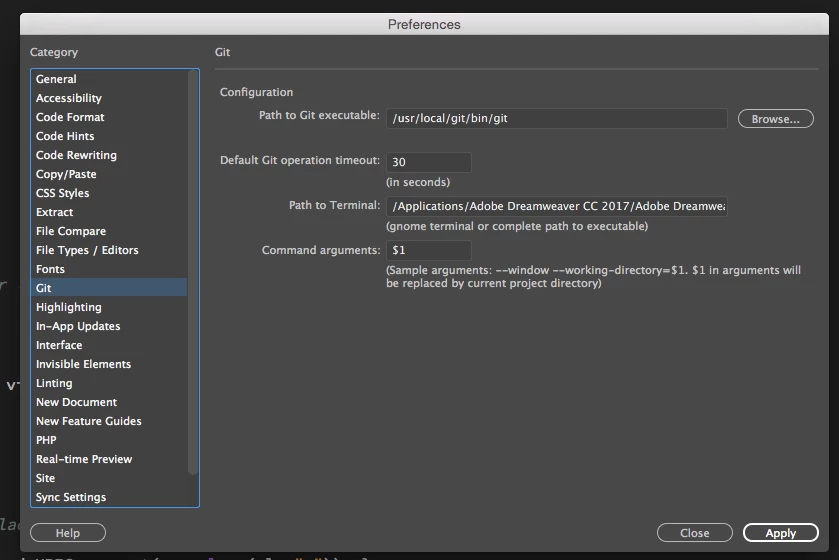
So I've gotten it working with the help of a co-worker. It seems that when I attempted to manually browse through the preferences it was maybe storing some bad path to the application that I couldn't undo/delete. And that was preventing the sites window from searching... once I entered the same information through preferences that he had (populated the preferences when he checked the box in sites) - it now works. Yay. Oh, and I did again need to restart DW.

Hope someone else finds this useful.

BTW - it would be good if DW could rescan for the Git application. Just saying.

2 replies

dijonaise
Known Participant
February 1, 2018

This still is not working!

The link to the "Instructions" is woefully incomplete.

In the screenshot of the git prefs, the "Path to terminal" Field looks to be populated with the DreamWeaver app.

Why?

What am I supposed to put there? There is NO explanation of this in the instructions here:

https://helpx.adobe.com/dreamweaver/using/git-support.html

Halp!

BenPleysier
Community Expert
Community Expert
February 2, 2018

Did you download the Git Client?

If that is the case and you have installed it to a folder, then the Path to Terminal has to be entered to reflect that as in (this is for Windows)

Wappler is the DMXzone-made Dreamweaver replacement and includes the best of their powerful extensions, as well as much more!
chase439
Participant
August 26, 2018

Mac doesn't have C: or git-bash

FYI, Pointing path to /Applications/Utilities/Terminal.app/Contents/MacOS/Terminal doesn't work.

Eric MadsenAuthorCorrect answer
Participant
July 20, 2017

So I've gotten it working with the help of a co-worker. It seems that when I attempted to manually browse through the preferences it was maybe storing some bad path to the application that I couldn't undo/delete. And that was preventing the sites window from searching... once I entered the same information through preferences that he had (populated the preferences when he checked the box in sites) - it now works. Yay. Oh, and I did again need to restart DW.

Hope someone else finds this useful.

BTW - it would be good if DW could rescan for the Git application. Just saying.

Participant
November 7, 2017

Hi Eric,

I still could not make it work on my mac, when I use these settings...

How do you find the correct path to executive file?

May be somebody have a solution? Not so much one can google - I guess real developers do not use either mac, or dreamweaver?

(I am just a beginner).

Thank you for your possible answer,

Olga Komarova

Participant
November 9, 2017

Hi Olga

for me works in this way

i need to disinstall the desktop version of GIT and download and install:  this

you can follow this video and after with the previous setting it works

Hope this Help