This topic has been closed for replies.
Correct answer Nancy OShea

Below is a quick example of what you could do with a Bootstrap 4 responsive layout and a few CSS classes.  No tables or HTML formatting required.
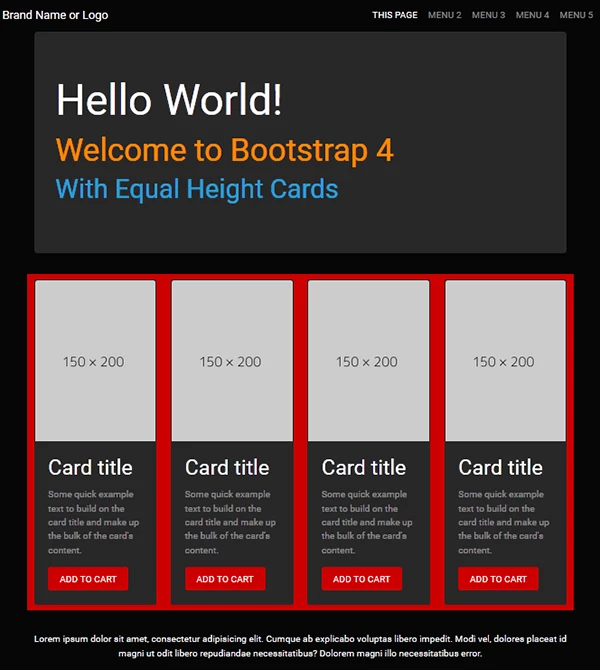
<!doctype html>

<html lang="en">

<head>

<meta charset="utf-8">

<title>Bootstrap 4.0, Equal Height Cards Demo</title>

<meta name="viewport" content="width=device-width, initial-scale=1">

<meta http-equiv="X-UA-Compatible" content="IE=edge">

<!--BOOTSTRAP CYBORG THEME-->

<link rel="stylesheet" href="https://maxcdn.bootstrapcdn.com/bootswatch/4.0.0-beta.2/cyborg/bootstrap.min.css">

<style>

html, body {height: 100% }

</style>

</head>

<body>

<!--begin top nav bar-->

<nav class="navbar navbar-expand-lg navbar-dark bg-default">

<!-- Brand -->

<a class="navbar-brand" href="#">Brand Name or Logo</a>

<!-- Toggler/collapsibe Button -->

<button class="navbar-toggler" type="button" data-toggle="collapse" data-target="#collapsibleNavbar"> <span class="navbar-toggler-icon"></span> </button>

<!-- Navbar links -->

<div class="collapse navbar-collapse" id="collapsibleNavbar">

<ul class="navbar-nav ml-auto">

<li class="nav-item active"> <a class="nav-link" href="#">THIS PAGE</a> </li>

<li class="nav-item"> <a class="nav-link" href="#">MENU 2</a> </li>

<li class="nav-item"> <a class="nav-link" href="#">MENU 3</a> </li>

<li class="nav-item"> <a class="nav-link" href="#">MENU 4</a> </li>

<li class="nav-item"> <a class="nav-link" href="#">MENU 5</a> </li>

</ul>

</div>

<!--/TOP NAV--></nav>

<div class="container">

<div class="jumbotron center-block">

<h1 class="text-white">Hello World!</h1>

<h2 class="text-warning">Welcome to Bootstrap 4</h2>

<h3 class="text-primary">With Equal Height Cards</h3>

</div>

<div class="row bg-danger">

<!--BEGIN 4 COLUMNS & CARDS-->

<div class="col-sm-6 col-lg-3 py-2">

<div class="card h-100"> <img class="card-img-top" src="https://dummyimage.com/150x200" alt="Card image">

<div class="card-body">

<h4 class="card-title">Card title</h4>

<p class="card-text">Some quick example text to build on the card title and make up the bulk of the card's content.</p>

<a href="#" class="btn btn-danger">ADD TO CART</a>

<!--/card-body--></div>

<!--/card--></div>

<!--/col--></div>

<div class="col-sm-6 col-lg-3 py-2">

<div class="card h-100"> <img class="card-img-top" src="https://dummyimage.com/150x200" alt="Card image">

<div class="card-body">

<h4 class="card-title">Card title</h4>

<p class="card-text">Some quick example text to build on the card title and make up the bulk of the card's content.</p>

<a href="#" class="btn btn-danger">ADD TO CART</a>

<!--/card-body--></div>

<!--/card--></div>

<!--/col--></div>

<div class="col-sm-6 col-lg-3 py-2">

<div class="card h-100"> <img class="card-img-top" src="https://dummyimage.com/150x200" alt="Card image">

<div class="card-body">

<h4 class="card-title">Card title</h4>

<p class="card-text">Some quick example text to build on the card title and make up the bulk of the card's content.</p>

<a href="#" class="btn btn-danger">ADD TO CART</a>

<!--/card-body--></div>

<!--/card--></div>

<!--/col--></div>

<div class="col-sm-6 col-lg-3 py-2">

<div class="card h-100"> <img class="card-img-top" src="https://dummyimage.com/150x200" alt="Card image">

<div class="card-body">

<h4 class="card-title">Card title</h4>

<p class="card-text">Some quick example text to build on the card title and make up the bulk of the card's content.</p>

<a href="#" class="btn btn-danger">ADD TO CART</a>

<!--/card-body--></div>

<!--/card--></div>

<!--/col--></div>

<!--/row--></div>

<hr>

<footer class="row">

<p class="text-center text-light">Lorem ipsum dolor sit amet, consectetur adipisicing elit. Cumque ab explicabo voluptas libero impedit. Modi vel, dolores placeat id magni ut odit libero repudiandae necessitatibus? Dolorem magni illo necessitatibus error.</p>

</footer>

<!--/container--></div>

<!--First jQuery then Popper then Bootstrap-->

<script src="https://code.jquery.com/jquery-3.2.1.min.js" integrity="sha256-hwg4gsxgFZhOsEEamdOYGBf13FyQuiTwlAQgxVSNgt4=" crossorigin="anonymous"></script>

<!--Popper JS-->

<script src="https://cdnjs.cloudflare.com/ajax/libs/popper.js/1.11.0/umd/popper.min.js" integrity="sha384-b/U6ypiBEHpOf/4+1nzFpr53nxSS+GLCkfwBdFNTxtclqqenISfwAzpKaMNFNmj4" crossorigin="anonymous"></script>

<!--Latest Bootstap 4 JS-->

<script src="https://maxcdn.bootstrapcdn.com/bootstrap/4.0.0-beta/js/bootstrap.min.js" integrity="sha384-h0AbiXch4ZDo7tp9hKZ4TsHbi047NrKGLO3SEJAg45jXxnGIfYzk4Si90RDIqNm1" crossorigin="anonymous"></script>

</body>

</html>

3 replies

Nancy OShea
Community Expert
Nancy OSheaCommunity ExpertCorrect answer
Community Expert
November 26, 2017

Below is a quick example of what you could do with a Bootstrap 4 responsive layout and a few CSS classes.  No tables or HTML formatting required.

<!doctype html>

<html lang="en">

<head>

<meta charset="utf-8">

<title>Bootstrap 4.0, Equal Height Cards Demo</title>

<meta name="viewport" content="width=device-width, initial-scale=1">

<meta http-equiv="X-UA-Compatible" content="IE=edge">

<!--BOOTSTRAP CYBORG THEME-->

<link rel="stylesheet" href="https://maxcdn.bootstrapcdn.com/bootswatch/4.0.0-beta.2/cyborg/bootstrap.min.css">

<style>

html, body {height: 100% }

</style>

</head>

<body>

<!--begin top nav bar-->

<nav class="navbar navbar-expand-lg navbar-dark bg-default">

<!-- Brand -->

<a class="navbar-brand" href="#">Brand Name or Logo</a>

<!-- Toggler/collapsibe Button -->

<button class="navbar-toggler" type="button" data-toggle="collapse" data-target="#collapsibleNavbar"> <span class="navbar-toggler-icon"></span> </button>

<!-- Navbar links -->

<div class="collapse navbar-collapse" id="collapsibleNavbar">

<ul class="navbar-nav ml-auto">

<li class="nav-item active"> <a class="nav-link" href="#">THIS PAGE</a> </li>

<li class="nav-item"> <a class="nav-link" href="#">MENU 2</a> </li>

<li class="nav-item"> <a class="nav-link" href="#">MENU 3</a> </li>

<li class="nav-item"> <a class="nav-link" href="#">MENU 4</a> </li>

<li class="nav-item"> <a class="nav-link" href="#">MENU 5</a> </li>

</ul>

</div>

<!--/TOP NAV--></nav>

<div class="container">

<div class="jumbotron center-block">

<h1 class="text-white">Hello World!</h1>

<h2 class="text-warning">Welcome to Bootstrap 4</h2>

<h3 class="text-primary">With Equal Height Cards</h3>

</div>

<div class="row bg-danger">

<!--BEGIN 4 COLUMNS & CARDS-->

<div class="col-sm-6 col-lg-3 py-2">

<div class="card h-100"> <img class="card-img-top" src="https://dummyimage.com/150x200" alt="Card image">

<div class="card-body">

<h4 class="card-title">Card title</h4>

<p class="card-text">Some quick example text to build on the card title and make up the bulk of the card's content.</p>

<a href="#" class="btn btn-danger">ADD TO CART</a>

<!--/card-body--></div>

<!--/card--></div>

<!--/col--></div>

<div class="col-sm-6 col-lg-3 py-2">

<div class="card h-100"> <img class="card-img-top" src="https://dummyimage.com/150x200" alt="Card image">

<div class="card-body">

<h4 class="card-title">Card title</h4>

<p class="card-text">Some quick example text to build on the card title and make up the bulk of the card's content.</p>

<a href="#" class="btn btn-danger">ADD TO CART</a>

<!--/card-body--></div>

<!--/card--></div>

<!--/col--></div>

<div class="col-sm-6 col-lg-3 py-2">

<div class="card h-100"> <img class="card-img-top" src="https://dummyimage.com/150x200" alt="Card image">

<div class="card-body">

<h4 class="card-title">Card title</h4>

<p class="card-text">Some quick example text to build on the card title and make up the bulk of the card's content.</p>

<a href="#" class="btn btn-danger">ADD TO CART</a>

<!--/card-body--></div>

<!--/card--></div>

<!--/col--></div>

<div class="col-sm-6 col-lg-3 py-2">

<div class="card h-100"> <img class="card-img-top" src="https://dummyimage.com/150x200" alt="Card image">

<div class="card-body">

<h4 class="card-title">Card title</h4>

<p class="card-text">Some quick example text to build on the card title and make up the bulk of the card's content.</p>

<a href="#" class="btn btn-danger">ADD TO CART</a>

<!--/card-body--></div>

<!--/card--></div>

<!--/col--></div>

<!--/row--></div>

<hr>

<footer class="row">

<p class="text-center text-light">Lorem ipsum dolor sit amet, consectetur adipisicing elit. Cumque ab explicabo voluptas libero impedit. Modi vel, dolores placeat id magni ut odit libero repudiandae necessitatibus? Dolorem magni illo necessitatibus error.</p>

</footer>

<!--/container--></div>

<!--First jQuery then Popper then Bootstrap-->

<script src="https://code.jquery.com/jquery-3.2.1.min.js" integrity="sha256-hwg4gsxgFZhOsEEamdOYGBf13FyQuiTwlAQgxVSNgt4=" crossorigin="anonymous"></script>

<!--Popper JS-->

<script src="https://cdnjs.cloudflare.com/ajax/libs/popper.js/1.11.0/umd/popper.min.js" integrity="sha384-b/U6ypiBEHpOf/4+1nzFpr53nxSS+GLCkfwBdFNTxtclqqenISfwAzpKaMNFNmj4" crossorigin="anonymous"></script>

<!--Latest Bootstap 4 JS-->

<script src="https://maxcdn.bootstrapcdn.com/bootstrap/4.0.0-beta/js/bootstrap.min.js" integrity="sha384-h0AbiXch4ZDo7tp9hKZ4TsHbi047NrKGLO3SEJAg45jXxnGIfYzk4Si90RDIqNm1" crossorigin="anonymous"></script>

</body>

</html>

Nancy O'Shea— Product User & Community Expert
kjoelkirk
kjoelkirkAuthor
Participant
November 26, 2017

Thanks for the suggestions.  I agree the site does need to be updated.  I appreciate it, I'm going to get to work on resdesigning.  Just need it to be readable for the time being.

Nancy OShea
Community Expert
Community Expert
November 25, 2017

I'm scratching my head looking at this and wondering "why, why, why are we still looking at table-based, HTML styled code from the mid-90's?" 

It's so last century, it makes me sad.  I'm sad because 1) I like Heavy Metal and 2) this site is screaming for a modern makeover and 3)  I'm doubly sad for mobile users who represent 80% of web traffic and for whom this site is an unholy mess to navigate.

I implore you to throw this out and rebuild your site to modern web standards.   If you can't do it, please hire someone who can do it for you.   Your business is the first impression many people have of you and your services.  You don't get a 2nd chance at first impressions.

Suggestions:

1) Re-build with a responsive CSS layout or framework that breaks from multiple columns on large devices to one column on small devices.

2) You need a real contact form so ALL people can reach you; not just the folks with an email client like Outlook.

3)  I think a database driven site would help you.  For example, when you're sold out of an item, it looks bad to say "Oooops, we don't have that item. "   It's much better to not list it in the first place.  Also, if you keep track of inventory in a database, you'll know supplies are getting low and re-stock sooner.

Nancy

Nancy O'Shea— Product User & Community Expert
BenPleysier
Community Expert
Community Expert
November 25, 2017
  • You have not declared a Doctype
  • No opening H1 in Heavy Metal Shop Red Logo T-Shirts Now Available!</h1>
  • 2 opening <strong> tags in <p><strong><font face="Arial,Helvetica, sans-serif" color="000000" size="2">HMS Fanny Pack - $20</font><strong></p>
  • A stray character in <option value=+"Large">Large </option>
  • You figure this one out <option value="Large"<Large </option>

I could keep going on like this. All I can say that there is some very sloppy coding which undoubtedly contribute to your problem. You can run the document through The W3C Markup Validation Service so that you can correct all of the errors. There are many many end tags that have been omitted.

Wappler is the DMXzone-made Dreamweaver replacement and includes the best of their powerful extensions, as well as much more!
kjoelkirk
kjoelkirkAuthor
Participant
November 26, 2017

Oh man, I feel stupid now.  Thanks.

BenPleysier
Community Expert
Community Expert
November 26, 2017

We have all been there and done that. In other words, we are all stupid. Even worse, the real stupid one is the computer. At least I know what you meant to write down, spelling mistakes and all. The computer doesn't know.

Wappler is the DMXzone-made Dreamweaver replacement and includes the best of their powerful extensions, as well as much more!

