Participating Frequently
December 9, 2016
Answered

Troubleshooting linked images

  • December 9, 2016
  • 2 replies
  • 890 views

Hello all

I have an issue with linked images.

One of my pages on my site contains lyrics and audio to my musical works.  I have been successful, up until 2 days ago, with regard to linking the audio files in Dreamweaver as well as both the audio and links showing up in my web browser (IE 11).  Now, not even the images themselves will show up.  Is this a problem with something within Dreamweaver itself, or could it be a browser issue?  Should I be using a different web browser other than IE? (currently having issues with Chrome)

I am trying to show two images, one in Dreamweaver itself, the other from IE 11 to show my concern, but am not sure how to do so.

Thanks,

Nick

    This topic has been closed for replies.
    Correct answer Nancy OShea

    Holy code errors.  Mostly deprecated tags.

    Showing results for http://musiceducationandcompositions.com/compositions.html - Nu Html Checker

    Alright. You've got some other strange stuff going on.  I'm seeing a PHP include starement in your code which I should never be able to see.  What's that about?  Maybe because .html files don't parse PHP code.  Or your server doesn't support PHP code in .html files.

    Are there supposed to be audio files for each song title?

    <tr>

      <td><div align="center">A Chance In Heaven</div></td>

      <td><div align="center">Ballad</div></td>

      <td><div align="center"><a href="compositions/A/a_chance_in_heaven/a_chance_in_heaven.pdf"><img src="images/silver_pen.jpg" width="45" height="33" border="0"></a></div></td>

      <td><div align="center"></div></td>

      </tr>

    <tr>

       <td><div align="center">A New Beginning</div></td>

       <td><div align="center">Ballad</div></td>

       <td><div align="center"><a href="compositions/A/a_new_beginning/a_new_beginning.pdf"><img src="images/silver_pen.jpg" width="45" height="33" border="0"></a></div></td>

       <td><div align="center"><a href="/dreamweaverfiles/compositions/A/a_new_beginning/a_new_beginning.wav"><img src="images/Drums.gif" width="45" height="33" border="0"></a></div></td>

       </tr>

    The link to audio file noted in red above is 404 not found on server.  Probably because there is no "dereamweaverfiles" folder on your server.

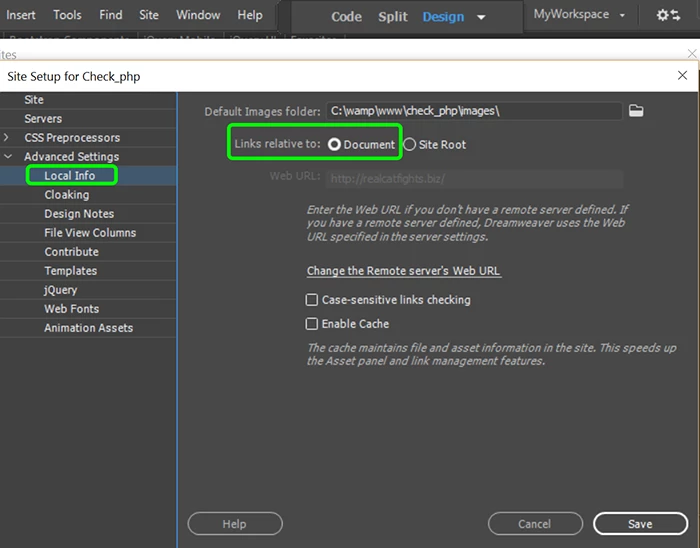
    Are you using links relative to Site Root or Document in DW?  See screenshot.
    Nancy

    2 replies

    Participating Frequently
    December 9, 2016
    Nancy OShea
    Community Expert
    Nancy OSheaCommunity ExpertCorrect answer
    Community Expert
    December 9, 2016

    Holy code errors.  Mostly deprecated tags.

    Showing results for http://musiceducationandcompositions.com/compositions.html - Nu Html Checker

    Alright. You've got some other strange stuff going on.  I'm seeing a PHP include starement in your code which I should never be able to see.  What's that about?  Maybe because .html files don't parse PHP code.  Or your server doesn't support PHP code in .html files.

    Are there supposed to be audio files for each song title?

    <tr>

      <td><div align="center">A Chance In Heaven</div></td>

      <td><div align="center">Ballad</div></td>

      <td><div align="center"><a href="compositions/A/a_chance_in_heaven/a_chance_in_heaven.pdf"><img src="images/silver_pen.jpg" width="45" height="33" border="0"></a></div></td>

      <td><div align="center"></div></td>

      </tr>

    <tr>

       <td><div align="center">A New Beginning</div></td>

       <td><div align="center">Ballad</div></td>

       <td><div align="center"><a href="compositions/A/a_new_beginning/a_new_beginning.pdf"><img src="images/silver_pen.jpg" width="45" height="33" border="0"></a></div></td>

       <td><div align="center"><a href="/dreamweaverfiles/compositions/A/a_new_beginning/a_new_beginning.wav"><img src="images/Drums.gif" width="45" height="33" border="0"></a></div></td>

       </tr>

    The link to audio file noted in red above is 404 not found on server.  Probably because there is no "dereamweaverfiles" folder on your server.

    Are you using links relative to Site Root or Document in DW?  See screenshot.

    Nancy

    Nancy O'Shea— Product User & Community Expert
    Participating Frequently
    December 9, 2016

    For the two "problem" songs, I had them relative to site root, that was the issue.

    Should I delete the whole table, all links on that specific page, and start fresh?  I don't know coding at all and do everything by design tools instead.

    Nick

    Nancy OShea
    Community Expert
    Community Expert
    December 9, 2016

    Better yet, upload your problem page to your server and post the URL.  That way we can see what you see and check the source code with our developer tools.

    Nancy

    Nancy O'Shea— Product User & Community Expert