
Hosun
Inspiring
March 26, 2019
Question

Troubleshooting message when using QR code with Safari

  • March 26, 2019
  • 1 reply
  • 610 views

I scanned the QR code with my iPhone.

But Troubleshooting message pops up.

How would I do?

I have Safari only in my iPhone.
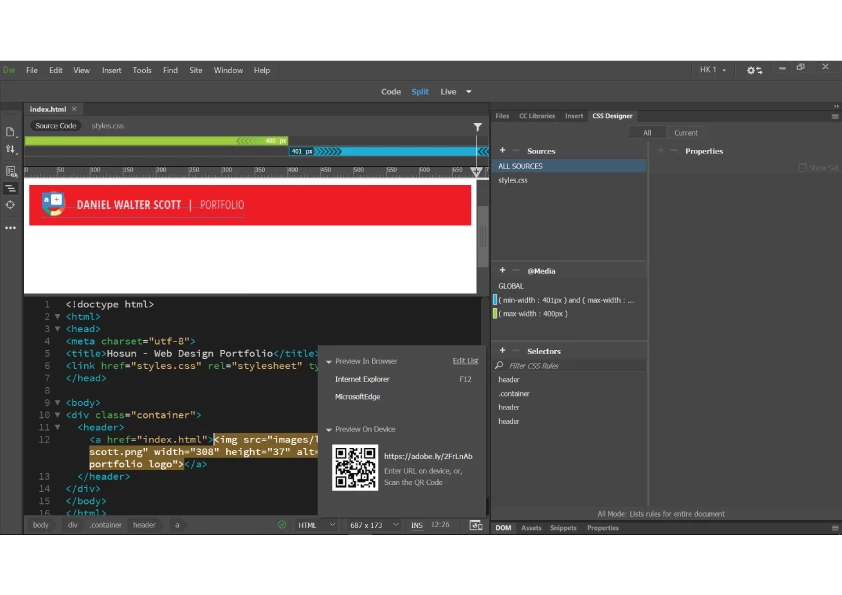
This topic has been closed for replies.

1 reply

HARSHIKA_VERMA
Community Manager
Community Manager
April 2, 2019

Hi Hosun,

Sorry that you are unable to scan the QR code properly. Could you please share the exact error message you are getting while scanning the QR code?

I would also request you to please try these steps mentioned on the link:-How to troubleshoot issues with Device Preview in Dreamweaver.

Please let us know if you need further assistance with this.

Regards,

Harshika

Hosun
HosunAuthor
Inspiring
April 3, 2019

Hi,

Thank you very much for your reply.

1.

When I scanned QR code, I see the message below on Safari of my iPhone XS Max.

2.

I tried the basic checks on the link you posted. Everything looks OK.

(Advanced Troubleshooting is hard to follow.)

HARSHIKA_VERMA
Community Manager
Community Manager
April 3, 2019

Thank you for sharing the screenshot Hosun.

In addition to this, you can try connecting with different network or hotspot, make sure you are connected with the same network on both devices.

You can also go through this link. If Safari displays a blank page or quits on your iPhone, iPad, or iPod touch - Apple Support and share the results.

Regards,

Harshika
