
Simon_IMG
Participant
August 12, 2019
Answered

Turn off CSS pop-up box that appears every time I click in the Design View pane

  • August 12, 2019
  • 1 reply
  • 491 views

Well! This is annoying.

I hadn't opened Dreamweaver in a while, but I still find it's a great way to format Microsoft Word text into HTML.

However, on my Dreamweaver CC v19.2 for Mac, every time I click in the Design View pane, just to insert my cursor or to highlight text, I get this dialogue box that prevents me from typing or editing the text in the design view. It makes editing text impossible.
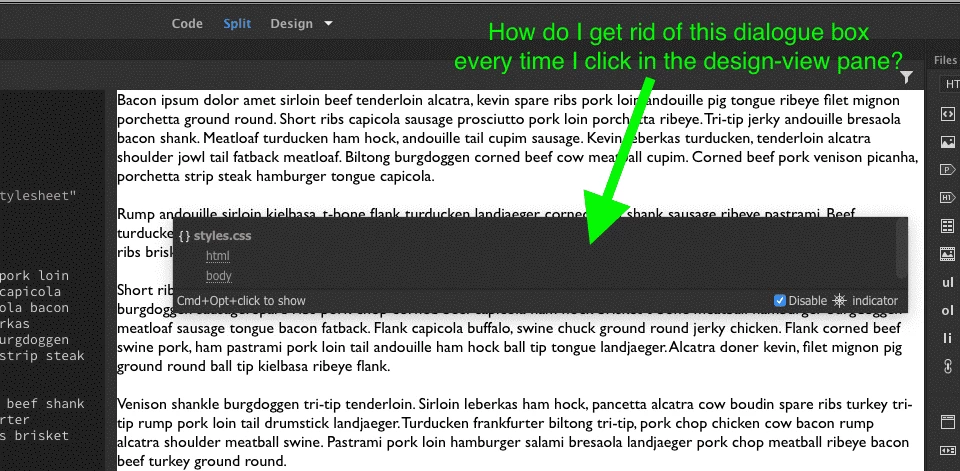
As you can see in my screenshot, I'm definitely in Split Code/Design View. It also happens in just Design View.

  • I've tried View > Design View Options > Hide All
  • I've tried ticking and unticking that Disable [Pirate Ship Wheel] Indicator - no affect
  • I've tried unticking Preferences > Code Hints > Options > Enable code hints and Enable description tools

How do I turn this feature off?

    This topic has been closed for replies.
    Correct answer Simon_IMG

    I am on a MacBook Pro with a wired numeric keyboard. I don't think the keys were sticking at the time on either the numeric keyboard or the MacBook Pro keyboard.

    But since I launched Dreamweaver this morning, the issue has gone away (even though I restarted Dreamweaver multiple times when the issue was occurring.

    Additionally, yes! Command + Option + Click brings up the Code Navigator. It's definitely not doing it without me holding down Command and Option anymore.

    Thanks for your help Jon. I guess the solution is to check your keyboard (disconnect and reconnect back in any external keyboards) and restart Dreamweaver if this occurs.

    1 reply

    Jon Fritz
    Community Expert
    Community Expert
    August 12, 2019

    That's called the Code Navigator. 

    It's usually triggered when you Alt + click (I think Option + Click on a mac).

    I don't know of any setting in the preferences that would make it appear automatically.

    Is there any chance your option keys are sticking at all? That would make it auto-fire every time you click in the Design View window.

    Simon_IMG
    Simon_IMGAuthorCorrect answer
    Participant
    August 12, 2019

    I am on a MacBook Pro with a wired numeric keyboard. I don't think the keys were sticking at the time on either the numeric keyboard or the MacBook Pro keyboard.

    But since I launched Dreamweaver this morning, the issue has gone away (even though I restarted Dreamweaver multiple times when the issue was occurring.

    Additionally, yes! Command + Option + Click brings up the Code Navigator. It's definitely not doing it without me holding down Command and Option anymore.

    Thanks for your help Jon. I guess the solution is to check your keyboard (disconnect and reconnect back in any external keyboards) and restart Dreamweaver if this occurs.