
Nov 21, 2016 11:00 AM UTC
Answered

Turn off new feature guides

Thank Adobe for really doing a number on Dreamweaver, the update is a nightmare to work with!

Is there a way to turn off the new feature guides that keep popping up, I am not interested and they are very distracting when I am trying to come to terms with the new layout, colours.... well all of it.

Failing this is there a way to roll back to the previous version of Dreamweaver, this would be more helpful so I can get on and work.

    This topic is closed to new replies. Start a new post to keep the conversation going.
    BenPleysier
    BenPleysierCorrect answer
    Community Expert
    Nov 21, 2016 12:42 PM UTC

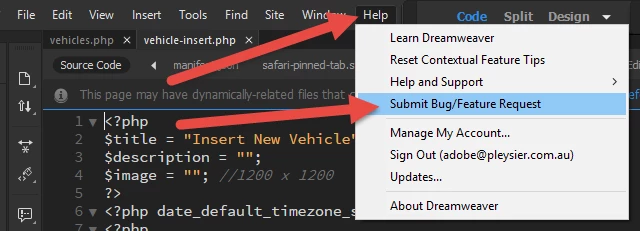
    Please log a feature request that allows you to opt out of the Feature Guides

    To go back to a previous version see How to Find and Install Previous Version of Adobe Apps in CC 2015 | Adobe Customer Care Team

    Wappler is the DMXzone-made Dreamweaver replacement and includes the best of their powerful extensions, as well as much more!

    1 reply

    BenPleysier
    Community Expert
    BenPleysierCommunity ExpertCorrect answer
    Community Expert
    Nov 21, 2016 12:42 PM UTC

    Please log a feature request that allows you to opt out of the Feature Guides

    To go back to a previous version see How to Find and Install Previous Version of Adobe Apps in CC 2015 | Adobe Customer Care Team

    Translate
    Wappler is the DMXzone-made Dreamweaver replacement and includes the best of their powerful extensions, as well as much more!