JaySprout
Inspiring
March 20, 2018
Answered

Turn Off Rich Tooltips in DW

  • March 20, 2018
  • 1 reply
  • 1046 views

An angel from heaven told us how to turn them off in Photoshop but there's no "Tools" section in DW's Preferences.

Please help. Dear God, make it stop.

    This topic has been closed for replies.
    Correct answer Jon Fritz

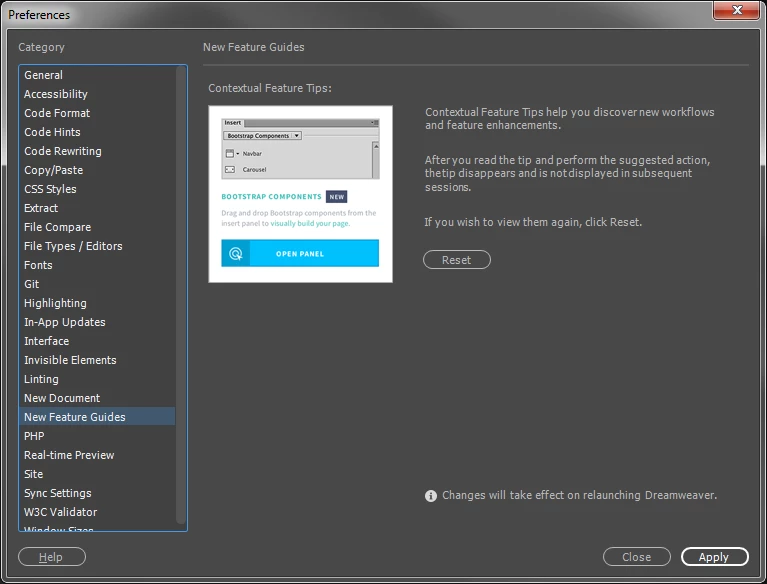
    I think they're talking about the animated New Features Guides that pop up on a bunch of items during first use after a new install. Currently, we can only reset them from the preferences panel.

    1 reply

    WolfShade
    Legend
    March 20, 2018

    Are you talking about code hints?  Or which "Rich Tooltips" are you referring to?

    V/r,

    ^ _ ^

    Jon Fritz
    Community Expert
    Jon FritzCommunity ExpertCorrect answer
    Community Expert
    March 20, 2018

    I think they're talking about the animated New Features Guides that pop up on a bunch of items during first use after a new install. Currently, we can only reset them from the preferences panel.

    JaySprout
    JaySproutAuthor
    Inspiring
    March 21, 2018

    Even with it being under a different name/tab/whatever than Photoshop, I really should have been able to spot "New Feature Guides"! Thank you.