
Known Participant
June 7, 2021
Question

Unable connect to FTP with CS6

  • June 7, 2021
  • 3 replies
  • 383 views

Hi, I am trying to connect my dreamweaver to my ftp server and am unable to do so. I receive the following error:
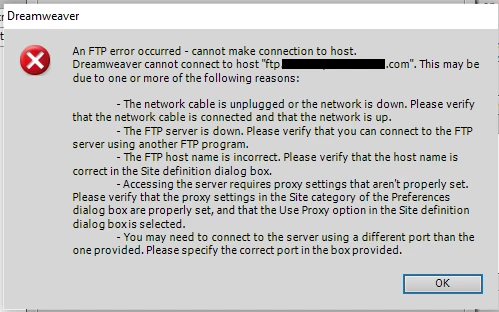
I have every firewall turned off, and all the informtion is correct- verified by successfully connecting to it from filezilla. Moreover, I downloaded the free trial of CC Dreamweaver, (now expired), and was able to connect no problem. I went so far as to export the settings from CC dreamweaver, which worked, and imported them into CS6 dreamweaver, where they again did not work. 


Any help would be appreciated; thank you

    This topic has been closed for replies.

    3 replies

    Nancy OShea
    Community Expert
    Community Expert
    June 7, 2021

    Try connecting with FREE FileZilla S/FTP client.  If it works, you have a secure way to upload files to remote server. 


    CS6 is probably not compatible with your server anymore because it's outdated and unsupported.  Adobe hasn't updated it since it came out in 2012.  Ideally, you should be using modern software anyway.  If not DW CC, then something else.


    ================
    CODE EDITORS:
    -- Adobe Dreamweaver CC - https://www.adobe.com/products/dreamweaver.html
    -- Atom (free) - https://atom.io/
    -- Codespaces (free, browser-based) - https://github.com/features/codespaces
    -- Nova (Mac only, formerly called Coda) - https://nova.app/
    -- Pinegrow - https://pinegrow.com/
    -- Sublime Text - http://www.sublimetext.com/
    -- Visual Studio Code (free) - https://code.visualstudio.com/
    -- Wappler ~ Visual Web App Builder - https://wappler.io/


    Nancy O'Shea— Product User & Community Expert
    Known Participant
    June 10, 2021

    Yeah, it's looking like this is it. Thank you!

    Community Expert
    June 7, 2021

    What kind of security is your host using?  I'm wondering if the older CS6 (v12) doesn't support a newer protocol that CC (v21) does. There is 8 years of changes between those versions.

    Jon Fritz
    Community Expert
    Community Expert
    June 7, 2021

    Have you toggled the Use Passive FTP and FTP Performance Optimization checkboxes under "More Options" in the Basic FTP settings?

    Sometimes one of those will make a difference.


    You could try replacing the ftp domain address with the server's IP address. That has worked for me in the past when "everything is the same but DW just won't connect" when working with GoDaddy.

    Might be worth a shot anyway.

    Known Participant
    June 7, 2021

    I've tried toggling passive and optimization and proxies, to no effect.

    Have not tried with the IP address, will report back on that one.

    Known Participant
    June 7, 2021

    Nope, no luck with this either.