Inspiring
July 18, 2018
Answered

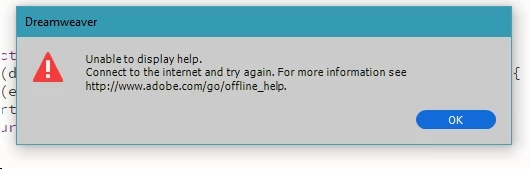
Unable to Display Help

  • July 18, 2018
  • 3 replies
  • 597 views

Hi folks.

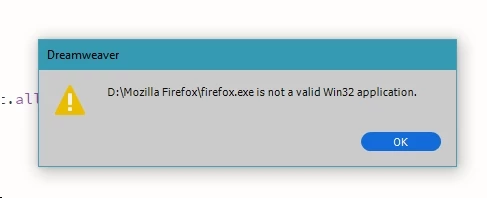
On a number of icons I select, I keep getting a popup and similar. (See the attached photo)
    This topic has been closed for replies.
    Correct answer BigDingus

    It would seem Internet Explorer works once I make it the Primary Browser.

    It now also works when I put it back to Secondary Browser, but Firefox still gives this issue.


    Nancy, your post gave me an idea that works.

    I deleted Firefox from my browser list, then added it again. Works fine now.

    Thanks to everyone for the help

    3 replies

    BigDingusAuthor
    Inspiring
    July 19, 2018

    Thanks Ben and Nancy.

    I've tried both suggestions but without any success.

    I'll keep trying.

    Nancy OShea
    Community Expert
    Community Expert
    July 19, 2018

    Try using a different browser that allows cookies and does not have script blockers.

    Nancy O'Shea— Product User & Community Expert
    BigDingusAuthor
    Inspiring
    July 19, 2018

    It would seem Internet Explorer works once I make it the Primary Browser.

    It now also works when I put it back to Secondary Browser, but Firefox still gives this issue.

    Nancy OShea
    Community Expert
    Community Expert
    July 19, 2018

    Use the online help below.

    Adobe Dreamweaver Learn & Support

    Nancy O'Shea— Product User & Community Expert
    BenPleysier
    Community Expert
    Community Expert
    July 19, 2018
    1. Is Firefox located in the named link?
    2. Because of the numerous changes taking effect on a regular basis, it was impossible to keep the help files up to date for all of the different Dreamweaver versions, reason why the plug was pulled. You are better off, Googling the problem.

    Wappler is the DMXzone-made Dreamweaver replacement and includes the best of their powerful extensions, as well as much more!
