
Participant
October 9, 2020
Answered

Unable to Preview Page in Browser

  • October 9, 2020
  • 1 reply
  • 430 views

I am brand new to Dreamweaver and I am trying to get the "Open in Browser" option working.


Currently I set up DW to link to my shared hosting server -- all seems fine with that.


All of my webpages on my server are in a public_html folder.


When I try to select the file from the file/folder list and then, select "Open in Browser", I get a 404 error.


The reason for this appears to be because it is including "public_html" in the path:


i.e. www.mysite.com/public_html/index.html


How do I set this up, so clicking on my files will omit the "public_html" reference?
 

    This topic has been closed for replies.
    Correct answer Nancy OShea

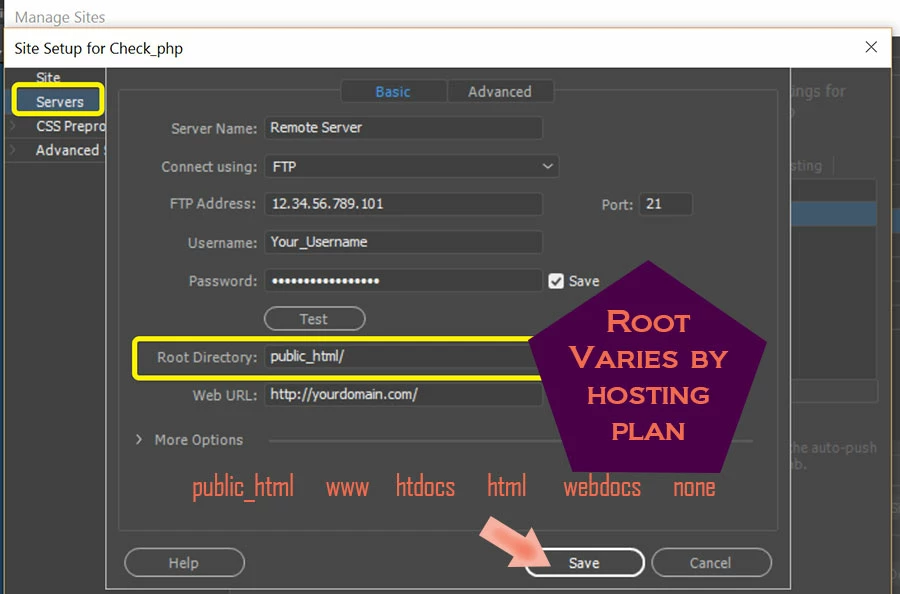
    Your site is not defined properly.  Public_html is a server root only.  It must never appear in your local files panel.

    See screenshot.


    1 reply

    Nancy OShea
    Community Expert
    Nancy OSheaCommunity ExpertCorrect answer
    Community Expert
    October 9, 2020

    Your site is not defined properly.  Public_html is a server root only.  It must never appear in your local files panel.

    See screenshot.


    Nancy O'Shea— Product User & Community Expert
    HonestZedAuthor
    Participant
    October 10, 2020

    Thank you for your help and the image.