Participant
Dec 30, 2020 1:51 AM UTC
Answered

Unable to see .htaccess file in local server

I am using version 21 of Dreamweaver. I need to update my .htaccess files and can't see them in the local directory. I KNOW they are here. I can see them in the server, when I click to download them I am asked if I want to replace them, but then I cannot see them listed. A tech support rep suggested me to install the old version (20), and I can see them with this version. So I am currently using version 20 to edit and publish .htaccess files and version 21 for everything else.... crazy


Any help is appreciated.

This topic is closed to new replies. Start a new post to keep the conversation going.
Jon Fritz
Jon FritzCorrect answer
Community Expert
Dec 30, 2020 1:46 PM UTC

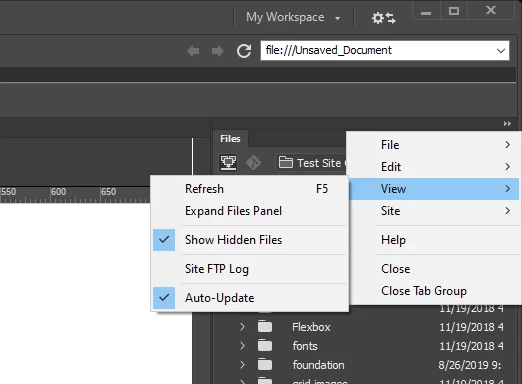
If your Hidden Files are turned on at the OS level, you may just need to turn them on in DW 2021's Files Window.

1. Go to Window > Files (or hit F8) if the Files Window is not open
2. Click the small menu icon in the upper right of the Files Window 
3. Click View 
4. Verify a check is next to Show Hidden Files


9 replies

Community Expert
Dec 30, 2020 3:36 PM UTC

Since you haven't stated which OS you are using here are the instructions for unhiding hidden files on a Mac in case you updated recently.  Typically .htaccess is hidden on Mac OS, but it's usually visible in Windows. All you need to do is open up the Terminal and type the following command to show hidden files.


defaults write com.apple.finder AppleShowAllFiles TRUE 


Translate
PatriceAnn
Participating Frequently
Jul 15, 2022 9:31 PM UTC

Click the small menu icon in the upper right of the Files Window...


this is the part I can't find. On the left top is a small icon that when moused over says show files. I can't see any other icon that has a drop down to show hidden files.

Translate
PatriceAnn
Participating Frequently
Jul 15, 2022 9:37 PM UTC

I can see the files on Mac, in Transmit but not DW 2021. It worked fine with DW6.

Translate
MikeB-S9UK
Known Participant
Dec 30, 2020 3:20 PM UTC

You could make .htaccess file name into htaccess.txt on the server then pull it to your local folder and see if the file is visible as htaccess.txt

Translate
- "Good English is an Art."
Jon Fritz
Community Expert
Jon FritzCommunity ExpertCorrect answer
Community Expert
Dec 30, 2020 1:46 PM UTC

If your Hidden Files are turned on at the OS level, you may just need to turn them on in DW 2021's Files Window.

1. Go to Window > Files (or hit F8) if the Files Window is not open
2. Click the small menu icon in the upper right of the Files Window 
3. Click View 
4. Verify a check is next to Show Hidden Files


Translate
Steve R
Known Participant
Mar 13, 2022 1:14 PM UTC

Thank you!

Translate
signcarver
Legend
Dec 30, 2020 6:02 AM UTC

I'm not sure why you can see htaccess in v20 but  not v21 ..... In the first instance make sure have the setting 'show hidden files and folders' on for your OS, here is how to do that in Windows 10 - are you on Windows or Mac?

Translate
Paul-M - Community Expert