j_anettec88390899
Participant
October 5, 2018
Answered

Unbalanced body tag

  • October 5, 2018
  • 4 replies
  • 1699 views

Hello Everyone,

I cannot figure out why I am getting an unbalanced body tag when I only have 2 in the entire document.  Please can someone help me out.

<!DOCTYPE HTML>

<html xmlns="http://www.w3.org/1999/xhtml">

<head>

<script type="text/javascript" scr="js/query.js"></script>

<script type="text/javascript" scr="js/timothy.js"></script>


    <link href="css/styles.css" rel="stylesheet" type="text/css" media="screen" />

    <link href"css/print.css" rel="stylesheet" type="text/css" media="printer>


    <meta http-equiv="Content-Type" content="text/html; charset=UTF-8" />

<meta http-equiv="Content-Type" content="cache" />

    <meta name="robots" content="INDEX,FOLLOW" />

    <meta name="keywords" content="Enter keywords" />

    <meta name="description" content="Description Here />

<title> Welcome to 2 Hands and a Mouse</title>

<!-- Google Antalytics Code Goes Below Here  -->

<!-- End Google Antalytics Code -->

</head>

<body>

<div id="outer">

<div id="wrapper">


        <div id="company-logo">

        <img src="images/logo.png" width="164" height="136" />

        </div>


   <div id="social-media-icons">

        <ul>

            <li><img src= "images/icons/if_facebook_2308066.png" /></li>

            <li><img src="images/icons/if_linkedin_2308061.png" /></li>

         </ul>

        </div>


   <div id="topnav">

      <ul>

                <li><a href="index.html">HOME</a></li>

                    <li><a href="about.html">ABOUT</a></li>

                    <li><a href="repairandupgrade.html">SERVICES</a></li>

                    <li><a href="shop.html">SHOP</a></li>

                    <li><a href="contact.html">CONTACT</a></li>


                   </ul>

        </div>


        <div id="banner" >

        <img src="images/banner/jeshoots-com-523925-unsplash.jpg" width="844" height="425" />


</div>


        <div id="content">

        <h1>Welcome to 2 Hands and a Mouse</h1>

      <p>We repair and diagnose Mac laptops as well as PC laptops. Diagnosis of laptops in 48 hour or less.

                    We now  repair and troubleshoot printers.</p>


                    <img src="images/desktop.jpg" width="242" height="156" class="image-frame" />

                    <img src="images/laptop.jpg" width="233" height="159" class="image-frame" />

                    <p>We specialize in PC/Mac desktop computers for diagnosis, upgrade and repair.  We will personally analyse your computer in less than 24 hours.  </p>

        </div>


         <div id "rightside">


                <h2>Call Us</h2>


                <p>678-886-2529 or 678-886-3723</p>


                <h3>Email Us</h3>


                <p>2handsandamouse@gmail.com or Janettetheartiste@icloud.com</p>


         </div>


        <div id="footer">

            <p>Copyright 2018 - 2 Hands and a Mouse /Photo by Thomas Quaritsch</p>


            <p>Photo by JESHOOTS.COM on Unsplash</p>


          <div>Logo made with <a href="https://www.designevo.com/en/" title="Free Online Logo Maker">DesignEvo</a></div>

        </div>


</div>

        </div>

</body>

</html>

    This topic has been closed for replies.
    Correct answer Nancy OShea

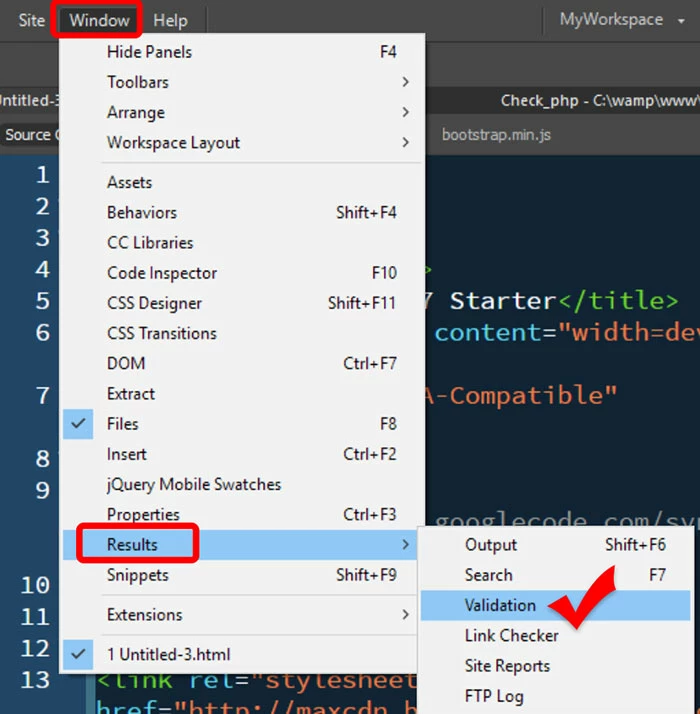
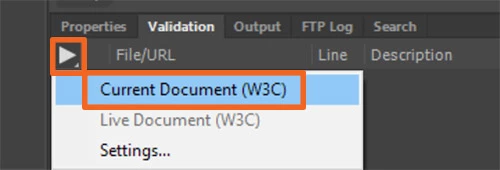
    In the future use the W3C Validation tool in DW.  And use it often during development.

    4 replies

    Nancy OShea
    Community Expert
    Nancy OSheaCommunity ExpertCorrect answer
    Community Expert
    October 5, 2018

    In the future use the W3C Validation tool in DW.  And use it often during development.

    Nancy O'Shea— Product User & Community Expert
    Nancy OShea
    Community Expert
    Community Expert
    October 5, 2018

    This looks like a conversion from an older document type to HTML5.  Actually, I found quite a few mistakes.

    See if this helps.

    <!doctype html>

    <html lang="en">

    <head>

    <meta charset="utf-8">

    <title> Welcome to 2 Hands and a Mouse</title>

    <meta http-equiv="X-UA-Compatible" content="IE=edge">

    <meta name="viewport" content="width=device-width, initial-scale=1">

    <meta name="robots" content="INDEX,FOLLOW">

    <meta name="keywords" content="Enter keywords">

    <meta name="description" content="Description Here">

    <link href="css/styles.css" rel="stylesheet" type="text/css" media="screen">

    <link href="css/print.css" rel="stylesheet" type="text/css" media="print">

    </head>

    <body>

    <div id="outer">

    <div id="wrapper">

    <div id="company-logo">

    <img alt="describe"  src="images/logo.png" width="164" height="136">

    </div>

    <div id="social-media-icons">

    <ul>

    <li><img alt="describe"  src= "images/icons/if_facebook_2308066.png"></li>

    <li><img alt="describe"  src="images/icons/if_linkedin_2308061.png"></li>

    </ul>

    </div>

    <div id="topnav">

    <ul>

    <li><a href="index.html">HOME</a></li>

    <li><a href="about.html">ABOUT</a></li>

    <li><a href="repairandupgrade.html">SERVICES</a></li>

    <li><a href="shop.html">SHOP</a></li>

    <li><a href="contact.html">CONTACT</a></li>

    </ul>

    </div>

    <div id="banner"> <img alt="describe"  src="images/banner/jeshoots-com-523925-unsplash.jpg" width="844" height="425"> </div>

    <div id="content">

    <h1>Welcome to 2 Hands and a Mouse</h1>

    <p>We repair and diagnose Mac laptops as well as PC laptops. Diagnosis of laptops in 48 hour or less. We now  repair and troubleshoot printers.</p>

    <img alt="describe"  src="images/desktop.jpg" width="242" height="156" class="image-frame"> <img alt="describe"  src="images/laptop.jpg" width="233" height="159" class="image-frame">

    <p>We specialize in PC/Mac desktop computers for diagnosis, upgrade and repair.  We will personally analyse your computer in less than 24 hours. </p>

    </div>

    <div id="rightside">

    <h2>Call Us</h2>

    <p>678-886-2529 or 678-886-3723</p>

    <h3>Email Us</h3>

    <p>2handsandamouse@gmail.com or Janettetheartiste@icloud.com</p>

    </div>

    <div id="footer">

    <p>Copyright 2018 - 2 Hands and a Mouse /Photo by Thomas Quaritsch</p>

    <p>Photo by JESHOOTS.COM on Unsplash</p>

    <div>Logo made with <a href="https://www.designevo.com/en/" title="Free Online Logo Maker">DesignEvo</a></div>

    </div>

    </div>

    </div>

    <!--defer loading scripts until after content-->

    <script src="js/query.js"> </script>

    <script src="js/timothy.js"> </script>

    <!--Google Antalytics Code Goes Here-->

    </body>

    </html>

    Nancy O'Shea— Product User & Community Expert
    j_anettec88390899
    Participant
    October 5, 2018

    I cannot use this as a templete it keeps saying unbalanced body

    magical_Skyline0D4A
    Inspiring
    October 5, 2018

    Hi,

    I copied / pasted your code into a new document in Dreamwaver and I do not see any mistakes ... DW has green icon and no error!